> ## Documentation Index
> Fetch the complete documentation index at: https://docs.kinemation.xyz/llms.txt
> Use this file to discover all available pages before exploring further.
# 🔹Example Content
> This page explains the demo content files for CAS.
## Overview
**Character Animation System** comes with a free example demo package that includes animations, items, prefabs and scripts. Follow this guide to install the demo: [Install Demo Content](/cas/quickstart/install-demo-content).
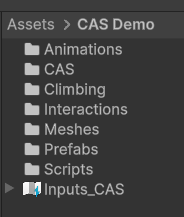 * **Animation** includes clips and animator controllers used in the demo, including Humanoid and Generic versions.
* **CAS** contains Character, Procedural Animation Settings and Animation Assets.
* **Climbing** includes data assets used for parkour.
* **Interactions** contains data assets and settings used in interactions (e.g., pulling a lever).
* **Meshes** includes all custom prop meshes used in the demo (e.g., torch, axe, etc.).
* **Prefabs** contains item and character prefabs.
**Input\_CAS** is the main input asset used in the demo content. It defines general (like move, look or jump) and item-specific actions (e.g., aim or use item).
* **Animation** includes clips and animator controllers used in the demo, including Humanoid and Generic versions.
* **CAS** contains Character, Procedural Animation Settings and Animation Assets.
* **Climbing** includes data assets used for parkour.
* **Interactions** contains data assets and settings used in interactions (e.g., pulling a lever).
* **Meshes** includes all custom prop meshes used in the demo (e.g., torch, axe, etc.).
* **Prefabs** contains item and character prefabs.
**Input\_CAS** is the main input asset used in the demo content. It defines general (like move, look or jump) and item-specific actions (e.g., aim or use item).