> ## Documentation Index
> Fetch the complete documentation index at: https://docs.kinemation.xyz/llms.txt
> Use this file to discover all available pages before exploring further.
# 🔹Example Controller
> This page explains how the player controller works in the demo.
## Overview
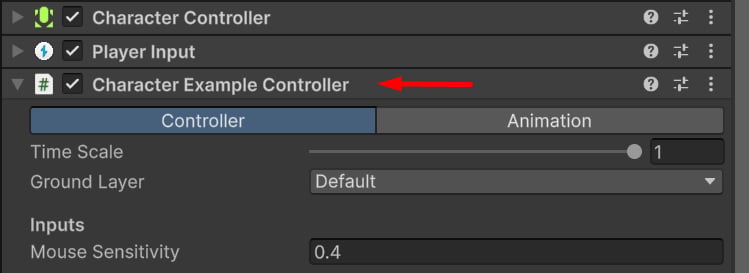
**CharacterExampleController** is a demo script included with the CAS demo. It handles character movement, item actions, and interactions.
The component is added directly to the player prefab alongside the [Character Controller](https://docs.unity3d.com/ScriptReference/CharacterController.html) and [Player Input](https://docs.unity3d.com/Packages/com.unity.inputsystem@1.5/manual/PlayerInput.html) components.
 ## How it works
This component works out of the box in the demo and does not require additional setup.
**Tip:** It is recommended to tweak the component values to fit the needs of your project.
The update cycle is structured as follows:
#### Initialization
When the game starts, the example controller searches for `CasProp` components in the character hierarchy. These represent items such as a torch, axe, or barrel. The first item found is equipped automatically.
The controller assumes that items are added directly to the character hierarchy, for example, parented to the character’s right hand.
#### Update
At runtime, the controller processes character velocity, rotation, and movement based on the current input values.
The order of operations is as follows:
`UpdateAnimatorParameters()` updates the following Animator parameters:
* **MoveX** and **MoveY** (float) — normalized player movement input.
* **ViewWeight** (float) — normalized perspective weight. `0` is first-person, and `1` is third-person.
* **IsFirstPerson** (bool) — whether the player is in first-person or third-person mode.
* **Gait** (float) — current movement state. `0` is idle, `1` is walking, `2` is jogging, and `3` is sprinting.
* **Crouch** (bool) — whether the character is crouching or standing.
* **IsMoving** (bool) — whether the character is moving.
* **Jumped** (trigger) — triggered when the player jumps.
* **IsInAir** (bool) — whether the player is falling.
* **AimingWeight** (float) — smooth, normalized aiming alpha in the `[0; 1]` range.
* **IsTraversing** (bool) — whether the character is playing a traversal action, such as climbing or vaulting.
#### Input Action Callbacks
The example controller implements the following input callbacks by default:
## Component Settings
`Character Example Controller` properties are split into two tabs: **Controller** and **Animation**.
### Controller Properties
> General controller settings.
## How it works
This component works out of the box in the demo and does not require additional setup.
**Tip:** It is recommended to tweak the component values to fit the needs of your project.
The update cycle is structured as follows:
#### Initialization
When the game starts, the example controller searches for `CasProp` components in the character hierarchy. These represent items such as a torch, axe, or barrel. The first item found is equipped automatically.
The controller assumes that items are added directly to the character hierarchy, for example, parented to the character’s right hand.
#### Update
At runtime, the controller processes character velocity, rotation, and movement based on the current input values.
The order of operations is as follows:
`UpdateAnimatorParameters()` updates the following Animator parameters:
* **MoveX** and **MoveY** (float) — normalized player movement input.
* **ViewWeight** (float) — normalized perspective weight. `0` is first-person, and `1` is third-person.
* **IsFirstPerson** (bool) — whether the player is in first-person or third-person mode.
* **Gait** (float) — current movement state. `0` is idle, `1` is walking, `2` is jogging, and `3` is sprinting.
* **Crouch** (bool) — whether the character is crouching or standing.
* **IsMoving** (bool) — whether the character is moving.
* **Jumped** (trigger) — triggered when the player jumps.
* **IsInAir** (bool) — whether the player is falling.
* **AimingWeight** (float) — smooth, normalized aiming alpha in the `[0; 1]` range.
* **IsTraversing** (bool) — whether the character is playing a traversal action, such as climbing or vaulting.
#### Input Action Callbacks
The example controller implements the following input callbacks by default:
## Component Settings
`Character Example Controller` properties are split into two tabs: **Controller** and **Animation**.
### Controller Properties
> General controller settings.
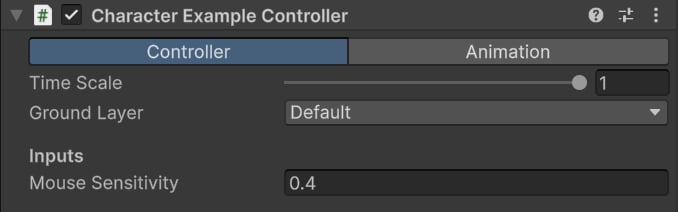 * **Time Scale** — current time scale value.
* **Ground Layer** — surfaces considered walkable by the controller.
* **Mouse Sensitivity** — vertical and horizontal mouse input multiplier.
#### Movement Gaits
> Controls the main movement states.
* **Time Scale** — current time scale value.
* **Ground Layer** — surfaces considered walkable by the controller.
* **Mouse Sensitivity** — vertical and horizontal mouse input multiplier.
#### Movement Gaits
> Controls the main movement states.
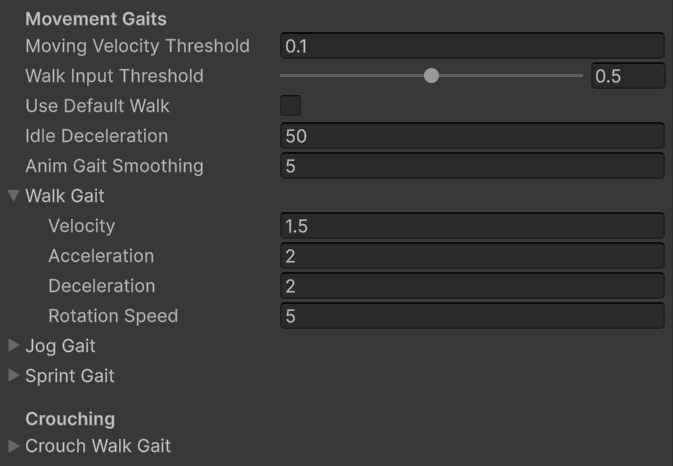 * **Moving Velocity Threshold** — if exceeded, the controller is considered moving.
* **Walk Input Threshold** — minimum movement input required to start moving.
* **Use Default Walk** — whether the walking gait should be used by default.
* **Idle Deceleration** — how quickly velocity decays to zero while idle.
* **Anim Gait Smoothing** — gait interpolation speed for Animator parameters.
#### Walk / Jog / Sprint / Crouch Gait
> Movement settings for each movement state.
* **Velocity** — target velocity in meters per second.
* **Acceleration** — how quickly velocity increases.
* **Deceleration** — how quickly velocity decreases.
* **Rotation Speed** — angular interpolation speed for this gait.
#### In Air
> Controls in-air movement.
* **Moving Velocity Threshold** — if exceeded, the controller is considered moving.
* **Walk Input Threshold** — minimum movement input required to start moving.
* **Use Default Walk** — whether the walking gait should be used by default.
* **Idle Deceleration** — how quickly velocity decays to zero while idle.
* **Anim Gait Smoothing** — gait interpolation speed for Animator parameters.
#### Walk / Jog / Sprint / Crouch Gait
> Movement settings for each movement state.
* **Velocity** — target velocity in meters per second.
* **Acceleration** — how quickly velocity increases.
* **Deceleration** — how quickly velocity decreases.
* **Rotation Speed** — angular interpolation speed for this gait.
#### In Air
> Controls in-air movement.
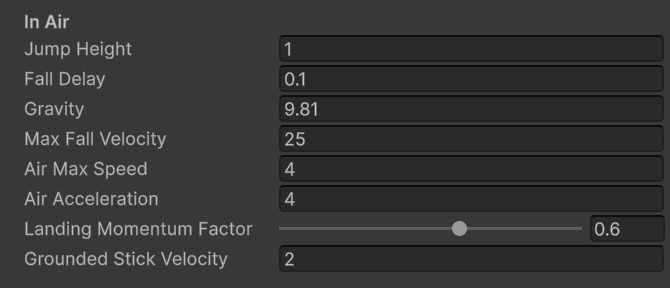 * **Jump Height** — how high, in meters, the character should jump.
* **Fall Delay** — delay, in seconds, before the character is considered falling.
* **Gravity** — constant downward force.
* **Max Fall Velocity** — maximum allowed falling velocity.
* **Air Max Speed** — maximum allowed movement speed while in air.
* **Air Acceleration** — movement acceleration while in air.
* **Landing Momentum Factor** — slows down player movement after landing.
* **Grounded Stick Velocity** — vertical velocity below this value is not considered falling, and the character will snap to the ground. Use this for uneven terrain and rough surfaces to avoid false in-air triggers.
#### Grounding Stability
> Controls grounded movement on uneven surfaces.
* **Jump Height** — how high, in meters, the character should jump.
* **Fall Delay** — delay, in seconds, before the character is considered falling.
* **Gravity** — constant downward force.
* **Max Fall Velocity** — maximum allowed falling velocity.
* **Air Max Speed** — maximum allowed movement speed while in air.
* **Air Acceleration** — movement acceleration while in air.
* **Landing Momentum Factor** — slows down player movement after landing.
* **Grounded Stick Velocity** — vertical velocity below this value is not considered falling, and the character will snap to the ground. Use this for uneven terrain and rough surfaces to avoid false in-air triggers.
#### Grounding Stability
> Controls grounded movement on uneven surfaces.
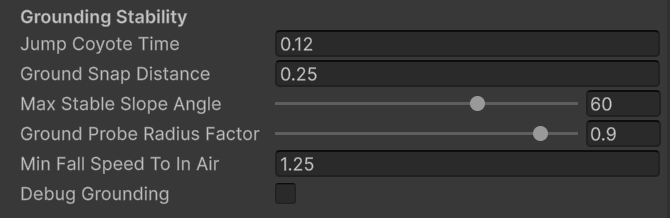 * **Jump Coyote Time** — delay, in seconds, during which the character can still jump after leaving the ground.
* **Ground Snap Distance** — maximum allowed distance to the ground before the character leaves the grounded state.
* **Max Stable Slope Angle** — if the surface angle exceeds this value, the character will not snap to it.
* **Ground Probe Radius Factor** — multiplier for capsule collision checks.
* **Min Fall Speed To In Air** — minimum required vertical speed to enter the in-air state.
* **Debug Grounded** — toggles Gizmo collision checks.
#### Rotation
> Controls player rotation.
* **Jump Coyote Time** — delay, in seconds, during which the character can still jump after leaving the ground.
* **Ground Snap Distance** — maximum allowed distance to the ground before the character leaves the grounded state.
* **Max Stable Slope Angle** — if the surface angle exceeds this value, the character will not snap to it.
* **Ground Probe Radius Factor** — multiplier for capsule collision checks.
* **Min Fall Speed To In Air** — minimum required vertical speed to enter the in-air state.
* **Debug Grounded** — toggles Gizmo collision checks.
#### Rotation
> Controls player rotation.
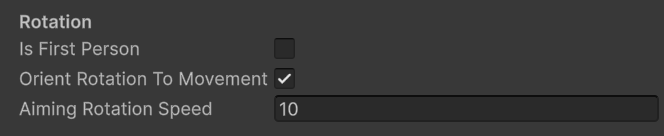 * **Is First Person** — toggles first-person mode. When enabled, controller rotation always follows the input direction.
* **Orient Rotation To Movement** — orients controller rotation to velocity. Only used in third-person mode.
* **Aiming Rotation Speed** — angular interpolation speed while aiming or in first-person mode.
### Animation Properties
> Controls general animation behavior.
* **Is First Person** — toggles first-person mode. When enabled, controller rotation always follows the input direction.
* **Orient Rotation To Movement** — orients controller rotation to velocity. Only used in third-person mode.
* **Aiming Rotation Speed** — angular interpolation speed while aiming or in first-person mode.
### Animation Properties
> Controls general animation behavior.
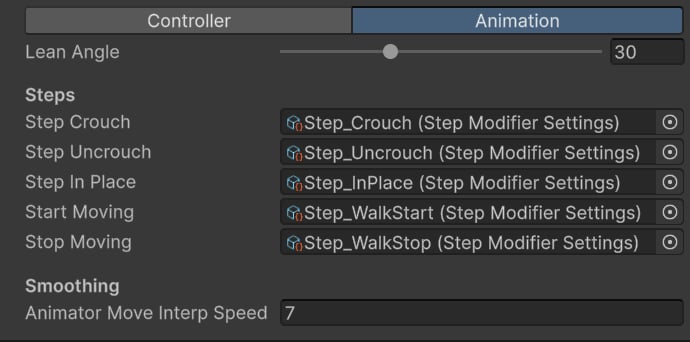 * **Lean Angle** — leaning angle in degrees.
* **Step Crouch** — Step Modifier played when crouching.
* **Step Uncrouch** — Step Modifier played when standing up.
* **Step In Place** — Step Modifier played when swapping items.
* **Start Moving** — Step Modifier played when starting movement.
* **Stop Moving** — Step Modifier played when stopping movement.
* **Animator Move Interp Speed** — interpolation speed for movement direction.
**Tip**: [Step Modifier](/cas/modifiers/step-modifier) is used to create a procedural transition and reduce foot sliding.
* **Lean Angle** — leaning angle in degrees.
* **Step Crouch** — Step Modifier played when crouching.
* **Step Uncrouch** — Step Modifier played when standing up.
* **Step In Place** — Step Modifier played when swapping items.
* **Start Moving** — Step Modifier played when starting movement.
* **Stop Moving** — Step Modifier played when stopping movement.
* **Animator Move Interp Speed** — interpolation speed for movement direction.
**Tip**: [Step Modifier](/cas/modifiers/step-modifier) is used to create a procedural transition and reduce foot sliding.