> ## Documentation Index
> Fetch the complete documentation index at: https://docs.kinemation.xyz/llms.txt
> Use this file to discover all available pages before exploring further.
# 🔹Items
> This page explains how item prefabs work in the CAS demo.
## Overview
**Cas Prop** script is used by all items wielded by the player:
* **Torch**
* **Barrel**
* **Axe**
* **Gun**
**Tip**: This component is added directly to the item prefab.
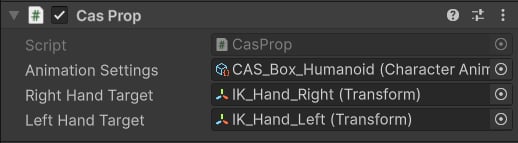 * **Animation Settings** — [CAS](/cas/core/character-animation-component#character-animation-settings) asset for this item.
* **Right** and **Left Hand Target** — IK targets for hands. These transforms are bound directly to the [Two Bone IK](/cas/modifiers/two-bone-ik) modifiers.
All items reside in the character prefab:
* **Animation Settings** — [CAS](/cas/core/character-animation-component#character-animation-settings) asset for this item.
* **Right** and **Left Hand Target** — IK targets for hands. These transforms are bound directly to the [Two Bone IK](/cas/modifiers/two-bone-ik) modifiers.
All items reside in the character prefab:
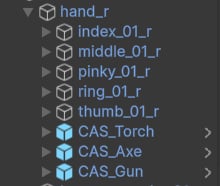 **Note**: Torch, Axe and Gun prefabs are attached to the right hand. When the game starts, the [Character Example Controller](/cas/core/example-content/example-controller) will try to find all items and equip the first one.
## API Reference
**Note**: Torch, Axe and Gun prefabs are attached to the right hand. When the game starts, the [Character Example Controller](/cas/core/example-content/example-controller) will try to find all items and equip the first one.
## API Reference