> ## Documentation Index
> Fetch the complete documentation index at: https://docs.kinemation.xyz/llms.txt
> Use this file to discover all available pages before exploring further.
# ◻️Attach Hand
> Documentation for ◻️Attach Hand.
## Overview
This modifier is used to attach the left hand to the weapon:
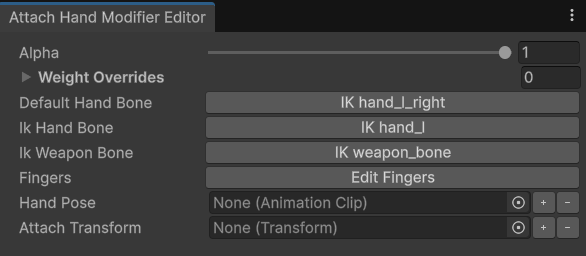 * **Default Hand Bone** is the default bone pose for the left hand. By default, it's set to IK hand\_l\_right.
* **Ik Hand Bone** is left-hand IK bone. The default value is IK hand\_l.
* **Ik Weapon Bone** is the IK weapon\_bone.
* **Fingers** is a bone chain that includes left-hand bone fingers.
* **Hand Pose** is an Animation Clip of the current grip pose.
* **Attach Transform** is the transform the hand will be attached to.
## Use-cases
The Attach Hand modifier can be used to implement custom grip poses for attachments. Here's an example from the example demo content:
* **Default Hand Bone** is the default bone pose for the left hand. By default, it's set to IK hand\_l\_right.
* **Ik Hand Bone** is left-hand IK bone. The default value is IK hand\_l.
* **Ik Weapon Bone** is the IK weapon\_bone.
* **Fingers** is a bone chain that includes left-hand bone fingers.
* **Hand Pose** is an Animation Clip of the current grip pose.
* **Attach Transform** is the transform the hand will be attached to.
## Use-cases
The Attach Hand modifier can be used to implement custom grip poses for attachments. Here's an example from the example demo content:
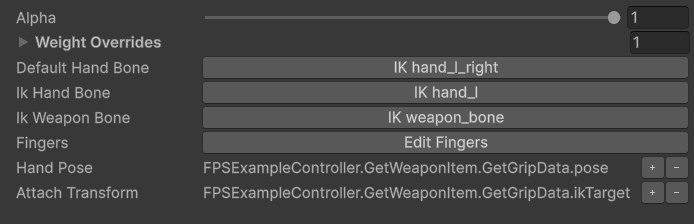 In this example, a weapon provides an animation pose and a target transform for the left hand.
**Note**: If the target transform is **null**, then the **Default Hand Bone** (IK hand\_l\_right) will be used instead.
The **IK hand\_l\_right** is a dynamic bone that contains the idle left-hand pose relative to the right hand.
In this example, a weapon provides an animation pose and a target transform for the left hand.
**Note**: If the target transform is **null**, then the **Default Hand Bone** (IK hand\_l\_right) will be used instead.
The **IK hand\_l\_right** is a dynamic bone that contains the idle left-hand pose relative to the right hand.