> ## Documentation Index
> Fetch the complete documentation index at: https://docs.kinemation.xyz/llms.txt
> Use this file to discover all available pages before exploring further.
# ◻️FPS Copy Bones
> Documentation for ◻️FPS Copy Bones.
## Overview
This modifier copies bone data to the IK bones.
 #### Copy From
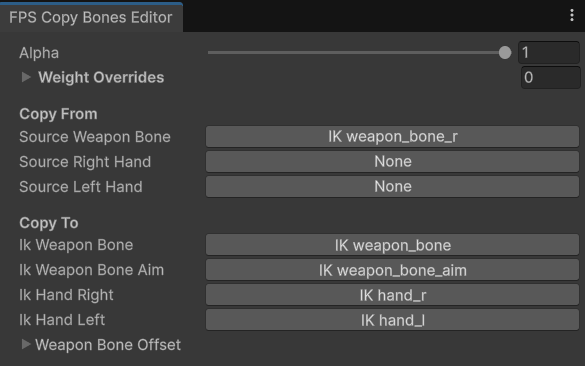
These are the bones that will provide the animation pose data.
* Source Weapon Bone is usually the IK weapon\_bone\_r.
* Source Right/Left Hand is a right or left hand bone.
#### Copy To
These are the bones that will copy the animation pose from previous bones.
* Ik Weapon Bone is the IK weapon\_bone, which represents the weapon animated transform.
* Ik Weapon Bone Aim is the bone that contains the weapon idle pose, which is used for aiming.
* Ik Hand Right/Left is an IK target bone for the right/left arm.
## Use-cases
This modifier lets you copy the animation poses from real bones to IK targets. This can be useful if there's a need to alter an existing animation without breaking the animation pose.
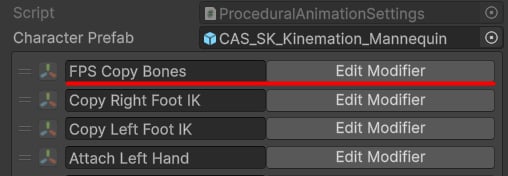
**FPS Copy Bones** is usually placed on top of all other modifiers in the settings:
#### Copy From
These are the bones that will provide the animation pose data.
* Source Weapon Bone is usually the IK weapon\_bone\_r.
* Source Right/Left Hand is a right or left hand bone.
#### Copy To
These are the bones that will copy the animation pose from previous bones.
* Ik Weapon Bone is the IK weapon\_bone, which represents the weapon animated transform.
* Ik Weapon Bone Aim is the bone that contains the weapon idle pose, which is used for aiming.
* Ik Hand Right/Left is an IK target bone for the right/left arm.
## Use-cases
This modifier lets you copy the animation poses from real bones to IK targets. This can be useful if there's a need to alter an existing animation without breaking the animation pose.
**FPS Copy Bones** is usually placed on top of all other modifiers in the settings: