> ## Documentation Index
> Fetch the complete documentation index at: https://docs.kinemation.xyz/llms.txt
> Use this file to discover all available pages before exploring further.
# ◻️IK Motions
> Documentation for ◻️IK Motions.
## Overview
**IK Motion** is a modifier that is used to play additive transition animations, like aiming for example.
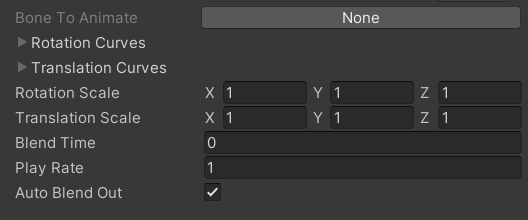 * **Bone To Animate**: A Bone that will be animated by this motion.
* **Rotation**/**Translation Curves**: Animation curves that will animate the bone.
* **Rotation**/**Translation Scale**: Scale multipliers for each rotation/translation axis.
* **Blend Time**: Blend in time in seconds.
* **Play Rate**: Playback speed.
* **Auto Blend Out**: Whether to automatically blend out the motion upon completion.
## Use-cases
IK Motion is used to play a dynamic additive animation on IK bones. For example, it can be used to add a "jiggle" effect when aiming.
Unlike other modifiers in CAS, IK Motion can be instantiated as a standalone Scriptable Object via right-click **Create/KINEMATION/CAS/Addons/FPS/IK Motion**.
To play an IK Motion in runtime, the `UpdateAnimationModifier` method should be used:
* **Bone To Animate**: A Bone that will be animated by this motion.
* **Rotation**/**Translation Curves**: Animation curves that will animate the bone.
* **Rotation**/**Translation Scale**: Scale multipliers for each rotation/translation axis.
* **Blend Time**: Blend in time in seconds.
* **Play Rate**: Playback speed.
* **Auto Blend Out**: Whether to automatically blend out the motion upon completion.
## Use-cases
IK Motion is used to play a dynamic additive animation on IK bones. For example, it can be used to add a "jiggle" effect when aiming.
Unlike other modifiers in CAS, IK Motion can be instantiated as a standalone Scriptable Object via right-click **Create/KINEMATION/CAS/Addons/FPS/IK Motion**.
To play an IK Motion in runtime, the `UpdateAnimationModifier` method should be used: