> ## Documentation Index
> Fetch the complete documentation index at: https://docs.kinemation.xyz/llms.txt
> Use this file to discover all available pages before exploring further.
# ◻️Weapon Collision
> Documentation for ◻️Weapon Collision.
## Overview
**Weapon Collision** is used to avoid weapon clipping with obstacles in the game world.
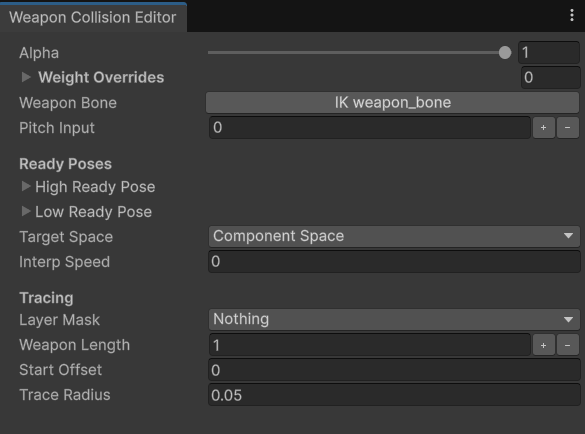 * **Pitch Input** is the vertical or look-up input value in range \[-90;90].
* **Primary Pose**/**Secondary Pose** are applied depending on the Pitch Input value. If it's greater than zero, Primary pose will be used — Secondary otherwise.
* **Target Space** defines the space to apply the collision in. It is recommended to have this set to "Component".
* **Interp Speed** is the smoothing speed. If set to zero, no smoothing will be applied.
* **Layer Mask** defines What collision layers to include during a raycast.
* **Start Offset** is the forward ray origin offset.
* **Weapon Length** is the trace length. It's possible to bind a custom value from a player or weapon component to support different types of weapons.
* **Trace Radius** is a sphere trace radius.
## Use-cases
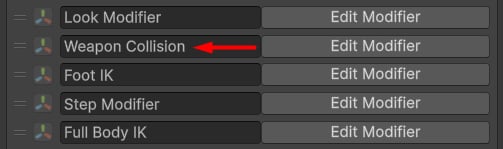
This modifier is used to avoid collisions with obstacles. It's usually placed after the Look and after the IK modifiers:
* **Pitch Input** is the vertical or look-up input value in range \[-90;90].
* **Primary Pose**/**Secondary Pose** are applied depending on the Pitch Input value. If it's greater than zero, Primary pose will be used — Secondary otherwise.
* **Target Space** defines the space to apply the collision in. It is recommended to have this set to "Component".
* **Interp Speed** is the smoothing speed. If set to zero, no smoothing will be applied.
* **Layer Mask** defines What collision layers to include during a raycast.
* **Start Offset** is the forward ray origin offset.
* **Weapon Length** is the trace length. It's possible to bind a custom value from a player or weapon component to support different types of weapons.
* **Trace Radius** is a sphere trace radius.
## Use-cases
This modifier is used to avoid collisions with obstacles. It's usually placed after the Look and after the IK modifiers: