> ## Documentation Index
> Fetch the complete documentation index at: https://docs.kinemation.xyz/llms.txt
> Use this file to discover all available pages before exploring further.
# 🔸Animation
> Documentation for 🔸Animation.
## CAS Assets
Every weapon has a unique [Character Animation Settings](/cas/core/character-animation-component#character-animation-settings) — it contains the Overlay pose and procedural animation settings.
You can treat this asset as a unique animation profile for a weapon.
Tip: All CAS assets are located at "**KINEMATION/CharacterAnimationSystem/Integrations/FPSAnimationPack/Settings**"
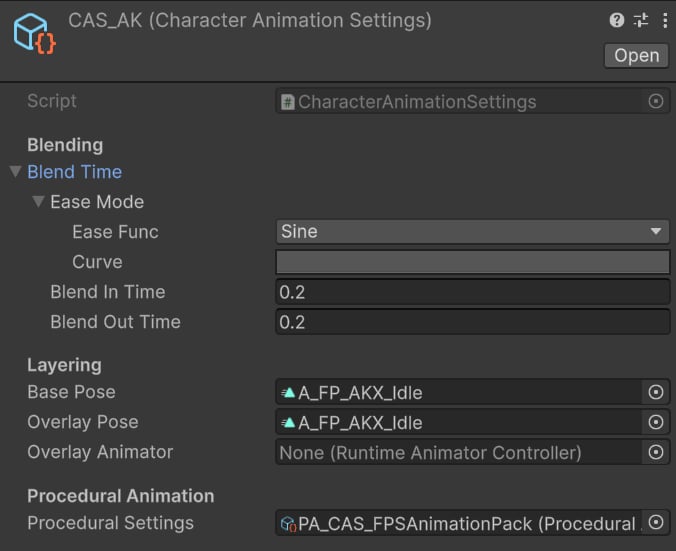 * **Blend In**/**Out Time** — set to 0.2s to have a smooth transition when switching weapons.
* **Base** and **Overlay Pose** — set to the default weapon idle pose, applied on the character upper body.
* **Procedural Settings** — set to `PA_CAS_FPSAnimationPack`, which contains procedural features used across all weapons (e.g., sway, ADS, recoil, etc.).
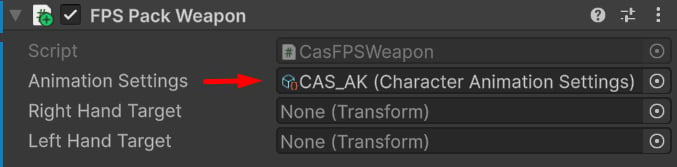
This asset is assigned in the `FPS Pack Weapon` component:
* **Blend In**/**Out Time** — set to 0.2s to have a smooth transition when switching weapons.
* **Base** and **Overlay Pose** — set to the default weapon idle pose, applied on the character upper body.
* **Procedural Settings** — set to `PA_CAS_FPSAnimationPack`, which contains procedural features used across all weapons (e.g., sway, ADS, recoil, etc.).
This asset is assigned in the `FPS Pack Weapon` component: