> ## Documentation Index
> Fetch the complete documentation index at: https://docs.kinemation.xyz/llms.txt
> Use this file to discover all available pages before exploring further.
# 🔹Weapons
> Documentation for 🔹Weapons.
## Weapon Component
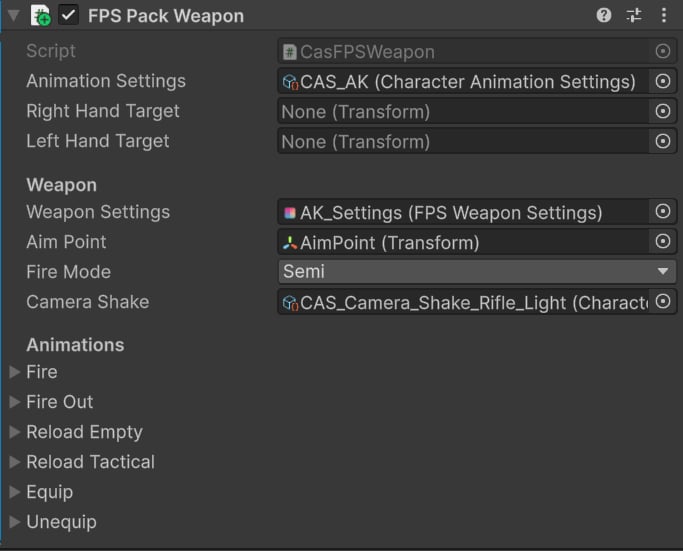
**Cas FPS Weapon** (FPS Pack Weapon) is the base class component for all weapons in this integration package.
 ### Animation Settings
Every weapon has unique [Character Animation Settings](/cas/core/character-animation-component#character-animation-settings). This asset contains the overlay pose and procedural animation settings.
You can treat this asset as a unique animation profile for a weapon.
Tip: All CAS assets are located at "**KINEMATION/CharacterAnimationSystem/Integrations/FPSAnimationPack/Settings**"
### Animation Settings
Every weapon has unique [Character Animation Settings](/cas/core/character-animation-component#character-animation-settings). This asset contains the overlay pose and procedural animation settings.
You can treat this asset as a unique animation profile for a weapon.
Tip: All CAS assets are located at "**KINEMATION/CharacterAnimationSystem/Integrations/FPSAnimationPack/Settings**"
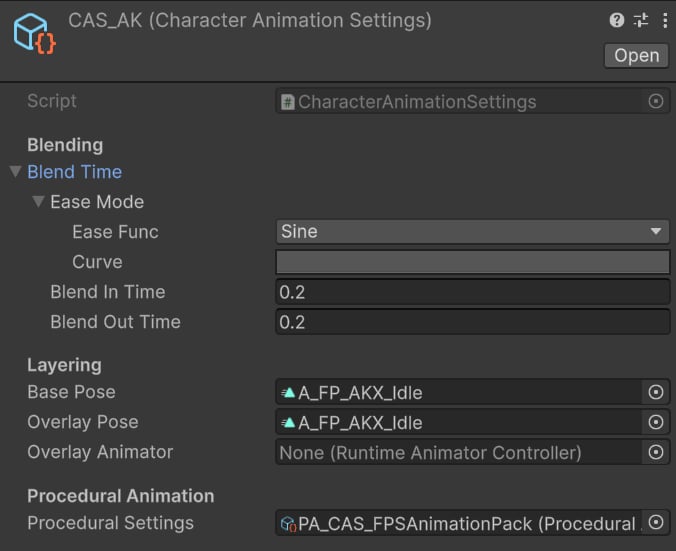 * **Blend In**/**Out Time** is set to 0.2s to ensure a smooth transition when switching weapons.
* **Base** and **Overlay Pose** are set to the default weapon idle pose, applied on the character's upper body.
* **Procedural Settings** are set to `PA_CAS_FPSAnimationPack`, which contains procedural features used across all weapons (e.g., sway, ADS, recoil, etc.).
### Weapon
* **Weapon Settings** are a data asset from the FPS Animation Pack used to play sound effects, position arms, and define basic weapon data.
* **Aim Point** is the default aiming point that will be aligned with the camera.
* **Fire Mode** defines the default fire mode.
* [**Camera Shake**](/cas/guides/character-camera#camera-shakes) is a recoil camera effect.
### Animations
All animations are defined as character-weapon clip pairs:
* **Blend In**/**Out Time** is set to 0.2s to ensure a smooth transition when switching weapons.
* **Base** and **Overlay Pose** are set to the default weapon idle pose, applied on the character's upper body.
* **Procedural Settings** are set to `PA_CAS_FPSAnimationPack`, which contains procedural features used across all weapons (e.g., sway, ADS, recoil, etc.).
### Weapon
* **Weapon Settings** are a data asset from the FPS Animation Pack used to play sound effects, position arms, and define basic weapon data.
* **Aim Point** is the default aiming point that will be aligned with the camera.
* **Fire Mode** defines the default fire mode.
* [**Camera Shake**](/cas/guides/character-camera#camera-shakes) is a recoil camera effect.
### Animations
All animations are defined as character-weapon clip pairs:
 [Animation Assets](/cas/core/animation-asset) are used to dynamically play all weapon-specific actions, including:
* Equip.
* Unequip.
* Reload.
* Fire (for some weapons).
**Tip**: All Animation Assets can be found at "**KINEMATION\CharacterAnimationSystem\Integrations\FPSAnimationPack\Animations**".
All character animations share similar settings:
[Animation Assets](/cas/core/animation-asset) are used to dynamically play all weapon-specific actions, including:
* Equip.
* Unequip.
* Reload.
* Fire (for some weapons).
**Tip**: All Animation Assets can be found at "**KINEMATION\CharacterAnimationSystem\Integrations\FPSAnimationPack\Animations**".
All character animations share similar settings:
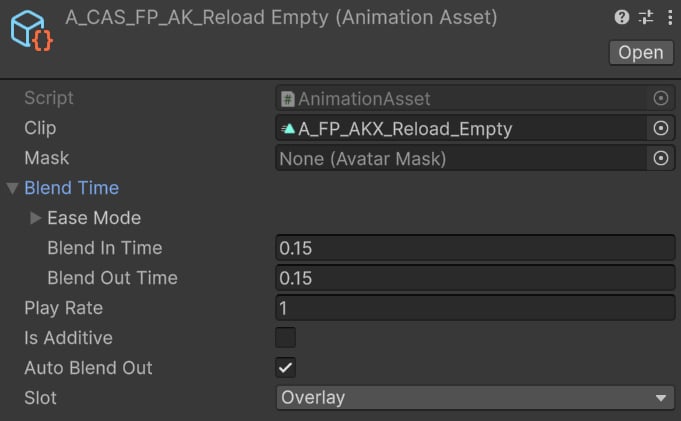 * **Blend In**/**Out** time ensures smooth transition when playing an animation.
* **Auto Blend Out** makes the animation blend out automatically upon completion.
* **Overlay** slot will correctly animate arms and weapon.
Weapon animations use a slightly different setup:
* **Blend In**/**Out** time ensures smooth transition when playing an animation.
* **Auto Blend Out** makes the animation blend out automatically upon completion.
* **Overlay** slot will correctly animate arms and weapon.
Weapon animations use a slightly different setup:
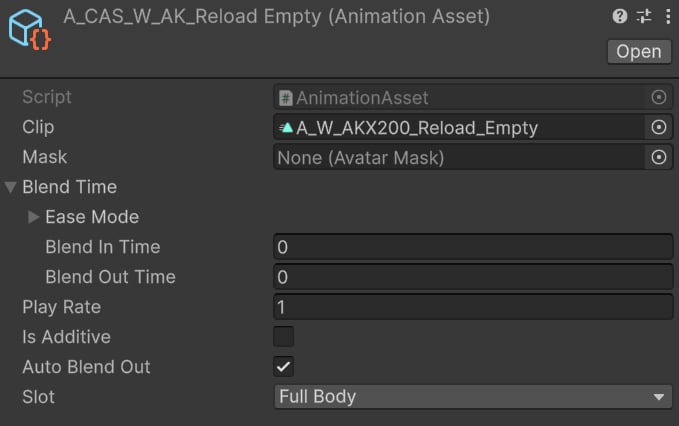 * **Blend In**/**Out** time is set to zero to avoid strange blending of gun parts.
**Tip**: Weapons ignore the "Slot" property, so it can be set to any value.
* **Blend In**/**Out** time is set to zero to avoid strange blending of gun parts.
**Tip**: Weapons ignore the "Slot" property, so it can be set to any value.