> ## Documentation Index
> Fetch the complete documentation index at: https://docs.kinemation.xyz/llms.txt
> Use this file to discover all available pages before exploring further.
# ◻️Modify Bone Chain
> Documentation for ◻️Modify Bone Chain.
## Overview
**Modify Bone Chain** has the same function as Modify Bone, but it applies translation and rotation to a chain of bones.
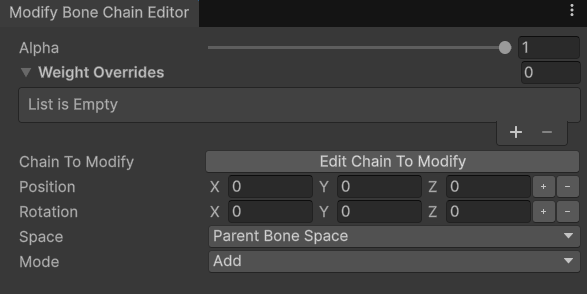 * **Chain To Modify** — bones that will be affected.
* **Position** — translation offset; it's possible to bind an external value here.
* **Rotation** — rotation offset; it's possible to bind an external value here.
* **Space** — what space the offset will be applied in.
* **Mode** — whether to add or replace bone transforms.
## Use-cases
This modifier is useful when there's a need to rotate multiple bones at once. For example, the FPS Add-on uses this feature to implement trigger discipline:
* **Chain To Modify** — bones that will be affected.
* **Position** — translation offset; it's possible to bind an external value here.
* **Rotation** — rotation offset; it's possible to bind an external value here.
* **Space** — what space the offset will be applied in.
* **Mode** — whether to add or replace bone transforms.
## Use-cases
This modifier is useful when there's a need to rotate multiple bones at once. For example, the FPS Add-on uses this feature to implement trigger discipline:
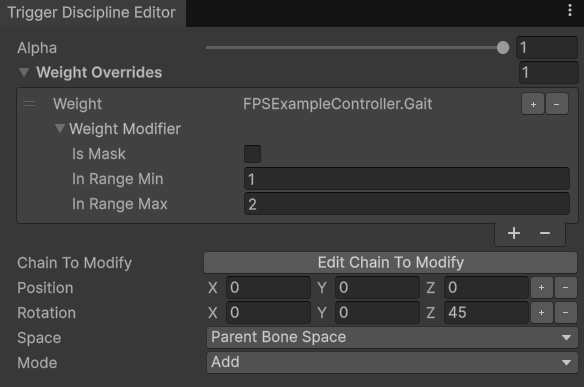 **Tip**: When a character is sprinting, this layer will apply 45 degree rotation around the Z axis for the right index finger bones.