> ## Documentation Index
> Fetch the complete documentation index at: https://docs.kinemation.xyz/llms.txt
> Use this file to discover all available pages before exploring further.
# ◻️Modify Bone
> Documentation for ◻️Modify Bone.
## Overview
**Modify Bone** allows to directly change bone position, rotation, or scale.
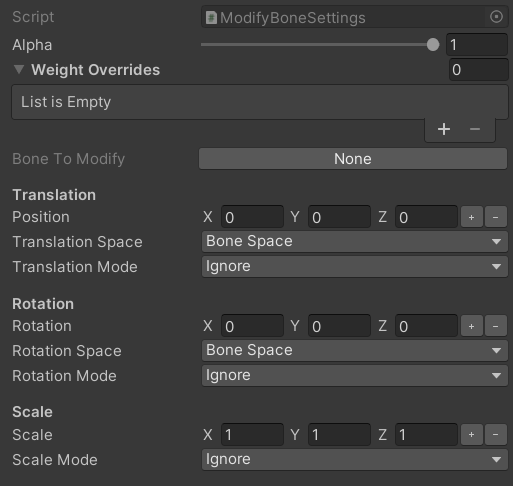 * **Bone To Modify** — bone that will be modified.
* **Position** — Vector3 position property. It is possible to bind any Vector3 value to this property.
* **Rotation** — Quaternion rotation property. It is possible to bind any Quaternion value to this property.
* **Scale** — Vector3 scale property. It is possible to bind any Vector3 value to this property.
* **Translation**/**Rotation Space** — space to apply the position offset in.
* **Translation**/**Rotation**/**Scale Mode** — whether to ignore, add, or replace the current transform.
## Use-cases
This feature is used to modify a bone's transform at runtime.
It's possible to bind offset values from external components (e.g., character controller) to drive the procedural animation logic.
* **Bone To Modify** — bone that will be modified.
* **Position** — Vector3 position property. It is possible to bind any Vector3 value to this property.
* **Rotation** — Quaternion rotation property. It is possible to bind any Quaternion value to this property.
* **Scale** — Vector3 scale property. It is possible to bind any Vector3 value to this property.
* **Translation**/**Rotation Space** — space to apply the position offset in.
* **Translation**/**Rotation**/**Scale Mode** — whether to ignore, add, or replace the current transform.
## Use-cases
This feature is used to modify a bone's transform at runtime.
It's possible to bind offset values from external components (e.g., character controller) to drive the procedural animation logic.