> ## Documentation Index
> Fetch the complete documentation index at: https://docs.kinemation.xyz/llms.txt
> Use this file to discover all available pages before exploring further.
# 🌌Introduction to CAS
> This page is a perfect start if you are new to CAS.
**Character Animation System** is a powerful solution that handles natural blending and procedural animation, while working alongside with Mecanim Animator.
This guide walks you through the CAS workflow using the demo content.
## Installing CAS
**Note**: If you use other KINEMATION assets, make sure to remove:
* KAnimationCore
* ScriptableWidget
* MotionWarping
folders before importing CAS!
**Character Animation System** is available on the Unity Asset Store. Follow these steps to import the asset to your project:
Find "My Assets" and type in "Character Animation System".
Select the asset, download and import it to the project.
## Content
Once the package is imported, you will see a "KINEMATION" folder:
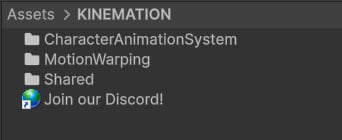 *Shared* contains common modules CAS relies on, such as:
* **KAnimationCore**: A library that provides a foundation for all animation logic.
* **PropertyBindings**: A system that binds properties in the editor without any code.
* **ScriptableWidget**: An editor widget used to display procedural animation modifiers.
* **Character**: Kinemation Mannequin model.
*MotionWarping* handles the climbing. You can learn more about it [here](/mw/welcome).
CharacterAnimationSystem contains scripts and example content:
* **Examples**: Includes Animator Controller template and example scripts (e.g., character controller).
* **Scripts**: Includes all CAS main animation logic — from layered blending to procedural modifiers.
## Getting Started
This section will demonstrate how to work with **CAS** using free demo content as an example. You will learn:
* How to install demo content.
* How to set up a character.
* What components CAS relies on.
* How to add and control animations.
* How to work with procedural animation.
* How to add climbing.
* What to do if something doesn't work.
Follow the pages below step-by-step:
*Shared* contains common modules CAS relies on, such as:
* **KAnimationCore**: A library that provides a foundation for all animation logic.
* **PropertyBindings**: A system that binds properties in the editor without any code.
* **ScriptableWidget**: An editor widget used to display procedural animation modifiers.
* **Character**: Kinemation Mannequin model.
*MotionWarping* handles the climbing. You can learn more about it [here](/mw/welcome).
CharacterAnimationSystem contains scripts and example content:
* **Examples**: Includes Animator Controller template and example scripts (e.g., character controller).
* **Scripts**: Includes all CAS main animation logic — from layered blending to procedural modifiers.
## Getting Started
This section will demonstrate how to work with **CAS** using free demo content as an example. You will learn:
* How to install demo content.
* How to set up a character.
* What components CAS relies on.
* How to add and control animations.
* How to work with procedural animation.
* How to add climbing.
* What to do if something doesn't work.
Follow the pages below step-by-step: