> ## Documentation Index
> Fetch the complete documentation index at: https://docs.kinemation.xyz/llms.txt
> Use this file to discover all available pages before exploring further.
# 🦾Character
> In this chapter we will cover character animation aspect.
## Skeleton Structure
The FPS arms model used in the package is based on UE4 Skeleton:
 This rig includes two important bones:
1. **ik\_hand\_gun** - contains the baked movement of the weapon.
2. **ik\_hand\_gun\_additive** - used for procedural idle, walking, and sprinting animations.
3. **camera\_bone** - contains camera keyframes.
**Tip**: the character rig type is Generic.
All animations also include keyframes for the lower body, meaning that clips can be used with full-body characters.
## Override Animator Controllers
All character animations are defined in override controllers. The **FPS Animation Pack** uses a convenient naming convention:
> **OC\_FP\_WeaponName, OC stands for "Override Controller"**
All character controllers have the same structure:
This rig includes two important bones:
1. **ik\_hand\_gun** - contains the baked movement of the weapon.
2. **ik\_hand\_gun\_additive** - used for procedural idle, walking, and sprinting animations.
3. **camera\_bone** - contains camera keyframes.
**Tip**: the character rig type is Generic.
All animations also include keyframes for the lower body, meaning that clips can be used with full-body characters.
## Override Animator Controllers
All character animations are defined in override controllers. The **FPS Animation Pack** uses a convenient naming convention:
> **OC\_FP\_WeaponName, OC stands for "Override Controller"**
All character controllers have the same structure:
 **"A\_FP"**-type animations are not typically overridden, as these are general motions used for all guns. **Fire**, **Idle**, and **Reload** slots are overridden depending on the weapon type. Now it's time to cover the main **AC\_FPS\_Character** controller.
## Main Character Controller
**AC\_FPS\_Character** consists of 7 layers:
**"A\_FP"**-type animations are not typically overridden, as these are general motions used for all guns. **Fire**, **Idle**, and **Reload** slots are overridden depending on the weapon type. Now it's time to cover the main **AC\_FPS\_Character** controller.
## Main Character Controller
**AC\_FPS\_Character** consists of 7 layers:
 ### Base Layer
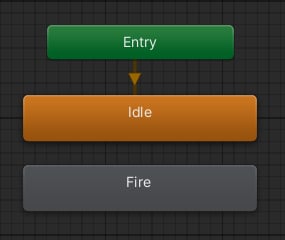 This layer includes the base idle pose and firing state.
### Additive Layer
This layer includes the base idle pose and firing state.
### Additive Layer
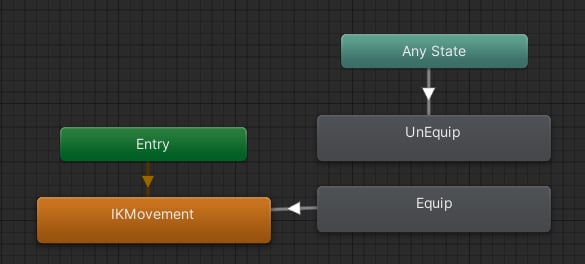 This layer only animates the **ik\_hand\_gun\_additive** bone. It is used later to apply IK animation on top of the character base pose. This allows to re-use of one set of animations for all weapons.
### Reload Layer
This layer only animates the **ik\_hand\_gun\_additive** bone. It is used later to apply IK animation on top of the character base pose. This allows to re-use of one set of animations for all weapons.
### Reload Layer
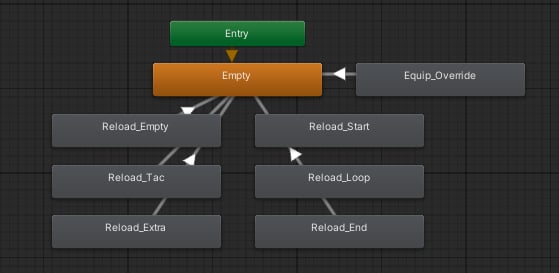 This layer is used to play reloading animations. It also has a slot for **Equip\_Override** - it is used exclusively for the Kolibri equip animation.
### Tac Sprint Layer
This layer is used to play reloading animations. It also has a slot for **Equip\_Override** - it is used exclusively for the Kolibri equip animation.
### Tac Sprint Layer
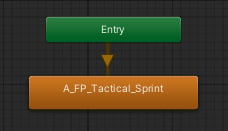 This layer only applies tactical sprinting animation.
### Grenade Layer
This layer is used to play the grenade throw sequence:
This layer only applies tactical sprinting animation.
### Grenade Layer
This layer is used to play the grenade throw sequence:
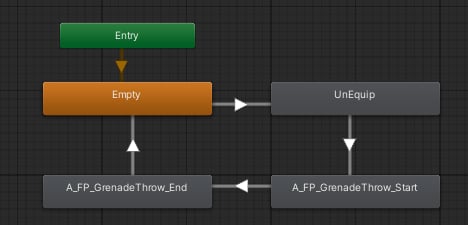 First, the character unequips the current weapon, then throws the grenade and gets back to the idle state.
### Right Hand and Trigger Discipline
These layers are activated when a character is tactical sprinting.
First, the character unequips the current weapon, then throws the grenade and gets back to the idle state.
### Right Hand and Trigger Discipline
These layers are activated when a character is tactical sprinting.