> ## Documentation Index
> Fetch the complete documentation index at: https://docs.kinemation.xyz/llms.txt
> Use this file to discover all available pages before exploring further.
# 📘Player Prefab
> In this section we will cover the character prefab.
## Structure
The **FPSPlayer** prefab is a game-ready entity, that you can drag and drop to the existing level. It consists of 2 parts:
* **SK\_Arms\_Mono** (Character model).
* **Camera**
## Character
Player prefab relies on these components:
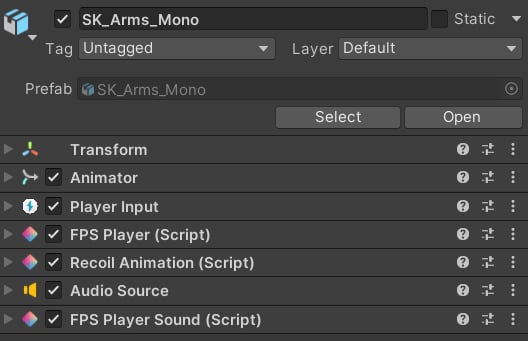 Let's break down each component's settings and purpose.
### Animator
It's responsible for applying all animations: reloads, fire, grenade throw, movement, and others.
Let's break down each component's settings and purpose.
### Animator
It's responsible for applying all animations: reloads, fire, grenade throw, movement, and others.
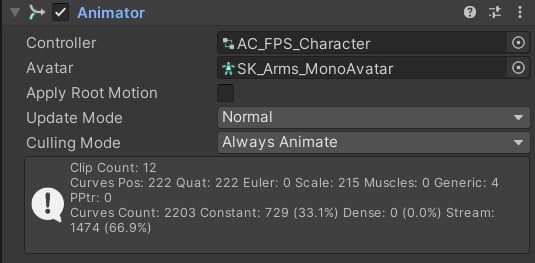 **AC\_FPS\_Character** is the main character controller. It is used as a source for all override controllers in the package.
**Tip**: this controller contains empty animation clips, overridden by weapon-specific animations.
Because it is a part of the animation system, it will be covered later in the [Character](/fps-animation-pack/unity/animations/character) section.
### Player Input
This is a component from Unity's *New Input System* package. You can find the input map here:
**AC\_FPS\_Character** is the main character controller. It is used as a source for all override controllers in the package.
**Tip**: this controller contains empty animation clips, overridden by weapon-specific animations.
Because it is a part of the animation system, it will be covered later in the [Character](/fps-animation-pack/unity/animations/character) section.
### Player Input
This is a component from Unity's *New Input System* package. You can find the input map here:
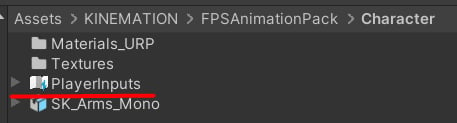 Note: the **FPS Animation Pack** supports legacy inputs as well, so it will work even if the *New Input System* is not imported.
The package comes with these gameplay actions:
1. **Reload** (R).
2. **Fire** (LMB).
3. **Aim** (RMB).
4. **Change Weapon** (F).
5. **Throw Grenade** (G).
6. **Move** (WASD).
7. **Sprint** (Left Shift).
8. **Tactical Sprint** (Left Shift + X).
9. **Change Fire** Mode (B).
10. **Mouse Wheel** (instant weapon swapping).
### FPS Player
This component is responsible for weapon management and procedural animation:
Note: the **FPS Animation Pack** supports legacy inputs as well, so it will work even if the *New Input System* is not imported.
The package comes with these gameplay actions:
1. **Reload** (R).
2. **Fire** (LMB).
3. **Aim** (RMB).
4. **Change Weapon** (F).
5. **Throw Grenade** (G).
6. **Move** (WASD).
7. **Sprint** (Left Shift).
8. **Tactical Sprint** (Left Shift + X).
9. **Change Fire** Mode (B).
10. **Mouse Wheel** (instant weapon swapping).
### FPS Player
This component is responsible for weapon management and procedural animation:
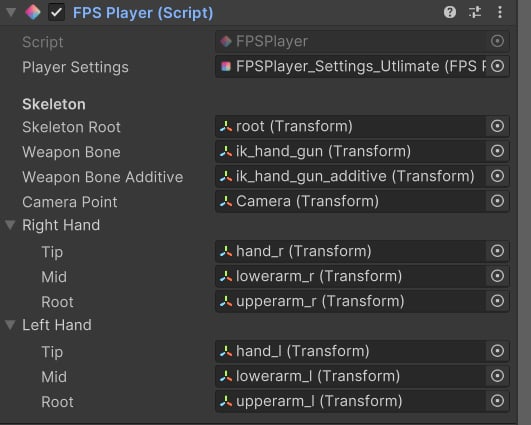 * **Player Settings**: contains character-related properties.
* **Skeleton Root**: the model root bone.
* **Weapon Bone**: the weapon bone, all weapons are parented to it.
* **Weapon Bone Additive**: the bone used to apply additive movement.
* **Camera Point**: it will be used to align iron sights.
* **Right/Left Hand**: used for applying procedural animations.
* Tip: the hand bone.
* Mid: the elbow bone.
* Root: the upper arm bone.
**Note**: the procedural animation is running in *LateUpdate()*.
### Recoil Animation
This component generates procedural firing animations. You can find out more [here](/scriptable-animation-system/recoil-system/recoil-animation).
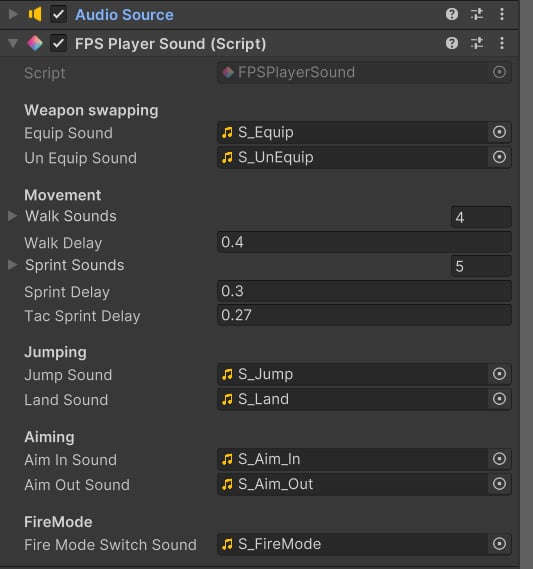
### Audio Source and FPS Player Sound
These components are used together to play general character effects, such as walking, swapping weapons, or throwing a grenade:
* **Player Settings**: contains character-related properties.
* **Skeleton Root**: the model root bone.
* **Weapon Bone**: the weapon bone, all weapons are parented to it.
* **Weapon Bone Additive**: the bone used to apply additive movement.
* **Camera Point**: it will be used to align iron sights.
* **Right/Left Hand**: used for applying procedural animations.
* Tip: the hand bone.
* Mid: the elbow bone.
* Root: the upper arm bone.
**Note**: the procedural animation is running in *LateUpdate()*.
### Recoil Animation
This component generates procedural firing animations. You can find out more [here](/scriptable-animation-system/recoil-system/recoil-animation).
### Audio Source and FPS Player Sound
These components are used together to play general character effects, such as walking, swapping weapons, or throwing a grenade:
 ## Camera
Custom camera animations and recoil shakes are applied via the **FPS Camera Animator** component:
## Camera
Custom camera animations and recoil shakes are applied via the **FPS Camera Animator** component:
 **Note**: camera curves exist in character animations, so whenever a player clip is played - it will also animate the camera.