> ## Documentation Index
> Fetch the complete documentation index at: https://docs.kinemation.xyz/llms.txt
> Use this file to discover all available pages before exploring further.
# 🔫Weapon System
> In this section we will cover the weapon system.
## Overview
Weapons are responsible for these gameplay actions:
1. Reloading
2. Changing fire modes
3. Equip/UnEquip animations
4. Firing
The functions above are implemented in the **FPSWeapon** component:
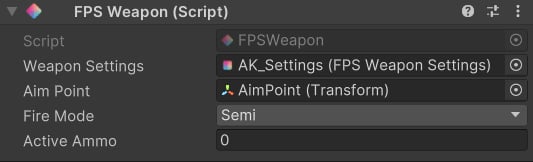
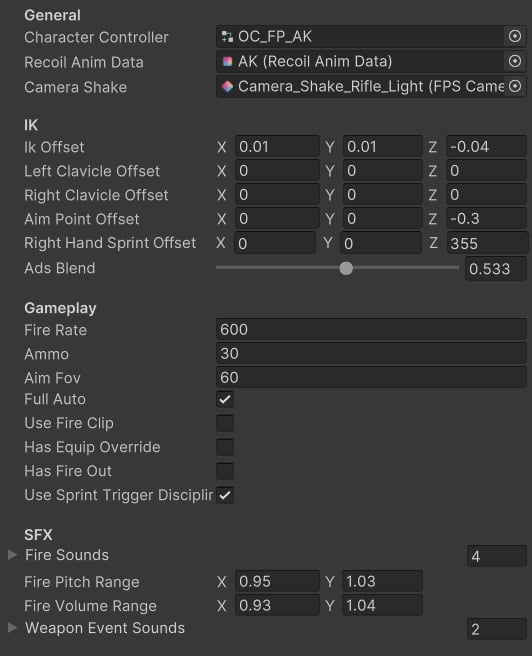 1. **Character Controller**: override controller for this weapon.
2. **Recoil Anim Data**: procedural recoil settings.
3. **Camera Shake**: recoil camera shakes.
4. **Ik Offset**: translation offset for the arms.
5. **Left Clavicle Offset**: translation offset for the left arm.
6. **Right Clavicle Offset**: translation offset for the right arm.
7. **Aim Point Offset**: translation offset for the aiming socket.
8. **Right Hand Sprint Offset**: rotation offset activated when tactical sprinting.
9. **Ads Blend**: blend between absolute and additive aiming.
10. **Fire Rate**: in rounds-per-minute.
11. **Ammo**: default ammo size.
12. **Aim Fov**: field-of-view when aiming.
13. **Full Auto**: whether the weapon supports full auto.
14. **Use Fire Clip**: whether to use firing animation.
15. **Has Equip Override**: whether to use custom equip animation.
16. **Has Fire Out**: whether to lock the bolt after firing.
17. **Use Sprint Trigger Discipline**: whether to use gun safety when sprinting.
18. **Fire Sounds**: firing sounds played randomly.
19. **Fire Pitch Range**: range for the pitch.
20. **Fire Volume Range**: range for the volume.
21. **Weapon Event Sounds**: reloading sounds played via animation events.
## Weapon mesh
The weapon model has these components:
1. **Character Controller**: override controller for this weapon.
2. **Recoil Anim Data**: procedural recoil settings.
3. **Camera Shake**: recoil camera shakes.
4. **Ik Offset**: translation offset for the arms.
5. **Left Clavicle Offset**: translation offset for the left arm.
6. **Right Clavicle Offset**: translation offset for the right arm.
7. **Aim Point Offset**: translation offset for the aiming socket.
8. **Right Hand Sprint Offset**: rotation offset activated when tactical sprinting.
9. **Ads Blend**: blend between absolute and additive aiming.
10. **Fire Rate**: in rounds-per-minute.
11. **Ammo**: default ammo size.
12. **Aim Fov**: field-of-view when aiming.
13. **Full Auto**: whether the weapon supports full auto.
14. **Use Fire Clip**: whether to use firing animation.
15. **Has Equip Override**: whether to use custom equip animation.
16. **Has Fire Out**: whether to lock the bolt after firing.
17. **Use Sprint Trigger Discipline**: whether to use gun safety when sprinting.
18. **Fire Sounds**: firing sounds played randomly.
19. **Fire Pitch Range**: range for the pitch.
20. **Fire Volume Range**: range for the volume.
21. **Weapon Event Sounds**: reloading sounds played via animation events.
## Weapon mesh
The weapon model has these components:
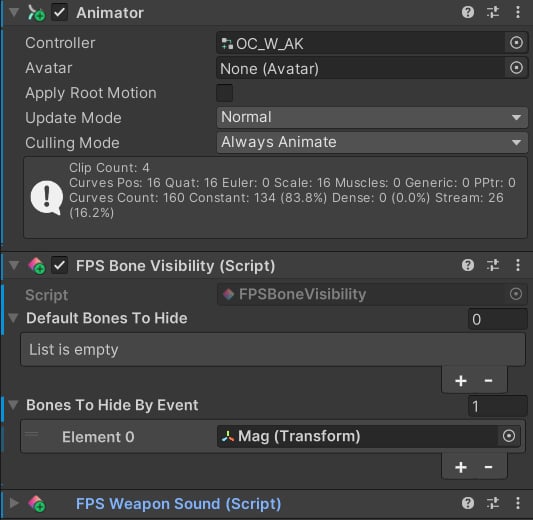 **Animator** is used to animate gun parts (bolt, mag, etc.), which are automatically synced with the character's movements.
**FPS Bone Visibility** is responsible for hiding or unhiding bones, based on animation events.
**FPS Weapon Sound** plays sounds related to the weapon (e.g. reloading, firing).
**Animator** is used to animate gun parts (bolt, mag, etc.), which are automatically synced with the character's movements.
**FPS Bone Visibility** is responsible for hiding or unhiding bones, based on animation events.
**FPS Weapon Sound** plays sounds related to the weapon (e.g. reloading, firing).