> ## Documentation Index
> Fetch the complete documentation index at: https://docs.kinemation.xyz/llms.txt
> Use this file to discover all available pages before exploring further.

# ➕FPS Animation Framework Integration

> In this tutorial you will learn how to use pack's animation with the FPSAF.

## Tutorial

To set up the character and animations from the pack, make sure to follow these video tutorials down below.

The process is the same for any model or animation. The only change needed is in the **Pose Sampler Layer**:
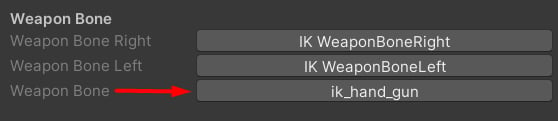
<Frame caption={"Select the ik_hand_gun bone here!"}>
  <img src="https://mintcdn.com/kinemation/PlmzVQHJ3J_C1x92/images/fps-animation-pack/unity/99dc5cf7fe3fd7a77f81.png?fit=max&auto=format&n=PlmzVQHJ3J_C1x92&q=85&s=7f8184e9b68f8c3fe99e3a6beae3c54d" alt="" width={419} data-path="images/fps-animation-pack/unity/99dc5cf7fe3fd7a77f81.png" />
</Frame>

<iframe src="https://iframely.net/eqZhXDS" title="Embedded content" allow="accelerometer *; clipboard-write *; encrypted-media *; gyroscope *; picture-in-picture *; web-share *;" allowFullScreen className="w-full aspect-video rounded-xl" />

<iframe src="https://iframely.net/7eClJzW" title="Embedded content" allow="accelerometer *; clipboard-write *; encrypted-media *; gyroscope *; picture-in-picture *; web-share *;" allowFullScreen className="w-full aspect-video rounded-xl" />
