> ## Documentation Index
> Fetch the complete documentation index at: https://docs.kinemation.xyz/llms.txt
> Use this file to discover all available pages before exploring further.

# 🔉Sounds

> In this page we will cover how the sounds work in the project.

## Resources

You can find all sound effects in the **Plugins → FPS Animation Pack Content → SFX**. There are 2 types of sounds, based on how they are triggered in runtime:

1. Anim Notify-Based

   1. Reloads

   2. Grenade

   3. Movement

2. Gameplay-Triggered

   1. Firing

   2. Aiming

   3. Fire mode switch

Let's see how exactly sounds are implemented using real examples:

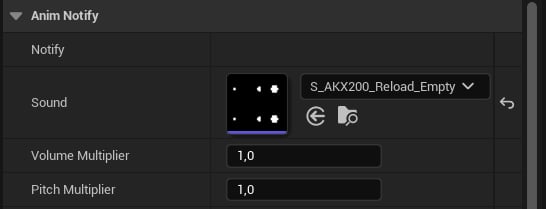
## AnimNotify\_PlaySound

This notify is used to play all animation-based sound effects:
<Frame caption={"Play Sound notify."}>
  <img src="https://mintcdn.com/kinemation/PlmzVQHJ3J_C1x92/images/fps-animation-pack/unreal/46256347f2b68236c877.png?fit=max&auto=format&n=PlmzVQHJ3J_C1x92&q=85&s=b6882f0d011eaff8b16ffa2c320b789c" alt="" width={410} data-path="images/fps-animation-pack/unreal/46256347f2b68236c877.png" />
</Frame>

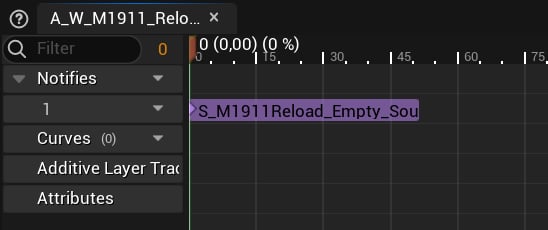
This notify is usually placed at the beginning of the sequence:
<Frame caption={"M1911 reload sound example."}>
  <img src="https://mintcdn.com/kinemation/6K2VhvCCGB3AmUKf/images/fps-animation-pack/unreal/649be4e05ff98f61d135.png?fit=max&auto=format&n=6K2VhvCCGB3AmUKf&q=85&s=9ccfa9d86b86cc1763510065dcca543f" alt="" width={411} data-path="images/fps-animation-pack/unreal/649be4e05ff98f61d135.png" />
</Frame>

## Gameplay Sounds

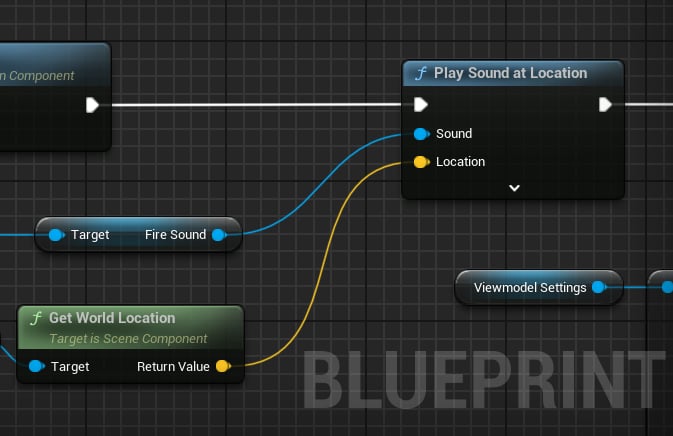
The firing sounds are played in the **BP\_WeaponBase**:
<Frame caption={"Firing sounds."}>
  <img src="https://mintcdn.com/kinemation/PlmzVQHJ3J_C1x92/images/fps-animation-pack/unreal/33e625fb2e4054529688.png?fit=max&auto=format&n=PlmzVQHJ3J_C1x92&q=85&s=a84b22bea47900dfcc7b18d128c87843" alt="" width={505} data-path="images/fps-animation-pack/unreal/33e625fb2e4054529688.png" />
</Frame>

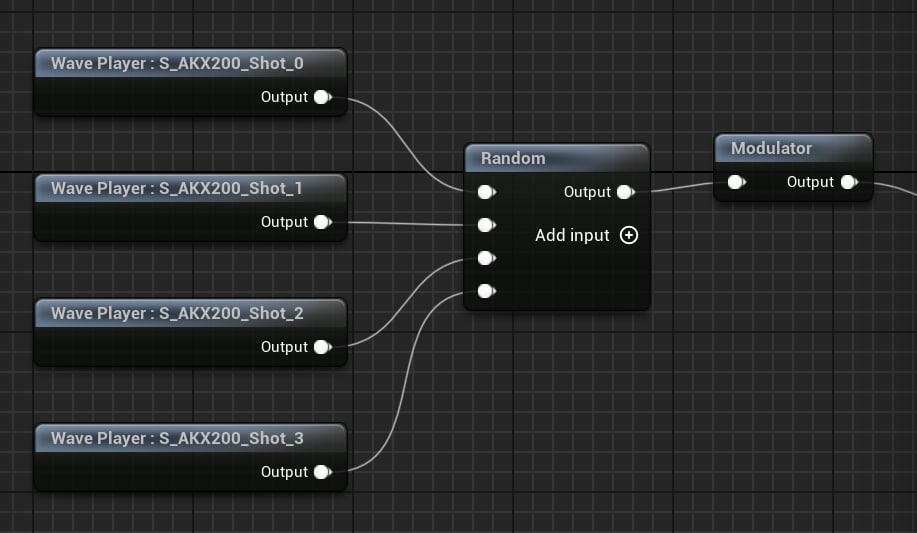
Unlike other effects, firing ones are *Sound Cues*, which implement randomized pitch, volume as well as the order of sounds:
<Frame caption={"SC_AKX200_Fire example."}>
  <img src="https://mintcdn.com/kinemation/6K2VhvCCGB3AmUKf/images/fps-animation-pack/unreal/5fd7e999ae10e08419f0.png?fit=max&auto=format&n=6K2VhvCCGB3AmUKf&q=85&s=0fcd7c898942ab2c121a168a19aeaef8" alt="" width={563} data-path="images/fps-animation-pack/unreal/5fd7e999ae10e08419f0.png" />
</Frame>

The fire mode switch is played in the respective method of the weapon blueprint:
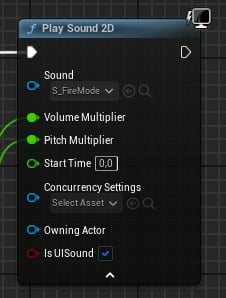
<Frame caption={"Fire mode switch with randomized effects."}>
  <img src="https://mintcdn.com/kinemation/6K2VhvCCGB3AmUKf/images/fps-animation-pack/unreal/7e054a52f94fe2decf6e.png?fit=max&auto=format&n=6K2VhvCCGB3AmUKf&q=85&s=2dbc7773f02e55e9a26dfd050660b1d9" alt="" width={226} data-path="images/fps-animation-pack/unreal/7e054a52f94fe2decf6e.png" />
</Frame>

Finally, the aiming sounds are played in the [Player Blueprint](/fps-animation-pack/unreal/gameplay/player-blueprint):
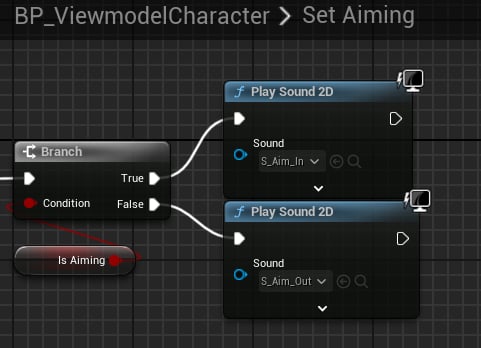
<Frame caption={"Aiming sounds."}>
  <img src="https://mintcdn.com/kinemation/6K2VhvCCGB3AmUKf/images/fps-animation-pack/unreal/be79d7aadc2530f67ef0.png?fit=max&auto=format&n=6K2VhvCCGB3AmUKf&q=85&s=8f3f00a9fa08e8a585140e0785806838" alt="" width={361} data-path="images/fps-animation-pack/unreal/be79d7aadc2530f67ef0.png" />
</Frame>
