> ## Documentation Index
> Fetch the complete documentation index at: https://docs.kinemation.xyz/llms.txt
> Use this file to discover all available pages before exploring further.
# ⚙️Recoil Settings
> In this section we will cover all recoil-related properties.
All settings are located in the **Recoil Data** asset (to create one, right-click and go **Miscellaneous -> Data Asset -> Recoil Data**). This asset contains many sections, and we will cover them one by one.
## Controller Recoil
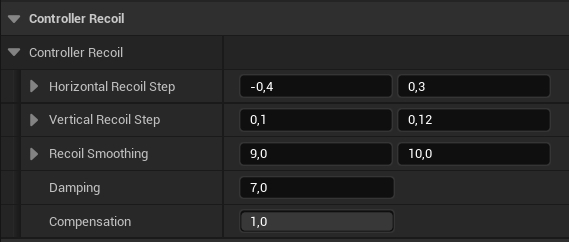 * **Horizontal Recoil Step**: a value will be computed in this range and added to the controller Yaw.
* **Vertical Recoil Step**: a value will be computed in this range and added to the controller Pitch.
* **Recoil Smoothing**: interpolation speed for X (Yaw) and Y (Pitch).
* **Damping**: how fast the both Pitch and Yaw will go to zero,
* **Compensation**: how much player input to take into account. 1 - 100%, 0 - 0%.
**Controller Recoil** is added directly to the **Player Controller** using *AddPitchInput* and *AddYawInput* methods.
## Curve
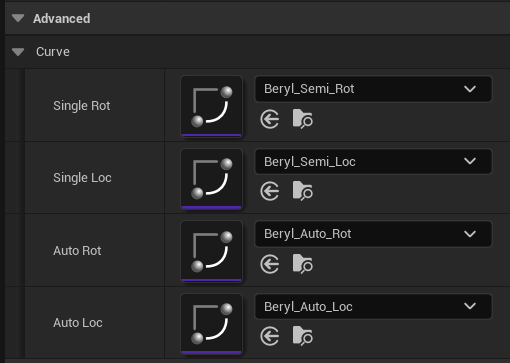
This section contains curves that we covered in the previous chapter:
* **Horizontal Recoil Step**: a value will be computed in this range and added to the controller Yaw.
* **Vertical Recoil Step**: a value will be computed in this range and added to the controller Pitch.
* **Recoil Smoothing**: interpolation speed for X (Yaw) and Y (Pitch).
* **Damping**: how fast the both Pitch and Yaw will go to zero,
* **Compensation**: how much player input to take into account. 1 - 100%, 0 - 0%.
**Controller Recoil** is added directly to the **Player Controller** using *AddPitchInput* and *AddYawInput* methods.
## Curve
This section contains curves that we covered in the previous chapter:
 ## Input
These properties generate main target recoil values:
## Input
These properties generate main target recoil values:
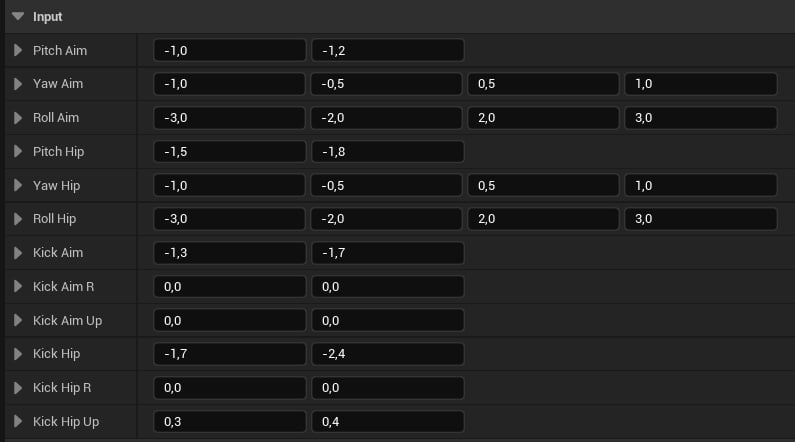 * **Pitch/Yaw/Roll Aim**: a value will be generated in this range and added to the pitch/yaw/roll when aiming.
* **Pitch/Yaw/Roll**: a value will be generated in this range and added to the pitch/yaw/roll when hip firing.
* **Kick/Kick R/ Kick Up Aim**: a value will be generated in this range and added in the forward/right/up direction when aiming.
* **Kick/Kick R/ Kick Up**: a value will be generated in this range and added in the forward/right/up direction when aiming.
It's worth noting how the random generation happens in runtime:
* For 2D vectors, it will compute a value via FRandRange(X, Y)
* For 4D vectors, it will compute a value via FRandRange(FRandRange(X, Y), FRandRange(Z, W)). We do it this way to avoid getting close-to-zero values, which sometimes look horrible.
## Smoothing
This group is only applied when auto/burst firing.
* **Pitch/Yaw/Roll Aim**: a value will be generated in this range and added to the pitch/yaw/roll when aiming.
* **Pitch/Yaw/Roll**: a value will be generated in this range and added to the pitch/yaw/roll when hip firing.
* **Kick/Kick R/ Kick Up Aim**: a value will be generated in this range and added in the forward/right/up direction when aiming.
* **Kick/Kick R/ Kick Up**: a value will be generated in this range and added in the forward/right/up direction when aiming.
It's worth noting how the random generation happens in runtime:
* For 2D vectors, it will compute a value via FRandRange(X, Y)
* For 4D vectors, it will compute a value via FRandRange(FRandRange(X, Y), FRandRange(Z, W)). We do it this way to avoid getting close-to-zero values, which sometimes look horrible.
## Smoothing
This group is only applied when auto/burst firing.
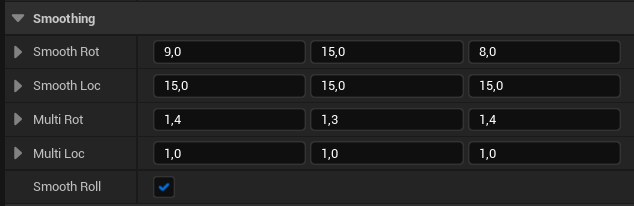 * **Smooth Rot/Loc**: interpolation speed for a rotation/translation axis. If the value is zero - no interpolation will be applied.
* **Multi Rot/Loc**: multipliers for a rotation/translation axis.
* **Smooth Roll**: if roll sign should change every shot. Keep it true to achieve the best results.
## Noise Layer
This layer applies translation 2D noise in the YZ plane (right and up movement).
* **Smooth Rot/Loc**: interpolation speed for a rotation/translation axis. If the value is zero - no interpolation will be applied.
* **Multi Rot/Loc**: multipliers for a rotation/translation axis.
* **Smooth Roll**: if roll sign should change every shot. Keep it true to achieve the best results.
## Noise Layer
This layer applies translation 2D noise in the YZ plane (right and up movement).
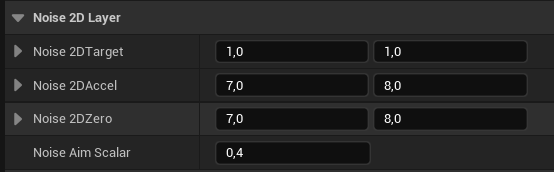 * **Noise 2DTarget**: this value will be added to the translation of every shot.
* **Noise 2DAccel**: interpolation speed for right and up axes.
* **Noise 2DZero**: how fast each axis will go to zero.
* **Noise Aim Scalar**: multiplier applied when aiming.
## Pushback
This layer is applied on the second shot of a burst or auto sequence.
* **Noise 2DTarget**: this value will be added to the translation of every shot.
* **Noise 2DAccel**: interpolation speed for right and up axes.
* **Noise 2DZero**: how fast each axis will go to zero.
* **Noise Aim Scalar**: multiplier applied when aiming.
## Pushback
This layer is applied on the second shot of a burst or auto sequence.
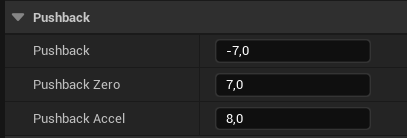 * **Pushback**: this value will be added to the forward translation.
* **Pushback Zero**: how fast the pushback should go to zero.
* **Pushback Accel**: pusback interpolation speed.
## Recoil Sway
This layer applies sway to simulate a body recoil.
* **Pushback**: this value will be added to the forward translation.
* **Pushback Zero**: how fast the pushback should go to zero.
* **Pushback Accel**: pusback interpolation speed.
## Recoil Sway
This layer applies sway to simulate a body recoil.
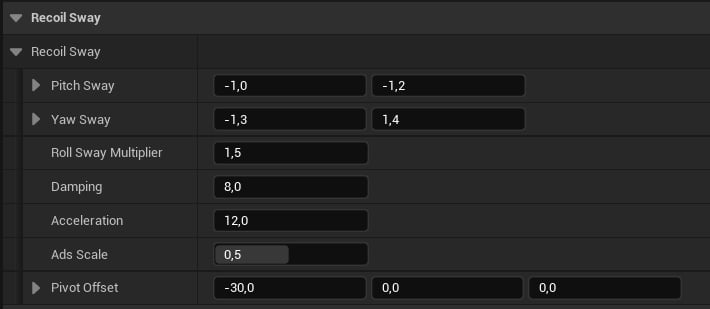 * **Pitch Sway**: a value will be randomly generated in this range and added to the pitch.
* **Yaw Sway**: a value will be randomly generated in this range and added to the yaw.
* **Roll Sway Multiplier**: will multiply the yaw result by this value and add it to the roll.
* **Damping**: how fast the sway should go to zero.
* **Acceleration**: interpolation sway speed.
* **Ads Scale**: this value will scale the recoil sway when aiming.
* **Pivot Offset**: will offset the recoil physical pivot.
## Timeline
These properties control the general animation timeline.
* **Pitch Sway**: a value will be randomly generated in this range and added to the pitch.
* **Yaw Sway**: a value will be randomly generated in this range and added to the yaw.
* **Roll Sway Multiplier**: will multiply the yaw result by this value and add it to the roll.
* **Damping**: how fast the sway should go to zero.
* **Acceleration**: interpolation sway speed.
* **Ads Scale**: this value will scale the recoil sway when aiming.
* **Pivot Offset**: will offset the recoil physical pivot.
## Timeline
These properties control the general animation timeline.
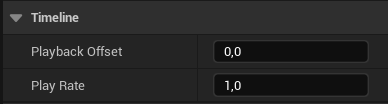 * **Playback Offset**: will offset the loop time interval. For example, if a weapon fire rate is 600RPM, the loop interval will be 0.1s + Playback Offset.
* **Play Rate**: animation speed multiplier.
## Pivot
This section controls the physical recoil pivot point.
* **Playback Offset**: will offset the loop time interval. For example, if a weapon fire rate is 600RPM, the loop interval will be 0.1s + Playback Offset.
* **Play Rate**: animation speed multiplier.
## Pivot
This section controls the physical recoil pivot point.
 * **Pivot Offset**: applied when hip firing.
* **Ads Pivot Offset**: applied when aiming.
**Tip**: pivot offsets can be useful when we want to apply recoil rotation around a certain point, like a shoulder.
* **Pivot Offset**: applied when hip firing.
* **Ads Pivot Offset**: applied when aiming.
**Tip**: pivot offsets can be useful when we want to apply recoil rotation around a certain point, like a shoulder.