> ## Documentation Index
> Fetch the complete documentation index at: https://docs.kinemation.xyz/llms.txt
> Use this file to discover all available pages before exploring further.
# Animation system
> Understand how the Sci-Fi FPS Pack layers locomotion, item actions, procedural features, IK, and retargeted animations.
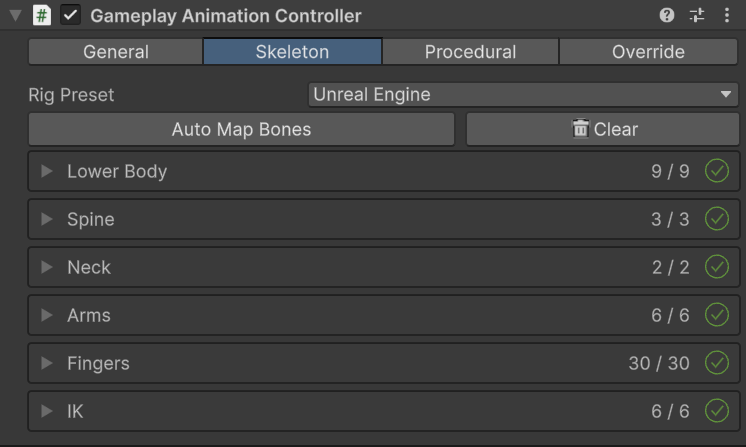
export const skeletonImageCaption_0 = "The Gameplay Animation Controller skeleton maps body, weapon, and IK transforms."
export const skeletonImage_0 =
 export const pairedAnimationImageCaption_0 = "A character-item animation pairs character and weapon assets with a sound."
export const pairedAnimationImage_0 =
export const pairedAnimationImageCaption_0 = "A character-item animation pairs character and weapon assets with a sound."
export const pairedAnimationImage_0 =
 export const productName_0 = "Sci-Fi FPS Pack"
## Animation pipeline
`GameplayAnimationController` extends the character Animator with ordered Playable outputs. The original Animator remains responsible for locomotion. Gameplay Framework layers item poses and actions over that result, then runs the procedural feature stack.
| Order | Stage | Responsibility |
| --------------- | ------------------ | --------------------------------------------------------------------------------- |
| Animator output | Locomotion source | Produces the base full-body animation and Animator parameters. |
| `100` | Locomotion capture | Caches the source pose for layered blending. |
| `200` | Gameplay layering | Combines the base pose, item overlay, and per-body layer weights. |
| `300` | Full-body slot | Plays actions that must replace the complete body. |
| `400` | Procedural output | Runs IK pose, the ordered procedural features, then two-bone IK. |
| `1000` | Pose blending | Preserves and blends the previous pose while the active procedural asset changes. |
The controller rebuilds its outputs if another system recreates the Animator Playable Graph at runtime.
{skeletonImage_0}
The skeleton map identifies the locomotion chains, hands, fingers, feet, weapon bone, additive weapon bone, and IK targets. Humanoid characters can map standard bones through the Animator. Generic characters use the explicit transform mapping created during character setup.
## Gameplay animation assets
`GameplayAnimationAsset` wraps an `AnimationClip` with the playback data required by the graph.
| Field | Purpose |
| ------------------ | --------------------------------------------------------------------------------------- |
| **Clip** | Animation played by the asset. |
| **Slot** | Uses **Overlay** for masked item actions or **Full Body** for complete-body actions. |
| **Mask** | Limits the affected transforms for Overlay playback. |
| **Blend Time** | Defines blend-in and blend-out time and easing. |
| **Play Rate** | Multiplies playback speed. `GetPlayLength()` returns clip length divided by this value. |
| **Is Additive** | Treats the clip as an additive action. |
| **Auto Blend Out** | Returns the slot to its previous source when playback reaches the blend-out window. |
{pairedAnimationImage_0}
`GameplayCharacterItemClip` keeps the character-side asset, item-side asset, and sound together. `GameplayItemView.PlayCharacterItemAnimation` starts both animations and plays the sound from one call. `GetLength()` returns the longer character or item duration, which the example controller uses to lock conflicting actions.
## Overlay and full-body actions
* **Overlay** actions enter the overlay slot and use the asset's Avatar Mask. Use this for draw, fire, reload, inspect, and similar upper-body actions that should preserve locomotion.
* **Full Body** actions enter a separate full-body output. Use this when the action must replace locomotion completely.
* The active procedural asset supplies the idle overlay pose or overlay Animator Controller used between actions.
## Animation overrides
Before an asset, clip, or Animator Controller reaches the graph, `GameplayAnimationController` checks its `GameplayAnimationOverride` list in order. The first override that contains a replacement wins. This is how retargeted {productName_0} assets replace the original pack animations without editing weapon prefabs.
Item scale is resolved from the override whose source config contains the active procedural asset's idle pose or overlay controller. If exactly one override exists, it is also used as the fallback scale.
## Runtime API
Call `PlayAnimation` and `StopAnimation` on the character controller. Pass the original pack asset; the controller resolves any active retargeting override automatically.
```csharp theme={null}
using KINEMATION.Shared.GameplayFramework.Scripts.Runtime.Animation;
using UnityEngine;
public class CharacterActionExample : MonoBehaviour
{
[SerializeField] private GameplayAnimationController animationController;
[SerializeField] private GameplayAnimationAsset action;
public void PlayAction()
{
if (!animationController.PlayAnimation(action)) return;
float duration = action.GetPlayLength();
animationController.StartAction(duration, duration > 0f);
}
public void CancelAction()
{
animationController.StopAnimation(action);
animationController.StopAction();
}
}
```
`PlayAnimation` returns `false` when the controller graph is not initialized or the asset is invalid. Keep gameplay state changes conditional on a successful call when animation timing controls the action.
## Sci-Fi asset conventions
Character-side assets use the `A_FP_*` prefix. Weapon-side assets use `A_W_*`. Pair the two assets in the corresponding `GameplayCharacterItemClip` field on the weapon view.
The source animation catalog is `Assets/KINEMATION/SciFiPack/Animations/Sci-Fi_FPS_Pack.asset`. Retargeting creates replacement `GameplayAnimationAsset` and Animator Controller entries in your selected generated folder. The active `GameplayAnimationOverride` resolves those replacements at runtime.
Use **Overlay** for the supplied weapon actions. Keep locomotion in the character Animator so the upper-body action and lower-body movement can run together.
export const productName_0 = "Sci-Fi FPS Pack"
## Animation pipeline
`GameplayAnimationController` extends the character Animator with ordered Playable outputs. The original Animator remains responsible for locomotion. Gameplay Framework layers item poses and actions over that result, then runs the procedural feature stack.
| Order | Stage | Responsibility |
| --------------- | ------------------ | --------------------------------------------------------------------------------- |
| Animator output | Locomotion source | Produces the base full-body animation and Animator parameters. |
| `100` | Locomotion capture | Caches the source pose for layered blending. |
| `200` | Gameplay layering | Combines the base pose, item overlay, and per-body layer weights. |
| `300` | Full-body slot | Plays actions that must replace the complete body. |
| `400` | Procedural output | Runs IK pose, the ordered procedural features, then two-bone IK. |
| `1000` | Pose blending | Preserves and blends the previous pose while the active procedural asset changes. |
The controller rebuilds its outputs if another system recreates the Animator Playable Graph at runtime.
{skeletonImage_0}
The skeleton map identifies the locomotion chains, hands, fingers, feet, weapon bone, additive weapon bone, and IK targets. Humanoid characters can map standard bones through the Animator. Generic characters use the explicit transform mapping created during character setup.
## Gameplay animation assets
`GameplayAnimationAsset` wraps an `AnimationClip` with the playback data required by the graph.
| Field | Purpose |
| ------------------ | --------------------------------------------------------------------------------------- |
| **Clip** | Animation played by the asset. |
| **Slot** | Uses **Overlay** for masked item actions or **Full Body** for complete-body actions. |
| **Mask** | Limits the affected transforms for Overlay playback. |
| **Blend Time** | Defines blend-in and blend-out time and easing. |
| **Play Rate** | Multiplies playback speed. `GetPlayLength()` returns clip length divided by this value. |
| **Is Additive** | Treats the clip as an additive action. |
| **Auto Blend Out** | Returns the slot to its previous source when playback reaches the blend-out window. |
{pairedAnimationImage_0}
`GameplayCharacterItemClip` keeps the character-side asset, item-side asset, and sound together. `GameplayItemView.PlayCharacterItemAnimation` starts both animations and plays the sound from one call. `GetLength()` returns the longer character or item duration, which the example controller uses to lock conflicting actions.
## Overlay and full-body actions
* **Overlay** actions enter the overlay slot and use the asset's Avatar Mask. Use this for draw, fire, reload, inspect, and similar upper-body actions that should preserve locomotion.
* **Full Body** actions enter a separate full-body output. Use this when the action must replace locomotion completely.
* The active procedural asset supplies the idle overlay pose or overlay Animator Controller used between actions.
## Animation overrides
Before an asset, clip, or Animator Controller reaches the graph, `GameplayAnimationController` checks its `GameplayAnimationOverride` list in order. The first override that contains a replacement wins. This is how retargeted {productName_0} assets replace the original pack animations without editing weapon prefabs.
Item scale is resolved from the override whose source config contains the active procedural asset's idle pose or overlay controller. If exactly one override exists, it is also used as the fallback scale.
## Runtime API
Call `PlayAnimation` and `StopAnimation` on the character controller. Pass the original pack asset; the controller resolves any active retargeting override automatically.
```csharp theme={null}
using KINEMATION.Shared.GameplayFramework.Scripts.Runtime.Animation;
using UnityEngine;
public class CharacterActionExample : MonoBehaviour
{
[SerializeField] private GameplayAnimationController animationController;
[SerializeField] private GameplayAnimationAsset action;
public void PlayAction()
{
if (!animationController.PlayAnimation(action)) return;
float duration = action.GetPlayLength();
animationController.StartAction(duration, duration > 0f);
}
public void CancelAction()
{
animationController.StopAnimation(action);
animationController.StopAction();
}
}
```
`PlayAnimation` returns `false` when the controller graph is not initialized or the asset is invalid. Keep gameplay state changes conditional on a successful call when animation timing controls the action.
## Sci-Fi asset conventions
Character-side assets use the `A_FP_*` prefix. Weapon-side assets use `A_W_*`. Pair the two assets in the corresponding `GameplayCharacterItemClip` field on the weapon view.
The source animation catalog is `Assets/KINEMATION/SciFiPack/Animations/Sci-Fi_FPS_Pack.asset`. Retargeting creates replacement `GameplayAnimationAsset` and Animator Controller entries in your selected generated folder. The active `GameplayAnimationOverride` resolves those replacements at runtime.
Use **Overlay** for the supplied weapon actions. Keep locomotion in the character Animator so the upper-body action and lower-body movement can run together.