> ## Documentation Index
> Fetch the complete documentation index at: https://docs.kinemation.xyz/llms.txt
> Use this file to discover all available pages before exploring further.
# Character runtime
> Reference the character-side Gameplay Framework components used by the Unity Sci-Fi FPS Pack.
export const controllerImageCaption_0 = "Gameplay Framework components on the configured character."
export const controllerImage_0 =
 export const productName_0 = "Sci-Fi FPS Pack"
## Gameplay Animation Controller
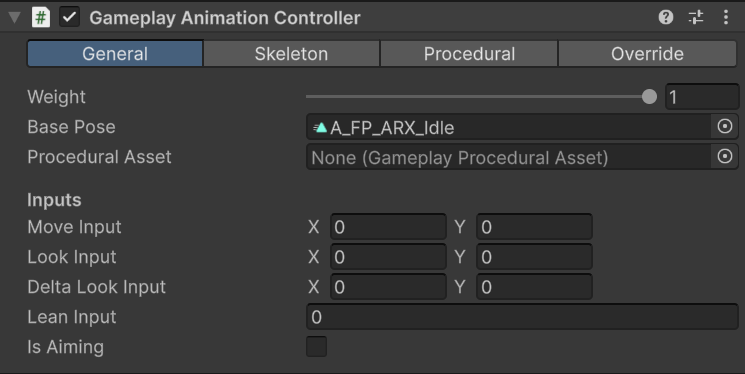
`GameplayAnimationController` owns the skeleton map, layered animation graph, procedural feature chain, retargeting overrides, and the live values consumed by procedural jobs.
{controllerImage_0}
| Area | Configure here |
| -------------- | ---------------------------------------------------------------------------- |
| **General** | Global weight, base pose, default procedural asset, and animation overrides. |
| **Skeleton** | Humanoid chains, weapon bones, camera-related transforms, and IK targets. |
| **Procedural** | The resolved feature list from the active procedural asset. |
| **Override** | Retargeted animation assets and Animator Controllers. |
Your gameplay controller must update `moveInput`, `lookInput`, `deltaLookInput`, `leanInput`, and `isAiming`. The procedural jobs read these values directly. `StartAction` and `StopAction` maintain `HasActiveAction`, which the supplied example uses to prevent incompatible actions from overlapping.
## Gameplay Item View
`GameplayItemView` is the presentation base class for equipped items. It owns the item Animator graph and synchronizes a paired character/item action through `GameplayCharacterItemClip`.
| Member | Responsibility |
| ------------------------------- | ------------------------------------------------------------------------------------------------------------ |
| `proceduralAsset` | Item-specific procedural profile applied during equip. |
| `itemIdleClip` | Base item animation played beneath item actions. |
| `OnEquipItem` | Finds the character controller and camera, applies the procedural asset, and resolves retargeted item scale. |
| `OnUnEquipItem` | Extension point for holster behavior. |
| `OnUseItem` / `OnStopUsingItem` | Extension points for continuous or one-shot use. |
| `OnAim` | Extension point for aim state. |
| `OnInspect` | Extension point that returns the action duration. |
| `PlayCharacterItemAnimation` | Plays the character asset, item asset, and optional sound together. |
| `SetItemVisibility` | Shows or hides the item immediately or after a delay. |
`HideBoneByName` preserves the hierarchy by forcing a selected transform to a small scale during `LateUpdate`. `UnhideBoneByName` clears that forced state; the animation or event code must write the visible scale again. Use this approach when removing a magazine or cartridge transform would break animation bindings.
## Gameplay Camera
`GameplayCamera` supports first-person and third-person placement, shoulder switching, crouch and aim offsets, obstacle tracing, camera animation, FOV interpolation, free look, and `GameplayCameraShake` assets.
The active item calls `UpdateTargetFOV` when aim state changes and `PlayCameraShake` when a weapon fires. A custom camera can replace this component, but your integration must reproduce those calls or move that responsibility into your own presentation layer.
## Particle System Player
`ParticleSystemPlayer` caches all child particle systems, including inactive children. `Play()` and `Stop()` forward to the complete group. Shooter Core uses it for muzzle flashes and empty casings.
## Equip flow
```text theme={null}
Gameplay controller selects an item
-> GameplayItemExample.EquipItem(player)
-> GameplayItemView.OnEquipItem(player)
-> GameplayAnimationController.UpdateProceduralAsset(item profile, item view)
-> character and item presentation use the resolved profile and overrides
```
The components in {productName_0} demonstrate this contract. You can replace the example input and movement code while keeping the animation controller and item-view calls.
## Supplied character
export const productName_0 = "Sci-Fi FPS Pack"
## Gameplay Animation Controller
`GameplayAnimationController` owns the skeleton map, layered animation graph, procedural feature chain, retargeting overrides, and the live values consumed by procedural jobs.
{controllerImage_0}
| Area | Configure here |
| -------------- | ---------------------------------------------------------------------------- |
| **General** | Global weight, base pose, default procedural asset, and animation overrides. |
| **Skeleton** | Humanoid chains, weapon bones, camera-related transforms, and IK targets. |
| **Procedural** | The resolved feature list from the active procedural asset. |
| **Override** | Retargeted animation assets and Animator Controllers. |
Your gameplay controller must update `moveInput`, `lookInput`, `deltaLookInput`, `leanInput`, and `isAiming`. The procedural jobs read these values directly. `StartAction` and `StopAction` maintain `HasActiveAction`, which the supplied example uses to prevent incompatible actions from overlapping.
## Gameplay Item View
`GameplayItemView` is the presentation base class for equipped items. It owns the item Animator graph and synchronizes a paired character/item action through `GameplayCharacterItemClip`.
| Member | Responsibility |
| ------------------------------- | ------------------------------------------------------------------------------------------------------------ |
| `proceduralAsset` | Item-specific procedural profile applied during equip. |
| `itemIdleClip` | Base item animation played beneath item actions. |
| `OnEquipItem` | Finds the character controller and camera, applies the procedural asset, and resolves retargeted item scale. |
| `OnUnEquipItem` | Extension point for holster behavior. |
| `OnUseItem` / `OnStopUsingItem` | Extension points for continuous or one-shot use. |
| `OnAim` | Extension point for aim state. |
| `OnInspect` | Extension point that returns the action duration. |
| `PlayCharacterItemAnimation` | Plays the character asset, item asset, and optional sound together. |
| `SetItemVisibility` | Shows or hides the item immediately or after a delay. |
`HideBoneByName` preserves the hierarchy by forcing a selected transform to a small scale during `LateUpdate`. `UnhideBoneByName` clears that forced state; the animation or event code must write the visible scale again. Use this approach when removing a magazine or cartridge transform would break animation bindings.
## Gameplay Camera
`GameplayCamera` supports first-person and third-person placement, shoulder switching, crouch and aim offsets, obstacle tracing, camera animation, FOV interpolation, free look, and `GameplayCameraShake` assets.
The active item calls `UpdateTargetFOV` when aim state changes and `PlayCameraShake` when a weapon fires. A custom camera can replace this component, but your integration must reproduce those calls or move that responsibility into your own presentation layer.
## Particle System Player
`ParticleSystemPlayer` caches all child particle systems, including inactive children. `Play()` and `Stop()` forward to the complete group. Shooter Core uses it for muzzle flashes and empty casings.
## Equip flow
```text theme={null}
Gameplay controller selects an item
-> GameplayItemExample.EquipItem(player)
-> GameplayItemView.OnEquipItem(player)
-> GameplayAnimationController.UpdateProceduralAsset(item profile, item view)
-> character and item presentation use the resolved profile and overrides
```
The components in {productName_0} demonstrate this contract. You can replace the example input and movement code while keeping the animation controller and item-view calls.
## Supplied character
Assets/KINEMATION/SciFiPack/Prefabs/Player/FPS\_SciFi\_Arms.prefab is the reference character setup. Use it to compare component assignments, the mapped weapon bone, camera transforms, IK targets, and the example controller.
Pack Setup adds the shared runtime components to a custom character. Your controller can replace GameplayControllerExample or ShooterControllerExample as long as it updates the animation inputs and invokes the ItemView lifecycle.
Understand what an equipped item's presentation component represents and how gameplay drives it.
Add the required components and skeleton mappings before integrating custom gameplay.