> ## Documentation Index
> Fetch the complete documentation index at: https://docs.kinemation.xyz/llms.txt
> Use this file to discover all available pages before exploring further.
# Features
> Configure procedural assets, per-weapon overrides, and the complete Sci-Fi FPS Pack feature stack.
export const productName_0 = "Sci-Fi FPS Pack"
export const assetImageCaption_0 = "The Sci-Fi procedural template and its ordered feature list."
export const assetImage_0 =
 export const overrideImageCaption_0 = "Create a local override for one inherited procedural feature."
export const overrideImage_0 =
export const overrideImageCaption_0 = "Create a local override for one inherited procedural feature."
export const overrideImage_0 =
 export const templateAsset_0 = "PA_Template_SciFi_FPS"
export const overridePattern_0 = "PA_SciFi_FPS_*"
## Procedural assets
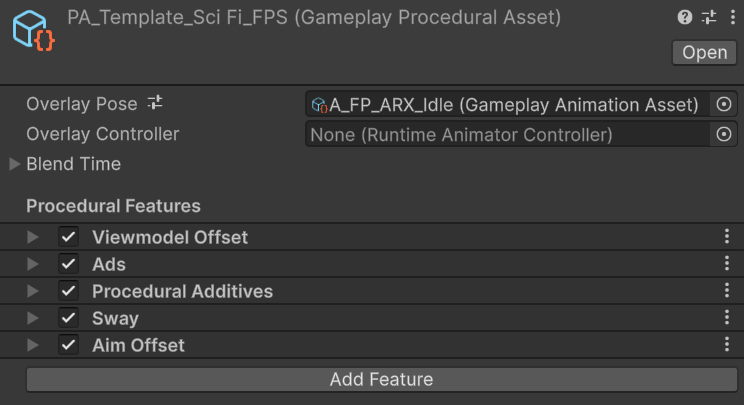
`GameplayProceduralAsset` stores the ordered feature stack used by {productName_0}. It also selects the default idle pose, an optional overlay Animator Controller, and the blend used when the active item changes.
{assetImage_0}
| Field | Runtime behavior |
| ---------------------- | ------------------------------------------------------------------------------------------------------------------- |
| **Default Idle Pose** | Supplies the overlay pose used before an action animation plays. |
| **Overlay Controller** | Optionally supplies a state-driven overlay. Matching non-trigger parameters are copied from the character Animator. |
| **Blend Time** | Controls how the controller blends from the previous item pose into this asset. |
| **Features** | Runs the procedural jobs in list order between the built-in IK pose and IK solve stages. |
Every feature has a **Weight** from `0` to `1`. Use `0` to isolate a feature while tuning. Removing a feature changes the stack itself; setting its weight to `0` keeps its position and configuration available.
## Per-item overrides
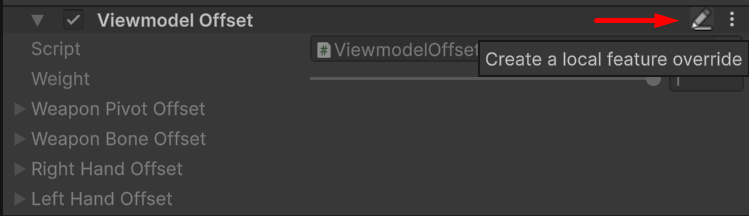
`GameplayProceduralOverride` inherits one parent `GameplayProceduralAsset`. It replaces only the selected parent features and resolves the remaining features from the parent.
{overrideImage_0}
Use
export const templateAsset_0 = "PA_Template_SciFi_FPS"
export const overridePattern_0 = "PA_SciFi_FPS_*"
## Procedural assets
`GameplayProceduralAsset` stores the ordered feature stack used by {productName_0}. It also selects the default idle pose, an optional overlay Animator Controller, and the blend used when the active item changes.
{assetImage_0}
| Field | Runtime behavior |
| ---------------------- | ------------------------------------------------------------------------------------------------------------------- |
| **Default Idle Pose** | Supplies the overlay pose used before an action animation plays. |
| **Overlay Controller** | Optionally supplies a state-driven overlay. Matching non-trigger parameters are copied from the character Animator. |
| **Blend Time** | Controls how the controller blends from the previous item pose into this asset. |
| **Features** | Runs the procedural jobs in list order between the built-in IK pose and IK solve stages. |
Every feature has a **Weight** from `0` to `1`. Use `0` to isolate a feature while tuning. Removing a feature changes the stack itself; setting its weight to `0` keeps its position and configuration available.
## Per-item overrides
`GameplayProceduralOverride` inherits one parent `GameplayProceduralAsset`. It replaces only the selected parent features and resolves the remaining features from the parent.
{overrideImage_0}
Use {templateAsset_0} as the shared stack for {productName_0}. Use {overridePattern_0} for item-specific aim alignment and viewmodel corrections. This keeps common sway, additives, and aim behavior in one asset.
Open {templateAsset_0} when every item should receive the same change.
Open the item asset, select the inherited feature, and create a local override. Edit the local copy without changing the parent.
Equip the item in Play mode. `GameplayItemView.OnEquipItem` passes its procedural asset to `GameplayAnimationController.UpdateProceduralAsset`.
Feature order is significant. A later feature receives the pose produced by every earlier feature. Keep the supplied order unless you are deliberately changing the animation pipeline.
## Feature stack
The shipped template runs these five features in order:
1. [Viewmodel offset](/sci-fi-fps-pack/unity/general/features/viewmodel-offset) aligns the weapon and hand IK targets.
2. [ADS](/sci-fi-fps-pack/unity/general/features/ads) aligns the weapon aim point with the character aim target.
3. [Procedural additives](/sci-fi-fps-pack/unity/general/features/procedural-additives) applies authored additive movement and runtime recoil.
4. [Sway](/sci-fi-fps-pack/unity/general/features/sway) applies spring motion from movement and look input.
5. [Aim offset](/sci-fi-fps-pack/unity/general/features/aim-offset) distributes view pitch, yaw, and lean across the body and can turn the model in place.
Tune weapon placement and ADS before evaluating additive motion or sway. Test Aim Offset with the final character controller because its turn-in-place behavior depends on how that controller rotates the character.