> ## Documentation Index
> Fetch the complete documentation index at: https://docs.kinemation.xyz/llms.txt
> Use this file to discover all available pages before exploring further.
# ADS
> Align each Sci-Fi weapon aim point with the first-person camera target and tune aim transitions.
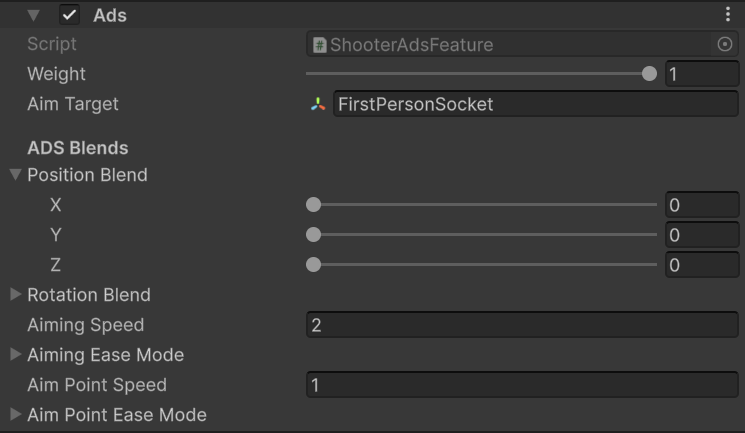
export const featureImageCaption_0 = "Shooter ADS target, axis blends, and transition settings."
export const featureImage_0 =
 export const aimTarget_0 = "FirstPersonSocket"
export const productName_0 = "Sci-Fi FPS Pack"
export const blendRange_0 = "0 to 0.5 per axis"
## Overview
`ShooterAdsFeature` aligns the mapped weapon bone with an aim target while `GameplayAnimationController.isAiming` is true. It reads the active `WeaponView.aimPoint`, so each sight or weapon can provide its own alignment transform.
{featureImage_0}
| Field | Effect |
| ----------------------- | --------------------------------------------------------------------------------------------------------------- |
| **Weight** | Blends the complete ADS correction. |
| **Aim Target** | Resolves the character transform that the weapon aim point should meet. |
| **Position Blend** | Blends each position axis between absolute runtime alignment (`0`) and the additive mesh-pose correction (`1`). |
| **Rotation Blend** | Blends each rotation axis between absolute and additive alignment. |
| **Aiming Speed** | Controls the hip-to-ADS and ADS-to-hip transition. Minimum value is `0.01`. |
| **Aiming Ease Mode** | Shapes the aiming blend. |
| **Aim Point Speed** | Controls transitions when `WeaponView.aimPoint` changes. Minimum value is `0.01`. |
| **Aim Point Ease Mode** | Shapes aim-point switching. |
## Use cases
* Use
export const aimTarget_0 = "FirstPersonSocket"
export const productName_0 = "Sci-Fi FPS Pack"
export const blendRange_0 = "0 to 0.5 per axis"
## Overview
`ShooterAdsFeature` aligns the mapped weapon bone with an aim target while `GameplayAnimationController.isAiming` is true. It reads the active `WeaponView.aimPoint`, so each sight or weapon can provide its own alignment transform.
{featureImage_0}
| Field | Effect |
| ----------------------- | --------------------------------------------------------------------------------------------------------------- |
| **Weight** | Blends the complete ADS correction. |
| **Aim Target** | Resolves the character transform that the weapon aim point should meet. |
| **Position Blend** | Blends each position axis between absolute runtime alignment (`0`) and the additive mesh-pose correction (`1`). |
| **Rotation Blend** | Blends each rotation axis between absolute and additive alignment. |
| **Aiming Speed** | Controls the hip-to-ADS and ADS-to-hip transition. Minimum value is `0.01`. |
| **Aiming Ease Mode** | Shapes the aiming blend. |
| **Aim Point Speed** | Controls transitions when `WeaponView.aimPoint` changes. Minimum value is `0.01`. |
| **Aim Point Ease Mode** | Shapes aim-point switching. |
## Use cases
* Use {aimTarget_0} as the aim target for the supplied {productName_0} player.
* Put the weapon's aim point transform on the sight line and assign it to `WeaponView.aimPoint`.
* Start with low axis blend values when exact sight alignment matters. Increase an axis when animation-relative correction looks more natural than absolute alignment.
* Use the shipped profiles as working ranges: {productName_0} uses position and rotation blends from {blendRange_0}, depending on the weapon.
* Raise **Aiming Speed** for a faster transition. Raise **Aim Point Speed** when changing sights should settle faster.
ADS also reads the active Viewmodel Offset feature when calculating the mesh reference pose. Tune weapon placement first, then tune ADS.
## Sci-Fi profiles
`PA_Template_SciFi_FPS` targets `FirstPersonSocket`, uses absolute alignment on every axis, and starts with **Aiming Speed** `2`. Weapon overrides adjust the axis blends and speed when their mesh or animation benefits from additive correction. For example, ARX uses `0.15` on each position and rotation axis with speed `3`, while TP12 uses `0.5` with speed `2`.