> ## Documentation Index
> Fetch the complete documentation index at: https://docs.kinemation.xyz/llms.txt
> Use this file to discover all available pages before exploring further.
# Procedural additives
> Blend Sci-Fi additive weapon motion and runtime recoil for idle, movement, hip fire, and ADS.
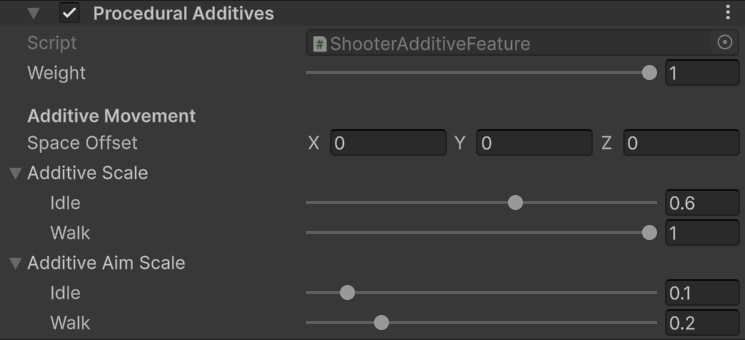
export const featureImageCaption_0 = "Procedural Additives scales for hip fire and ADS."
export const featureImage_0 =
 export const productName_0 = "Sci-Fi FPS Pack"
export const hipIdle_0 = "0.6"
export const hipWalk_0 = "1"
export const adsIdle_0 = "0.1"
export const adsWalk_0 = "0.2"
## Overview
`ShooterAdditiveFeature` applies authored motion from the mapped `weaponBoneAdditive` bone and runtime output from `RecoilAnimation` to the mapped weapon bone. It selects separate idle and moving scales for hip fire and ADS.
{featureImage_0}
| Field | Effect |
| ----------------------------- | ---------------------------------------------------------------------- |
| **Weight** | Blends the complete additive and recoil result. |
| **Space Offset** | Rotates additive translation into the character's expected axis space. |
| **Additive Scale / Idle** | Scales authored additive motion while stationary in hip fire. |
| **Additive Scale / Walk** | Scales authored additive motion while moving in hip fire. |
| **Additive Aim Scale / Idle** | Scales authored additive motion while stationary in ADS. |
| **Additive Aim Scale / Walk** | Scales authored additive motion while moving in ADS. |
## Use cases
* Keep **Space Offset** unchanged when using the supplied {productName_0} skeleton and animations.
* Use the shipped template as a baseline: hip idle
export const productName_0 = "Sci-Fi FPS Pack"
export const hipIdle_0 = "0.6"
export const hipWalk_0 = "1"
export const adsIdle_0 = "0.1"
export const adsWalk_0 = "0.2"
## Overview
`ShooterAdditiveFeature` applies authored motion from the mapped `weaponBoneAdditive` bone and runtime output from `RecoilAnimation` to the mapped weapon bone. It selects separate idle and moving scales for hip fire and ADS.
{featureImage_0}
| Field | Effect |
| ----------------------------- | ---------------------------------------------------------------------- |
| **Weight** | Blends the complete additive and recoil result. |
| **Space Offset** | Rotates additive translation into the character's expected axis space. |
| **Additive Scale / Idle** | Scales authored additive motion while stationary in hip fire. |
| **Additive Scale / Walk** | Scales authored additive motion while moving in hip fire. |
| **Additive Aim Scale / Idle** | Scales authored additive motion while stationary in ADS. |
| **Additive Aim Scale / Walk** | Scales authored additive motion while moving in ADS. |
## Use cases
* Keep **Space Offset** unchanged when using the supplied {productName_0} skeleton and animations.
* Use the shipped template as a baseline: hip idle {hipIdle_0}, hip walk {hipWalk_0}, ADS idle {adsIdle_0}, and ADS walk {adsWalk_0}.
* Reduce ADS scales when breathing or locomotion makes the sight picture unstable.
* Keep a small nonzero ADS scale when you want visible breathing and movement while aiming.
* Tune recoil through the equipped weapon's `RecoilAnimData`. This feature consumes the resulting `RecoilAnimation.RecoilTransform`; it does not define the recoil curve itself.
Movement state is inferred from the controller transform's frame-to-frame position. If your character moves a visual child instead of the object containing `GameplayAnimationController`, the feature may continue using the idle scale.
## Sci-Fi setup
The template values preserve full authored movement while walking in hip fire, reduce stationary hip motion to `0.6`, and strongly reduce motion in ADS. Tune `RecoilAnimData` per weapon for firing behavior; keep these scales focused on how that result and the authored additive bone blend into the final weapon pose.