> ## Documentation Index
> Fetch the complete documentation index at: https://docs.kinemation.xyz/llms.txt
> Use this file to discover all available pages before exploring further.
# Sway
> Configure Sci-Fi movement and aiming sway with spring response, clamps, application space, and ADS scaling.
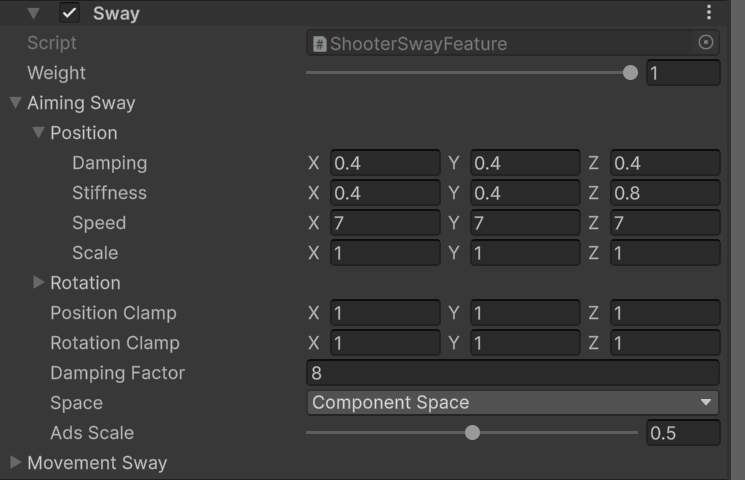
export const featureImageCaption_0 = "Shooter Sway aiming and movement spring settings."
export const featureImage_0 =
 export const productName_0 = "Sci-Fi FPS Pack"
export const adsScale_0 = "0.5"
## Overview
`ShooterSwayFeature` adds spring-based movement sway from `GameplayAnimationController.moveInput` and aiming sway from `deltaLookInput`. It applies both results to the mapped weapon bone.
{featureImage_0}
Both **Aiming Sway** and **Movement Sway** expose the same settings:
| Field | Effect |
| ----------------------------- | -------------------------------------------------------------------------------------- |
| **Position / Rotation Scale** | Sets the output amplitude per axis. Negative rotation values invert an axis. |
| **Speed** | Controls how quickly the spring responds. |
| **Stiffness** | Controls the force returning the result toward its target. |
| **Damping** | Reduces oscillation. |
| **Position / Rotation Clamp** | Limits the input target before the spring is evaluated. |
| **Damping Factor** | Smooths the raw movement or accumulated look target. |
| **Space** | Selects the transform space used to apply the result. |
| **ADS Scale** | Scales the block while aiming. `0` removes it in ADS; `1` preserves its full strength. |
## Use cases
* Keep **Component Space** for predictable first-person weapon motion with the supplied {productName_0} rig.
* Tune **Scale** first, then adjust **Speed**, **Stiffness**, and **Damping** only when the response shape is wrong.
* Keep clamps small enough that a large mouse delta or movement spike cannot throw the weapon off screen.
* Start with the supplied **ADS Scale** of
export const productName_0 = "Sci-Fi FPS Pack"
export const adsScale_0 = "0.5"
## Overview
`ShooterSwayFeature` adds spring-based movement sway from `GameplayAnimationController.moveInput` and aiming sway from `deltaLookInput`. It applies both results to the mapped weapon bone.
{featureImage_0}
Both **Aiming Sway** and **Movement Sway** expose the same settings:
| Field | Effect |
| ----------------------------- | -------------------------------------------------------------------------------------- |
| **Position / Rotation Scale** | Sets the output amplitude per axis. Negative rotation values invert an axis. |
| **Speed** | Controls how quickly the spring responds. |
| **Stiffness** | Controls the force returning the result toward its target. |
| **Damping** | Reduces oscillation. |
| **Position / Rotation Clamp** | Limits the input target before the spring is evaluated. |
| **Damping Factor** | Smooths the raw movement or accumulated look target. |
| **Space** | Selects the transform space used to apply the result. |
| **ADS Scale** | Scales the block while aiming. `0` removes it in ADS; `1` preserves its full strength. |
## Use cases
* Keep **Component Space** for predictable first-person weapon motion with the supplied {productName_0} rig.
* Tune **Scale** first, then adjust **Speed**, **Stiffness**, and **Damping** only when the response shape is wrong.
* Keep clamps small enough that a large mouse delta or movement spike cannot throw the weapon off screen.
* Start with the supplied **ADS Scale** of {adsScale_0} for both blocks. Lower it for a steadier sight picture.
* Set this feature's **Weight** to `0` while tuning ADS or Viewmodel Offset so spring motion does not hide alignment errors.
If sway does not respond, confirm that your controller updates `moveInput` and resets or replaces `deltaLookInput` with the current frame's look delta.
## Sci-Fi setup
`PA_Template_SciFi_FPS` uses the Shooter Core presets for both sway blocks. Both apply in component space with `0.5` ADS scale and `8` damping factor. Preserve these values as the baseline, then change amplitude per axis when a particular controller sensitivity makes the weapon move too far.