> ## Documentation Index
> Fetch the complete documentation index at: https://docs.kinemation.xyz/llms.txt
> Use this file to discover all available pages before exploring further.
# Viewmodel offset
> Place the Sci-Fi weapon bone and correct the right- and left-hand IK targets without editing animation clips.
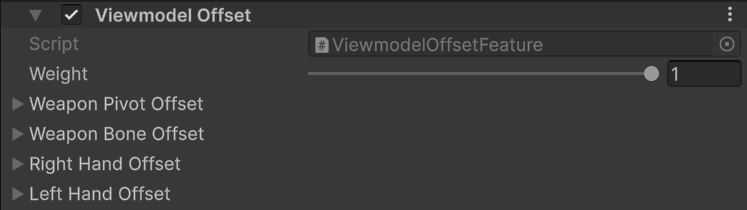
export const featureImageCaption_0 = "Viewmodel Offset fields for the weapon pivot, weapon bone, and hand IK targets."
export const featureImage_0 =
 export const templateAsset_0 = "PA_Template_SciFi_FPS"
export const productName_0 = "Sci-Fi FPS Pack"
export const overridePattern_0 = "PA_SciFi_FPS_*"
## Overview
`ViewmodelOffsetSettings` adjusts the mapped weapon and hand IK targets without editing animation clips. Position values are authored in centimeters and converted to Unity units at runtime.
{featureImage_0}
| Field | Effect |
| ----------------------- | -------------------------------------------------------------------------------------------------------------- |
| **Weight** | Blends the complete feature from `0` to `1`. |
| **Weapon Pivot Offset** | Moves and rotates the weapon around its own transform. Use it to correct the weapon's local axis or pivot. |
| **Weapon Bone Offset** | Moves and rotates the mapped weapon bone in character component space. Use it to place the complete viewmodel. |
| **Right Hand Offset** | Applies a final component-space correction to the right-hand IK target. |
| **Left Hand Offset** | Applies a final component-space correction to the left-hand IK target. |
## Use cases
* Correct the weapon axis with **Weapon Pivot Offset** before changing its screen position.
* Frame the weapon with **Weapon Bone Offset** after the pivot is correct.
* Use hand offsets only for small grip corrections. Large values can separate the hands from the authored pose.
* Keep the supplied pivot rotation when working from
export const templateAsset_0 = "PA_Template_SciFi_FPS"
export const productName_0 = "Sci-Fi FPS Pack"
export const overridePattern_0 = "PA_SciFi_FPS_*"
## Overview
`ViewmodelOffsetSettings` adjusts the mapped weapon and hand IK targets without editing animation clips. Position values are authored in centimeters and converted to Unity units at runtime.
{featureImage_0}
| Field | Effect |
| ----------------------- | -------------------------------------------------------------------------------------------------------------- |
| **Weight** | Blends the complete feature from `0` to `1`. |
| **Weapon Pivot Offset** | Moves and rotates the weapon around its own transform. Use it to correct the weapon's local axis or pivot. |
| **Weapon Bone Offset** | Moves and rotates the mapped weapon bone in character component space. Use it to place the complete viewmodel. |
| **Right Hand Offset** | Applies a final component-space correction to the right-hand IK target. |
| **Left Hand Offset** | Applies a final component-space correction to the left-hand IK target. |
## Use cases
* Correct the weapon axis with **Weapon Pivot Offset** before changing its screen position.
* Frame the weapon with **Weapon Bone Offset** after the pivot is correct.
* Use hand offsets only for small grip corrections. Large values can separate the hands from the authored pose.
* Keep the supplied pivot rotation when working from {templateAsset_0}. It converts the pack's authored weapon orientation into the runtime orientation expected by the mapped weapon bone.
For {productName_0}, each {overridePattern_0} asset overrides this feature when a weapon needs its own placement. Start from the nearest supplied weapon profile instead of rebuilding the offsets from zero.
## Runtime requirements
The feature resolves **Weapon Bone**, **IK Right Hand**, and **IK Left Hand** from the `GameplayAnimationController` skeleton. Missing hand IK targets disable only that hand correction. A missing weapon bone prevents weapon offsets from being applied.
## Sci-Fi workflow
Use `PA_Template_SciFi_FPS` for the shared pivot orientation. Edit the local Viewmodel Offset in the matching `PA_SciFi_FPS_*` asset to position one weapon. For example, `PA_SciFi_FPS_ARX` and `PA_SciFi_FPS_TP12` inherit the template and override only Viewmodel Offset and ADS.