> ## Documentation Index
> Fetch the complete documentation index at: https://docs.kinemation.xyz/llms.txt
> Use this file to discover all available pages before exploring further.
# Item views
> Understand the presentation views and matching example drivers on every supplied Sci-Fi FPS Pack item.
## What an ItemView represents
An ItemView is the presentation component on an equipped item prefab. It coordinates what the player sees and hears when gameplay equips, uses, aims, inspects, or holsters that item.
The view does not represent an inventory record or authoritative gameplay object. It does not decide ownership, damage, hit detection, ammunition persistence, networking, or whether an action is allowed.
| Layer | Owns |
| ------------------ | -------------------------------------------------------------------------------------------------------------------------- |
| Your gameplay code | Inventory, input policy, authority, damage, cooldowns, ammo persistence, spawning, and networking. |
| Example component | A small reference implementation of gameplay state that calls the view. |
| ItemView | Paired character/item animation, procedural profile, item scale, visibility, audio, VFX, FOV, recoil, and camera feedback. |
## Base ItemView
GameplayItemView is the base presentation class. Keep it on the same GameObject as the item's Animator.
During Awake, the view:
1. Caches its original local scale and parent GameplayAnimationController.
2. Finds the item Animator.
3. Builds an animation slot mixer over the Animator's playable graph, or creates a graph when the Animator has none.
4. Caches child transforms for bone visibility.
5. Plays itemIdleClip as the base item pose.
Without an Animator on the ItemView GameObject, the item animation graph is not initialized. Lifecycle calls still exist, but PlayItemAnimation returns false and paired item actions do not play.
## Paired character and item actions
GameplayCharacterItemClip groups a character-side GameplayAnimationAsset, an item-side asset, and an optional sound. PlayCharacterItemAnimation starts both animation assets together and plays the sound through the player's AudioSource.
Use paired assets for draw, holster, fire, reload, inspect, throw, and other actions where the hands and equipped object must remain synchronized.
## Equip context
OnEquipItem(player) resolves the active presentation context from the supplied player. When the argument is null, it uses the item's transform root.
The method then:
* Finds a child GameplayAnimationController and GameplayCamera.
* Applies the view's proceduralAsset to the character controller.
* Resolves any retargeted item scale from that procedural asset.
* Finds the context root's AudioSource for item sounds.
Call the base method from custom overrides before starting product-specific draw logic.
## Lifecycle contract
| Method | When gameplay calls it | Base behavior |
| ------------------------------------------------ | ------------------------------------------------- | ------------------------------------------------------------------------------------------- |
| OnEquipItem(player) | The item becomes active. | Resolves the player context and applies the procedural profile. Returns an action duration. |
| OnUnEquipItem() | The item is being holstered or replaced. | Extension point that returns a duration. |
| OnUseItem() | Use begins or a one-shot action fires. | Extension point. |
| OnStopUsingItem() | A held use input ends. | Extension point. |
| OnAim(isAiming) | Aim state changes. | Extension point. |
| OnInspect() | Inspect begins. | Extension point that returns a duration. |
| SetItemVisibility(visible, delay) | Draw or holster controls when the object appears. | Activates or deactivates the item immediately or through a delayed call. |
| PlayItemAnimation(asset, startTime) | A custom view needs an item-only animation. | Plays the asset through the view's animation slot mixer. |
| PlayCharacterItemAnimation(clip) | A custom view needs a synchronized action. | Plays character animation, item animation, and sound together. |
Return the animation length for actions that should block other actions. Return zero for no blocking action. A specialized sequence may return a negative duration and stop the controller action itself when the sequence actually finishes.
## Bone visibility
HideBoneByName and UnhideBoneByName preserve the transform hierarchy and animation bindings. Hidden transforms are scaled to 0.001 during LateUpdate. Use this for magazines, cartridges, or throwable parts that animation events need to hide without deleting or disabling the animated transform.
In the current implementation, UnhideBoneByName stops forcing the small scale but does not restore the cached default scale itself. The animation or your event code must write the visible scale again.
## GameplayItemExample
GameplayItemExample is a reference adapter, not the item presentation itself. It finds GameplayItemView on the same GameObject and forwards equip, unequip, aim, use, stop-use, and inspect calls.
The supplied GameplayControllerExample uses that adapter to demonstrate one complete loop:
1. It instantiates each configured item prefab below the mapped weapon bone.
2. It hides every item and equips the active one.
3. It forwards Input System callbacks to the active Example component.
4. It uses durations returned by equip, holster, and inspect to block overlapping actions.
5. On item change, it waits for the current view's holster duration before equipping the next item.
Use this as executable reference code. Your production controller can call an ItemView directly or provide its own adapter with the same lifecycle.
```csharp theme={null}
using UnityEngine;
using KINEMATION.Shared.GameplayFramework.Scripts.Runtime;
public sealed class InventoryItemPresentation : MonoBehaviour
{
[SerializeField] private GameplayItemView itemView;
public float Equip(GameObject player)
{
return itemView.OnEquipItem(player);
}
public float Holster()
{
return itemView.OnUnEquipItem();
}
public void SetAiming(bool isAiming)
{
itemView.OnAim(isAiming);
}
public void BeginUse()
{
itemView.OnUseItem();
}
public void EndUse()
{
itemView.OnStopUsingItem();
}
}
```
The inventory system still decides when these methods are legal and how their returned durations affect its state.
## Included Sci-Fi item views
Every supplied item prefab combines a concrete ItemView with the Example component that drives it in the demo player.
| Prefab | ItemView | Example component | What it demonstrates |
| ------------------------ | ------------------------------- | -------------------------------- | ------------------------------------------------------------------------------------------------------------ |
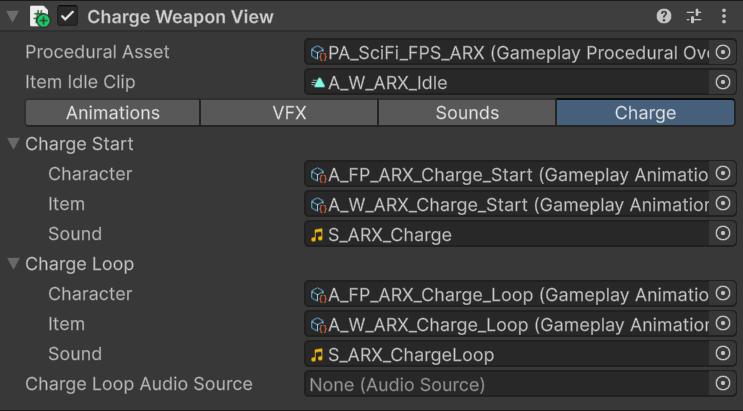
| W\_ARX\_Mk2 | ChargeWeaponView | ChargeWeaponExample | Energy charge rifle. Burst mode becomes hold-to-charge; release fires and resets the charge presentation. |
| W\_Gepard | WeaponView | WeaponExample | Standard firearm lifecycle with recoil, muzzle flash, camera shake, fire audio, reload, inspect, and ADS. |
| W\_M97 | ThrowableItemView | GameplayItemExample | Held throwable sequence with throw-start, repeating hold loop, release delay, throw-end, and redraw. |
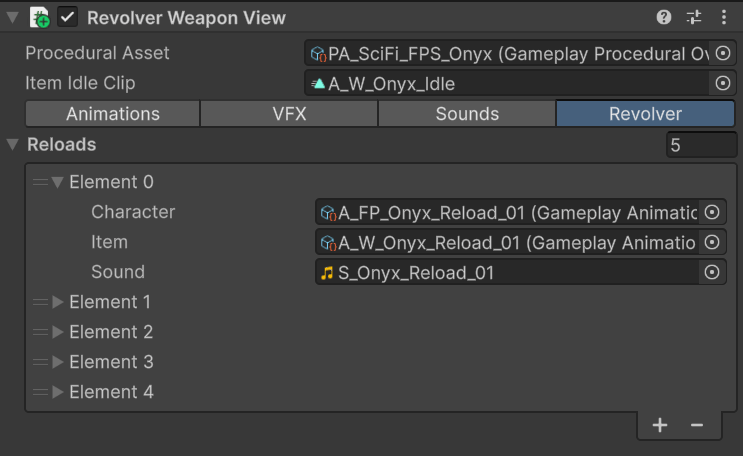
| W\_Onyx | RevolverWeaponView | WeaponExample | Revolver presentation that selects a partial reload from the number of missing rounds. |
| W\_RPG90 | WeaponView | WeaponExample | Launcher presentation using the same standard firearm view contract with launcher-specific clips and data. |
| W\_TP12 | ShotgunWeaponView | WeaponExample | Shell-by-shell reload, pump sequencing, multi-round fire length, and the product-specific cartridge display. |
## Choose a reference implementation
Start from the prefab whose presentation sequence matches your item:
* Use W\_Gepard or W\_RPG90 for a conventional weapon using WeaponView.
* Use W\_ARX\_Mk2 for an energy weapon that charges while use is held.
* Use W\_Onyx when reload selection depends on missing rounds.
* Use W\_TP12 for an open-ended, shell-by-shell reload.
* Use W\_M97 for a held throwable or another start-loop-release interaction.
Duplicate the prefab, preserve the ItemView and Example pairing while testing, and replace the Example component when your gameplay implementation is ready.
 Configure the Shooter Core view fields and specialized firearm behavior.
Adapt the supplied Example classes to your gameplay architecture.
Configure the Shooter Core view fields and specialized firearm behavior.
Adapt the supplied Example classes to your gameplay architecture.