> ## Documentation Index
> Fetch the complete documentation index at: https://docs.kinemation.xyz/llms.txt
> Use this file to discover all available pages before exploring further.
# Weapon runtime
> Reference the Shooter Core weapon views, animations, recoil, camera, sounds, VFX, and specialized weapon presentation.
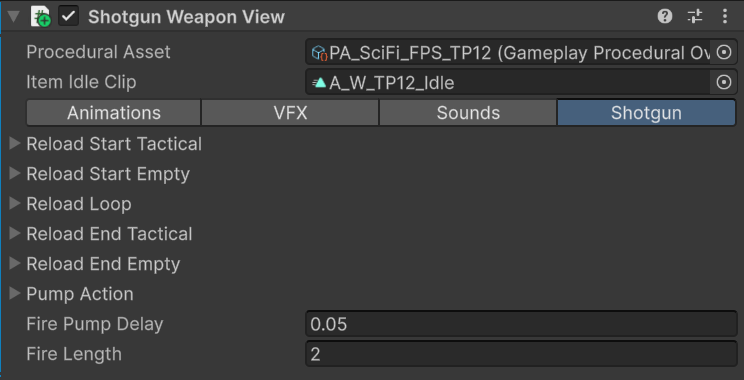
export const weaponViewImageCaption_0 = "The Shooter Weapon View component on a firearm prefab."
export const weaponViewImage_0 =
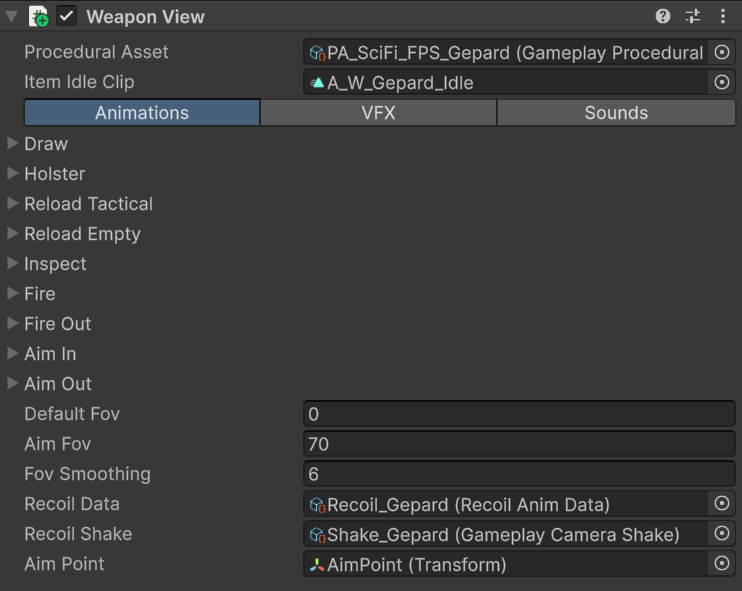
 export const animationImageCaption_0 = "Weapon View animation, FOV, recoil, and aim-point fields."
export const animationImage_0 =
export const animationImageCaption_0 = "Weapon View animation, FOV, recoil, and aim-point fields."
export const animationImage_0 =
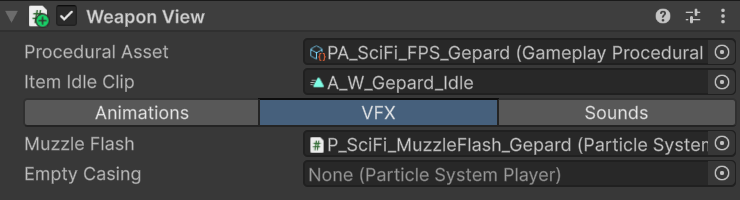
 export const vfxImageCaption_0 = "Weapon View VFX references."
export const vfxImage_0 =
export const vfxImageCaption_0 = "Weapon View VFX references."
export const vfxImage_0 =
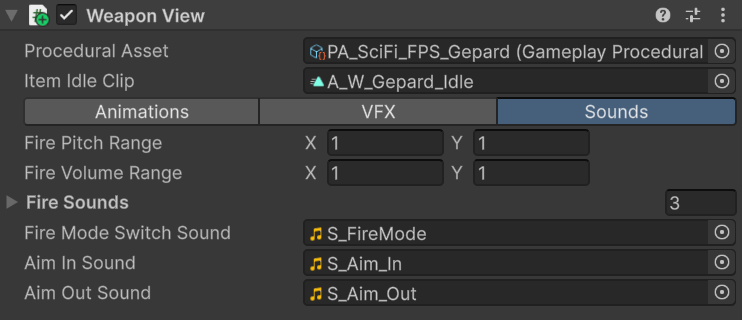
 export const soundImageCaption_0 = "Weapon View sound references and randomization ranges."
export const soundImage_0 =
export const soundImageCaption_0 = "Weapon View sound references and randomization ranges."
export const soundImage_0 =
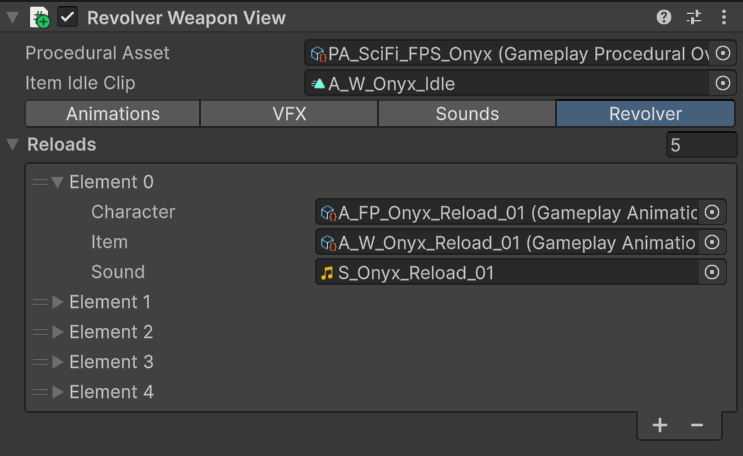
 export const revolverImageCaption_0 = "Revolver Weapon View partial reload list."
export const revolverImage_0 =
export const revolverImageCaption_0 = "Revolver Weapon View partial reload list."
export const revolverImage_0 =
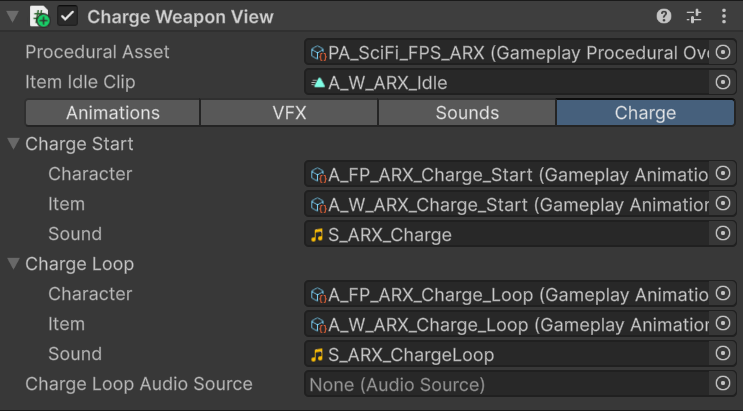
 export const chargeImageCaption_0 = "Charge Weapon View charge-start and charge-loop presentation."
export const chargeImage_0 =
export const chargeImageCaption_0 = "Charge Weapon View charge-start and charge-loop presentation."
export const chargeImage_0 =
 ## Weapon View
`WeaponView` extends `GameplayItemView` with firearm presentation. It does not perform hitscan, projectile simulation, damage, or authoritative ammo logic.
{weaponViewImage_0}
The **Animations** tab pairs character and item assets for draw, holster, tactical and empty reload, inspect, fire, empty fire, aim in, and aim out. It also configures default/aim FOV, recoil data, camera shake, and the ADS aim point.
{animationImage_0}
{vfxImage_0}
The **VFX** tab references `ParticleSystemPlayer` components for muzzle flash and empty casing effects. `PlayFireEffects` starts the muzzle flash. Animation events or gameplay code can call `PlayEmptyCasing` when the casing should appear.
{soundImage_0}
The **Sounds** tab randomizes fire clips, pitch, and volume within the configured ranges. It also stores fire-mode, aim-in, and aim-out sounds.
## Runtime event flow
| Call | Presentation result |
| ----------------------------------------- | ------------------------------------------------------------------------------------------------------ |
| `OnEquipItem(fireRate, fireMode, player)` | Applies the item profile, starts draw, initializes recoil, restores default FOV, and reveals the item. |
| `OnUnEquipItem()` | Starts holster and hides the item when the animation finishes. |
| `OnAim(bool)` | Updates recoil aim state, camera FOV, paired aim animation, and aim sound. |
| `OnUseItem()` | Calls `PlayFireEffects`. |
| `PlayFireEffects()` | Plays muzzle flash, recoil, camera shake, randomized fire audio, and the loaded/empty fire animation. |
| `OnReload()` | Chooses empty or tactical reload from `IWeaponAmmo.GetActiveAmmo()`. |
| `OnInspect()` | Plays inspect and returns its duration. |
| `OnChangeFireMode()` | Updates recoil mode and plays the switch sound. |
## Specialized views
{revolverImage_0}
`RevolverWeaponView` selects a partial reload by comparing active ammo with capacity. It falls back to the normal empty or tactical reload when the required entry is unavailable.
{chargeImage_0}
`ChargeWeaponView` uses Burst mode as a charge interaction. It plays charge-start, loops the charge animation and audio, and fires when use stops. Its animated `charge` property can drive product-specific VFX.
`ShotgunWeaponView` sequences reload start, shell loop, reload end, and pump actions. It reads `IWeaponAmmo` to stop when the weapon reaches capacity and uses `fireLength` to decide when a pump is required. `OnReload` returns `-1` because the shell loop has no fixed total duration.
## Ammo contract
Weapon views read `IWeaponAmmo` from the same GameObject. Your gameplay weapon may implement this interface instead of using the example:
```csharp theme={null}
public interface IWeaponAmmo
{
int GetActiveAmmo();
int GetAmmoCapacity();
void AddAmmo(int ammoToAdd = 0);
void RestoreAmmo();
}
```
Keep ammo mutation in gameplay code or animation events appropriate to your reload design. The view reads the interface to select presentation.
## Sci-Fi implementations
| Prefab | View type | Distinct behavior |
| ----------- | -------------------- | ---------------------------------------------------------------------------------------------------- |
| `W_ARX_Mk2` | `ChargeWeaponView` | Energy charge rifle presentation with charge-start, looping charge, release fire, and lightning VFX. |
| `W_Gepard` | `WeaponView` | Standard firearm presentation with its own recoil, shake, muzzle flash, and procedural override. |
| `W_M97` | `ThrowableItemView` | Throwable start, loop, and end presentation rather than firearm behavior. |
| `W_Onyx` | `RevolverWeaponView` | Partial reload selection based on missing rounds. |
| `W_RPG90` | `WeaponView` | Standard single-shot launcher presentation. |
| `W_TP12` | `ShotgunWeaponView` | Shell-by-shell reload, pump action, and cartridge display. |
Each prefab also includes a matching Example component that drives the view in the supplied demo. See [Item views](/sci-fi-fps-pack/unity/general/item-views) for every view/example pairing and [Examples](/sci-fi-fps-pack/unity/general/examples) for the implementation boundary.
Duplicate the closest prefab when creating an item with similar presentation. Replace inventory, ammo, firing, damage, and networking logic independently from the view.
## Weapon View
`WeaponView` extends `GameplayItemView` with firearm presentation. It does not perform hitscan, projectile simulation, damage, or authoritative ammo logic.
{weaponViewImage_0}
The **Animations** tab pairs character and item assets for draw, holster, tactical and empty reload, inspect, fire, empty fire, aim in, and aim out. It also configures default/aim FOV, recoil data, camera shake, and the ADS aim point.
{animationImage_0}
{vfxImage_0}
The **VFX** tab references `ParticleSystemPlayer` components for muzzle flash and empty casing effects. `PlayFireEffects` starts the muzzle flash. Animation events or gameplay code can call `PlayEmptyCasing` when the casing should appear.
{soundImage_0}
The **Sounds** tab randomizes fire clips, pitch, and volume within the configured ranges. It also stores fire-mode, aim-in, and aim-out sounds.
## Runtime event flow
| Call | Presentation result |
| ----------------------------------------- | ------------------------------------------------------------------------------------------------------ |
| `OnEquipItem(fireRate, fireMode, player)` | Applies the item profile, starts draw, initializes recoil, restores default FOV, and reveals the item. |
| `OnUnEquipItem()` | Starts holster and hides the item when the animation finishes. |
| `OnAim(bool)` | Updates recoil aim state, camera FOV, paired aim animation, and aim sound. |
| `OnUseItem()` | Calls `PlayFireEffects`. |
| `PlayFireEffects()` | Plays muzzle flash, recoil, camera shake, randomized fire audio, and the loaded/empty fire animation. |
| `OnReload()` | Chooses empty or tactical reload from `IWeaponAmmo.GetActiveAmmo()`. |
| `OnInspect()` | Plays inspect and returns its duration. |
| `OnChangeFireMode()` | Updates recoil mode and plays the switch sound. |
## Specialized views
{revolverImage_0}
`RevolverWeaponView` selects a partial reload by comparing active ammo with capacity. It falls back to the normal empty or tactical reload when the required entry is unavailable.
{chargeImage_0}
`ChargeWeaponView` uses Burst mode as a charge interaction. It plays charge-start, loops the charge animation and audio, and fires when use stops. Its animated `charge` property can drive product-specific VFX.
`ShotgunWeaponView` sequences reload start, shell loop, reload end, and pump actions. It reads `IWeaponAmmo` to stop when the weapon reaches capacity and uses `fireLength` to decide when a pump is required. `OnReload` returns `-1` because the shell loop has no fixed total duration.
## Ammo contract
Weapon views read `IWeaponAmmo` from the same GameObject. Your gameplay weapon may implement this interface instead of using the example:
```csharp theme={null}
public interface IWeaponAmmo
{
int GetActiveAmmo();
int GetAmmoCapacity();
void AddAmmo(int ammoToAdd = 0);
void RestoreAmmo();
}
```
Keep ammo mutation in gameplay code or animation events appropriate to your reload design. The view reads the interface to select presentation.
## Sci-Fi implementations
| Prefab | View type | Distinct behavior |
| ----------- | -------------------- | ---------------------------------------------------------------------------------------------------- |
| `W_ARX_Mk2` | `ChargeWeaponView` | Energy charge rifle presentation with charge-start, looping charge, release fire, and lightning VFX. |
| `W_Gepard` | `WeaponView` | Standard firearm presentation with its own recoil, shake, muzzle flash, and procedural override. |
| `W_M97` | `ThrowableItemView` | Throwable start, loop, and end presentation rather than firearm behavior. |
| `W_Onyx` | `RevolverWeaponView` | Partial reload selection based on missing rounds. |
| `W_RPG90` | `WeaponView` | Standard single-shot launcher presentation. |
| `W_TP12` | `ShotgunWeaponView` | Shell-by-shell reload, pump action, and cartridge display. |
Each prefab also includes a matching Example component that drives the view in the supplied demo. See [Item views](/sci-fi-fps-pack/unity/general/item-views) for every view/example pairing and [Examples](/sci-fi-fps-pack/unity/general/examples) for the implementation boundary.
Duplicate the closest prefab when creating an item with similar presentation. Replace inventory, ammo, firing, damage, and networking logic independently from the view.