> ## Documentation Index
> Fetch the complete documentation index at: https://docs.kinemation.xyz/llms.txt
> Use this file to discover all available pages before exploring further.
# 📖 Content overview
> This page explains what is included in the pack and where to find it.
## Overview
The Sci-Fi FPS Pack includes animated first-person arms, six weapon and item prefabs, character and weapon animations, procedural animation settings, recoil, sounds, visual effects, and a demo scene.
Most content is in `Assets/KINEMATION/SciFiFPSPack`. The shared animation and gameplay scripts are in `Assets/KINEMATION/Shared`, and the recoil system is in `Assets/KINEMATION/ProceduralRecoilAnimationSystem`.
## Try the demo
Open `SciFiFPSPack/DemoScene/Sci-Fi_FPS_Demo.unity` and click **Play**. The scene lets you try the character controls and weapon animations together.
Use **F** to change items, the left mouse button to use an item, the right mouse button to aim, **R** to reload, and **B** to change fire mode. [Character](/sci-fi-fps-pack/unity/general/character-runtime) lists the controls and explains the code behind them.
## Folder contents
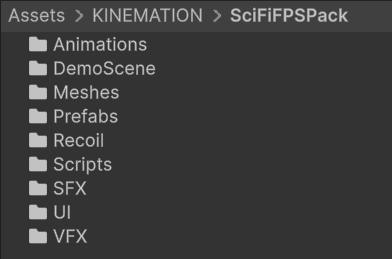 These paths are relative to `Assets/KINEMATION/SciFiFPSPack`.
| Folder | Contents |
| --------------------- | --------------------------------------------------------------------------------------------------------------------- |
| `Animations` | Character and item animations, Gameplay Animation Assets, Animator Controllers, and the retargeting animation config. |
| `Meshes` | Character, weapon, and attachment models and their related art assets. |
| `Prefabs/Player` | The configured `FPS_SciFi_Arms.prefab` character. |
| `Prefabs/Weapons` | Weapon and throwable prefabs, the common procedural template, and per-weapon procedural assets. |
| `Prefabs/Attachments` | The `ARX_Holograph.prefab` sight attachment. |
| `Recoil` | Weapon recoil data and camera-shake assets. |
| `SFX` | Weapon sounds and general sounds such as footsteps, jumping, and landing. |
| `VFX` | Muzzle-flash and lightning-charge prefabs with their materials, textures, and shaders. |
| `UI` | Helmet HUD and control-row prefabs and UI assets. |
| `DemoScene` | The playable demo and its environment modules. |
| `Scripts` | Pack setup code, the setup config, HUD scripts, lightning-charge control, and the TP12 cartridge display. |
The setup preset is `Scripts/Editor/SciFiGameplaySetupConfig.asset`. It references the animation config, locomotion controller, Input Actions asset, starting items, and character sounds.
### Shared systems
**Gameplay Framework** contains the animation controller, skeleton mapping, retargeting, Item View, camera, and basic character examples.
**Shooter Core** adds weapon views, firearm examples, ADS, recoil application, and sway. The example uses `Shared/ShooterCore/Inputs_Shooter_Core.inputactions`.
**KAnimationCore** contains common animation utilities and editor tools. Keep these shared folders with the pack; the pack's components use them.
## Weapons and items
These paths are relative to `Assets/KINEMATION/SciFiFPSPack`.
| Folder | Contents |
| --------------------- | --------------------------------------------------------------------------------------------------------------------- |
| `Animations` | Character and item animations, Gameplay Animation Assets, Animator Controllers, and the retargeting animation config. |
| `Meshes` | Character, weapon, and attachment models and their related art assets. |
| `Prefabs/Player` | The configured `FPS_SciFi_Arms.prefab` character. |
| `Prefabs/Weapons` | Weapon and throwable prefabs, the common procedural template, and per-weapon procedural assets. |
| `Prefabs/Attachments` | The `ARX_Holograph.prefab` sight attachment. |
| `Recoil` | Weapon recoil data and camera-shake assets. |
| `SFX` | Weapon sounds and general sounds such as footsteps, jumping, and landing. |
| `VFX` | Muzzle-flash and lightning-charge prefabs with their materials, textures, and shaders. |
| `UI` | Helmet HUD and control-row prefabs and UI assets. |
| `DemoScene` | The playable demo and its environment modules. |
| `Scripts` | Pack setup code, the setup config, HUD scripts, lightning-charge control, and the TP12 cartridge display. |
The setup preset is `Scripts/Editor/SciFiGameplaySetupConfig.asset`. It references the animation config, locomotion controller, Input Actions asset, starting items, and character sounds.
### Shared systems
**Gameplay Framework** contains the animation controller, skeleton mapping, retargeting, Item View, camera, and basic character examples.
**Shooter Core** adds weapon views, firearm examples, ADS, recoil application, and sway. The example uses `Shared/ShooterCore/Inputs_Shooter_Core.inputactions`.
**KAnimationCore** contains common animation utilities and editor tools. Keep these shared folders with the pack; the pack's components use them.
## Weapons and items
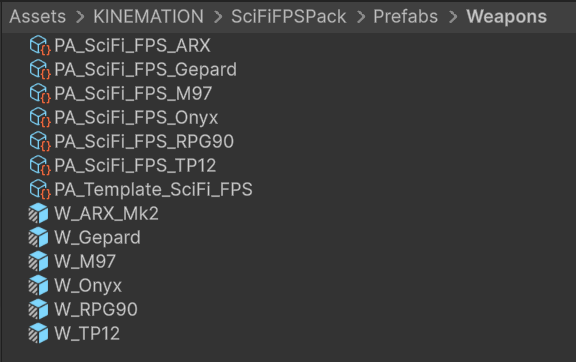 | Prefab | Included behavior |
| ----------- | --------------------------------------------------------------------------- |
| `W_ARX_Mk2` | Rifle with semi, automatic, and hold-to-charge firing. |
| `W_Gepard` | Rifle with semi and automatic fire. |
| `W_M97` | Throwable with preparation, held loop, release, and redraw animations. |
| `W_Onyx` | Revolver with reload animations for different numbers of missing rounds. |
| `W_RPG90` | Single-round launcher with firing and reload animations. |
| `W_TP12` | Shotgun with repeated shell loading, pump actions, and a cartridge display. |
Each prefab already has its animation references and item components assigned. See [Weapons](/sci-fi-fps-pack/unity/general/weapon-runtime) for how each one works and which settings to change.
The Pack Setup item list can be a subset of the available prefabs. Add another prefab to **Item Prefabs** on the character controller when you want it in the character's item cycle.
## Animations
`Animations` is divided into `ARX_Mk1`, `Gepard`, `M97`, `Onyx_Revolver`, `RPG90`, `TP12`, and `General`. The ARX animation folder is named `ARX_Mk1` even though the equipped prefab is `W_ARX_Mk2`.
Weapon folders group the character and item animations for actions such as idle, draw, holster, fire, reload, inspect, and aiming. Specialized items also contain charge, throw, or repeated reload animations.
`General/Character/AC_FPS_SciFi.controller` is the locomotion controller used by Pack Setup. `Animations/Sci-Fi_FPS_Pack.asset` is the animation config used by retargeting.
A clip stores the animated motion. A Gameplay Animation Asset stores that clip together with its mask, playback speed, and blending settings. [Animation system](/sci-fi-fps-pack/unity/general/animation-system) explains how to edit and play them.
## Procedural animation and effects
`Prefabs/Weapons/PA_Template_SciFi_FPS.asset` contains the common procedural features. The `PA_SciFi_FPS_*` assets set individual weapon poses and alignment. See [Procedural animation](/sci-fi-fps-pack/unity/general/features/index) for editing and runtime use.
`VFX/Prefabs` contains `P_SciFi_MuzzleFlash`, `P_SciFi_MuzzleFlash_Gepard`, and `P_SciFi_LightningCharge`. The lightning effect follows the charge weapon's animated charge value. Recoil motion and camera shake are configured separately on each weapon.
## Naming conventions
KINEMATION Unity content packs use the same asset prefixes. The prefix identifies the asset's role; the remainder identifies the product, item, or action.
| Prefix | Asset role | Example pattern |
| --------------------- | ------------------------------------- | --------------------------------------- |
|
| Prefab | Included behavior |
| ----------- | --------------------------------------------------------------------------- |
| `W_ARX_Mk2` | Rifle with semi, automatic, and hold-to-charge firing. |
| `W_Gepard` | Rifle with semi and automatic fire. |
| `W_M97` | Throwable with preparation, held loop, release, and redraw animations. |
| `W_Onyx` | Revolver with reload animations for different numbers of missing rounds. |
| `W_RPG90` | Single-round launcher with firing and reload animations. |
| `W_TP12` | Shotgun with repeated shell loading, pump actions, and a cartridge display. |
Each prefab already has its animation references and item components assigned. See [Weapons](/sci-fi-fps-pack/unity/general/weapon-runtime) for how each one works and which settings to change.
The Pack Setup item list can be a subset of the available prefabs. Add another prefab to **Item Prefabs** on the character controller when you want it in the character's item cycle.
## Animations
`Animations` is divided into `ARX_Mk1`, `Gepard`, `M97`, `Onyx_Revolver`, `RPG90`, `TP12`, and `General`. The ARX animation folder is named `ARX_Mk1` even though the equipped prefab is `W_ARX_Mk2`.
Weapon folders group the character and item animations for actions such as idle, draw, holster, fire, reload, inspect, and aiming. Specialized items also contain charge, throw, or repeated reload animations.
`General/Character/AC_FPS_SciFi.controller` is the locomotion controller used by Pack Setup. `Animations/Sci-Fi_FPS_Pack.asset` is the animation config used by retargeting.
A clip stores the animated motion. A Gameplay Animation Asset stores that clip together with its mask, playback speed, and blending settings. [Animation system](/sci-fi-fps-pack/unity/general/animation-system) explains how to edit and play them.
## Procedural animation and effects
`Prefabs/Weapons/PA_Template_SciFi_FPS.asset` contains the common procedural features. The `PA_SciFi_FPS_*` assets set individual weapon poses and alignment. See [Procedural animation](/sci-fi-fps-pack/unity/general/features/index) for editing and runtime use.
`VFX/Prefabs` contains `P_SciFi_MuzzleFlash`, `P_SciFi_MuzzleFlash_Gepard`, and `P_SciFi_LightningCharge`. The lightning effect follows the charge weapon's animated charge value. Recoil motion and camera shake are configured separately on each weapon.
## Naming conventions
KINEMATION Unity content packs use the same asset prefixes. The prefix identifies the asset's role; the remainder identifies the product, item, or action.
| Prefix | Asset role | Example pattern |
| --------------------- | ------------------------------------- | --------------------------------------- |
| W\_ | Equipped item or weapon prefab | W\_\ |
| PA\_ | Gameplay procedural asset or override | PA\_\\_\ |
| A\_FP\_ | Character-side first-person animation | A\_FP\_\- \_\
|
| A\_W\_ | Item- or weapon-side animation | A\_W\_\- \_\
|
| A\_Cam\_ | Camera animation | A\_Cam\_\- \_\
|
| AC\_ | Animator Controller | AC\_\ |
| Mask\_ | Avatar Mask | Mask\_\ |
| P\_ | Particle or visual-effect prefab | P\_\ |
| Recoil\_ | Recoil animation data | Recoil\_\ |
| Shake\_ | Gameplay camera-shake asset | Shake\_\ |
Use the prefix to find the asset type, then match the weapon and action names when assigning animation pairs.
For example, pair a character's `A_FP_*` action with the matching weapon's `A_W_*` action on Item View. Use the `PA_*` asset to adjust that weapon's idle pose and procedural motion.
## Set up your character
Follow [Character setup](/sci-fi-fps-pack/unity/get-started/character-setup) to configure a custom model, retarget the animations, and test the character in Play mode.