> ## Documentation Index
> Fetch the complete documentation index at: https://docs.kinemation.xyz/llms.txt
> Use this file to discover all available pages before exploring further.
# Copy Bone
> Bake motion from one bone to another across animation clips used by the Sci-Fi FPS Pack.
export const menuPath_0 = "Tools > KINEMATION"
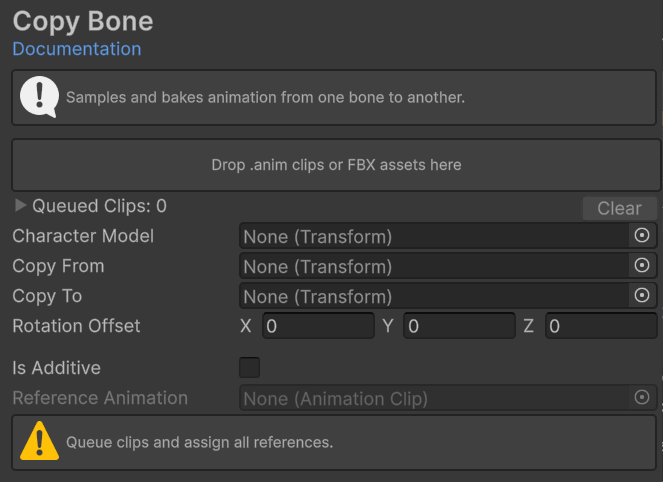
export const imageCaption_0 = "Copy Bone queue and transform mapping fields."
export const image_0 =
 ## Copy Bone
Use Copy Bone to sample one transform and bake its motion onto another transform for a queue of clips. Use it to move animation from a helper bone to a runtime bone, generate a weapon track, or correct a hierarchy mismatch.
Open **{menuPath_0}**, then select **Animation > Copy Bone**.
{image_0}
## Inputs
| Field | Purpose |
| ----------------------- | ---------------------------------------------------------------------------------------------------------------------------------- |
| Clip queue | Accepts
## Copy Bone
Use Copy Bone to sample one transform and bake its motion onto another transform for a queue of clips. Use it to move animation from a helper bone to a runtime bone, generate a weapon track, or correct a hierarchy mismatch.
Open **{menuPath_0}**, then select **Animation > Copy Bone**.
{image_0}
## Inputs
| Field | Purpose |
| ----------------------- | ---------------------------------------------------------------------------------------------------------------------------------- |
| Clip queue | Accepts .anim clips and FBX assets. An FBX adds every visible, non-preview clip it contains. |
| **Character Model** | Root used to sample the hierarchy and build the target bone path. |
| **Copy From** | Transform whose world pose is sampled. |
| **Copy To** | Transform that receives local position and quaternion rotation curves. It must have a parent and belong below **Character Model**. |
| **Rotation Offset** | Euler rotation applied while converting the sampled pose. |
| **Is Additive** | Copies motion relative to a reference pose. |
| **Reference Animation** | Required for additive mode. Frame zero supplies the reference pose. |
## Process clips
Drag .anim clips or FBX assets into the drop area. Expand **Queued Clips** to review the entries.
Assign **Character Model**, **Copy From**, and **Copy To** from the same representative hierarchy.
Set **Rotation Offset** when the transforms use different axes. Enable additive mode only when the copied motion must be relative.
Click **Process Queue**. Review each **Processed** or **Skipped** result.
Copy Bone modifies queued animation data. It writes curves into .anim clips. For FBX clips, it writes through the ModelImporter and reimports the FBX. Duplicate or version-control source assets first.
The target receives localPosition and localRotation curves at the clip's frame rate. Clips without a valid rate use 30 samples per second.