> ## Documentation Index
> Fetch the complete documentation index at: https://docs.kinemation.xyz/llms.txt
> Use this file to discover all available pages before exploring further.
# Animation modifiers
> Use the editor-time Animation Modifier Blueprints included with the Sci-Fi FPS Pack to author motion and curve data.
export const productName_0 = "Sci-Fi FPS Pack"
export const intro_0 = "Use Animation Modifier Blueprints when you need to derive curve data from a project-owned Animation Sequence before an Animation Blueprint or weapon view plays it."
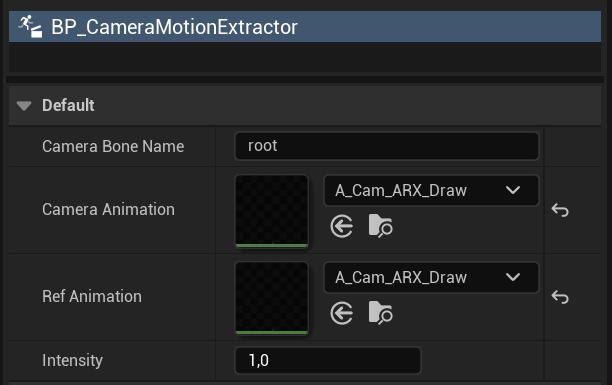
export const modifierImageCaption_0 = "BP_CameraMotionExtractor exposes camera and reference animation inputs for editor-time extraction."
export const modifierImage_0 =
 export const expectedResult_0 = "The project-owned Animation Sequence contains the expected curves, and the consuming Sci-Fi Animation Blueprint or weapon view previews the intended motion."
## Animation modifiers for {productName_0}
{intro_0}
Animation Modifier Blueprints run in the editor and write data into an Animation Sequence. They do not run as character components during play.
| Asset | Parent/type | Purpose |
| ---------------------------------------------------------------------- | ------------------------------ | -------------------------------------------------------------------------------------------------------------------- |
|
export const expectedResult_0 = "The project-owned Animation Sequence contains the expected curves, and the consuming Sci-Fi Animation Blueprint or weapon view previews the intended motion."
## Animation modifiers for {productName_0}
{intro_0}
Animation Modifier Blueprints run in the editor and write data into an Animation Sequence. They do not run as character components during play.
| Asset | Parent/type | Purpose |
| ---------------------------------------------------------------------- | ------------------------------ | -------------------------------------------------------------------------------------------------------------------- |
| /Game/KINEMATION/Common/Modifiers/BP\_BoneMotionExtractor | AnimationModifier | Samples a source animation and extracts one bone's transform relative to a reference bone into animation-curve data. |
| BP\_CameraMotionExtractor | AnimationModifier | Extracts camera-oriented motion for camera presentation workflows. |
| BP\_CopyCurves | AnimationModifier | Copies curve information between animation assets or workflows. |
BP\_BoneMotionExtractor exposes CurveName, RefBoneName, BoneName, SourceAnimation, CurveNames, Playback, RefPose, and SampleRate. Its apply path processes the selected sequence and its revert path removes the authored result.
{modifierImage_0}
Duplicate the target Animation Sequence when the supplied asset must remain updateable.
Open the Animation Sequence. Add BP\_BoneMotionExtractor in the **Animation Modifiers** panel.
Set SourceAnimation, BoneName, RefBoneName, the output curve name or names, and SampleRate.
Apply the modifier. Inspect the generated curves, then preview the Animation Blueprint or weapon view that consumes them.
Use the modifier's revert workflow if the result is offset, noisy, or sampled too sparsely. Do not delete only part of the generated curve data.
Applying a modifier mutates the Animation Sequence. Keep project copies and record the selected bones, curve names, and sample rate so you can reproduce the result after reimport.
{expectedResult_0}