> ## Documentation Index
> Fetch the complete documentation index at: https://docs.kinemation.xyz/llms.txt
> Use this file to discover all available pages before exploring further.
# ✨Resources
> In this section you will learn what animations and models are used in the demo.
## Unity Package
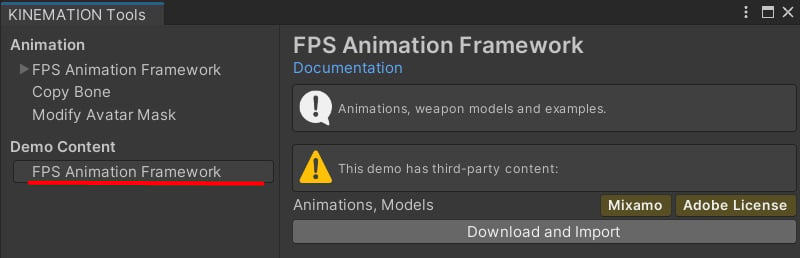
To install demo content directly into your project, simply go to Tools/KINEMATION and download the additional content for FPS Animation Framework:
 ## Standalone project
Alternatively, you get pull the latest demo version via GitHub:
## Standalone project
Alternatively, you get pull the latest demo version via GitHub:
 **Note:** the demo has dependencies on the **URP** and **Unity Input System** packages. Once you have imported the project, make sure to:
* Import the framework and input system packages.
* Rebuild the lighting
The demo project has a very simple structure:
**Note:** the demo has dependencies on the **URP** and **Unity Input System** packages. Once you have imported the project, make sure to:
* Import the framework and input system packages.
* Rebuild the lighting
The demo project has a very simple structure:
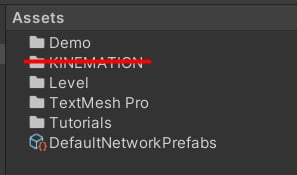 * **Demo** folder contains the actual demo settings and scripts used with the FPS Animation Framework. You can find here prefabs, weapon examples, Animator Profiles.
* **KINEMATION** folder contains the actual asset, you need to add it using Package Manager.
* **Level** directory contains lighting settings and the level itself.
* **Tutorials** folder includes all the materials used in our video tutorials.
* **Demo** folder contains the actual demo settings and scripts used with the FPS Animation Framework. You can find here prefabs, weapon examples, Animator Profiles.
* **KINEMATION** folder contains the actual asset, you need to add it using Package Manager.
* **Level** directory contains lighting settings and the level itself.
* **Tutorials** folder includes all the materials used in our video tutorials.