> ## Documentation Index
> Fetch the complete documentation index at: https://docs.kinemation.xyz/llms.txt
> Use this file to discover all available pages before exploring further.
# 📜Animator Layer
> In this section you will find out more about the Animator Layers.
## Overview
An **Animator Layer** is a procedural animation feature, which modifies your character pose in realtime.
**Tip:** usually animator layers reside in the **Animator Profile**. The only exception is the **IK Motion Laye**r - this layer counts as an "animation", so you can dynamically link it using:
```text theme={null}
_fpsAnimator.LinkAnimatorLayer(yourLayerHere)
```
You can find out more in this section:
All layers in the framework has a similar structure, let's take a look at it:
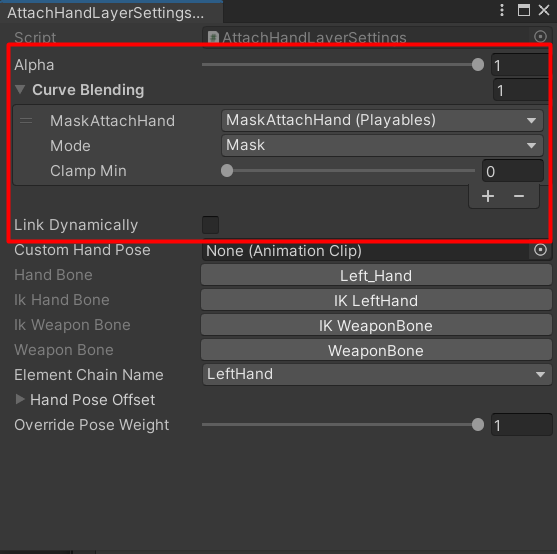 The red highlighted area represents general settings for all animator layers. Let's break them down:
* **Alpha**: controls the influence of the layer; if set to 1 - the layer will be fully applied, and if set to 0 - it will be disabled.
* **Link Dynamically** - defines if this layer will need to be cached when a new profile is linked. If set to true, there will be no smooth blending, but instead the settings will be updated.
## Curve Blending
**Curve Blending** is a crucial part of controlling animation features in realtime. You can select a parameter which will control the layer, so far the system supports these parameter types:
* Animator Controller float parameters.
* Playables curves.
* Input Config variables.
You can also specify the **Blend** parameter, which can be either **Mask** or **Direct**:
The red highlighted area represents general settings for all animator layers. Let's break them down:
* **Alpha**: controls the influence of the layer; if set to 1 - the layer will be fully applied, and if set to 0 - it will be disabled.
* **Link Dynamically** - defines if this layer will need to be cached when a new profile is linked. If set to true, there will be no smooth blending, but instead the settings will be updated.
## Curve Blending
**Curve Blending** is a crucial part of controlling animation features in realtime. You can select a parameter which will control the layer, so far the system supports these parameter types:
* Animator Controller float parameters.
* Playables curves.
* Input Config variables.
You can also specify the **Blend** parameter, which can be either **Mask** or **Direct**:
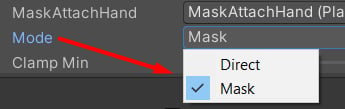 * **Mask** means that the value will be applied in reversed mode, computed via: **result = 1f - value.** For example, if the parameter value is 1, the final value will be 0.
* **Direct** mode is going to use the parameter value as is. If the value is 1, the final result will be 1.
It is possible to specify multiple **Curve Blends** in the list, where the top index item will overrides previous ones. **For example**:
* **Mask** means that the value will be applied in reversed mode, computed via: **result = 1f - value.** For example, if the parameter value is 1, the final value will be 0.
* **Direct** mode is going to use the parameter value as is. If the value is 1, the final result will be 1.
It is possible to specify multiple **Curve Blends** in the list, where the top index item will overrides previous ones. **For example**:
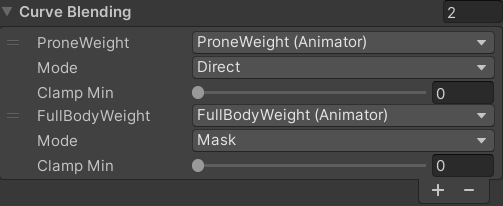 If the *FullBodyWeight* value will be 1, the final weight will be 0. However, if P\_roneWeight\_ is 0, the final result will be 0 as well.