> ## Documentation Index
> Fetch the complete documentation index at: https://docs.kinemation.xyz/llms.txt
> Use this file to discover all available pages before exploring further.
# Additive Layer
> Documentation for Additive Layer.
## Description
**Additive Layer** has 2 main functions: weapon recoil and curve-based animations.
Curve-based animations are extracted from the **WeaponBoneAdditive** Game Object, which is animated by the *Animator Controller*:
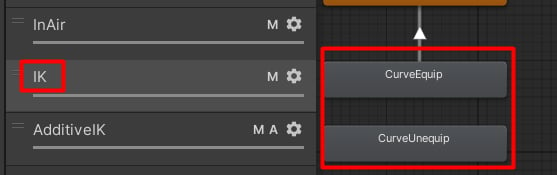 **Tip:** the demo project implements CurveEquip and CurveUnequip motions procedurally using this method. These animations only animate the WeaponBoneAdditive, so they do not affect other bones.
The procedural recoil is extracted from the [Recoil Animation](/scriptable-animation-system/recoil-system/recoil-animation) component.
## Properties
**Tip:** the demo project implements CurveEquip and CurveUnequip motions procedurally using this method. These animations only animate the WeaponBoneAdditive, so they do not affect other bones.
The procedural recoil is extracted from the [Recoil Animation](/scriptable-animation-system/recoil-system/recoil-animation) component.
## Properties
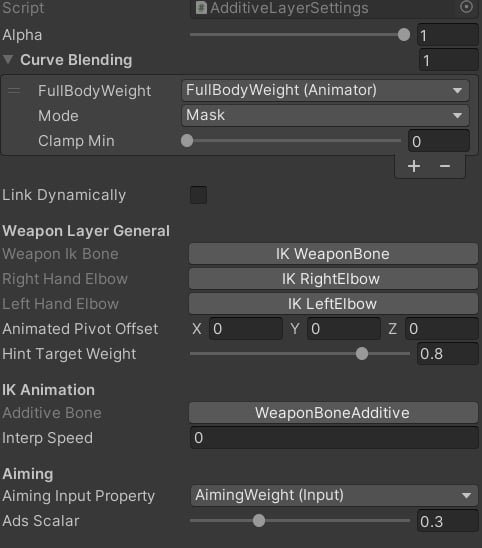 * **Additive Bone**: an element used to extract the additive animation.
* **Interp Speed**: smoothing speed for curve animations.
* **Aiming Input Property**: float property which will scale down effect of curve animations.
* **Ads Scalar**: a multiplier which will scale down the curve animations influence when aiming. It is used to reduce procedural motion when aiming.
* **Additive Bone**: an element used to extract the additive animation.
* **Interp Speed**: smoothing speed for curve animations.
* **Aiming Input Property**: float property which will scale down effect of curve animations.
* **Ads Scalar**: a multiplier which will scale down the curve animations influence when aiming. It is used to reduce procedural motion when aiming.