> ## Documentation Index
> Fetch the complete documentation index at: https://docs.kinemation.xyz/llms.txt
> Use this file to discover all available pages before exploring further.
# IK Motion Layer
> Documentation for IK Motion Layer.
## Description
**IK Motion** is a **unique** Animator Layer. Unlike other features in the framework, this layer can be created outside of the Animator Profile. You can do it by right clicking **Create -> KINEMATION -> FPS Animator Layers -> IK Motion**.
**Tip**: this layer can be used for transition motions, like a jiggling motion when aiming or leaning in the demo project.
The workflow with this animation feature is this:
1. Add **IK Motion Layer** to the Animator Profile.
2. Create **IK Motion Layers** manually using the right-click method above.
3. Dynamically link desired **IK Motion Layer** using the FPS Animator component.
Dynamic linking can be performed by using **LinkAnimatorLayer** method:
FPSController
```text theme={null}
private FPSAnimator _fpsAnimator;
private void DoSomething()
{
...
// Where `layerSettings` is your IK Motion Layer.
_fpsAnimator.LinkAnimatorLayer(layerSettings);
...
}
```
## Properties
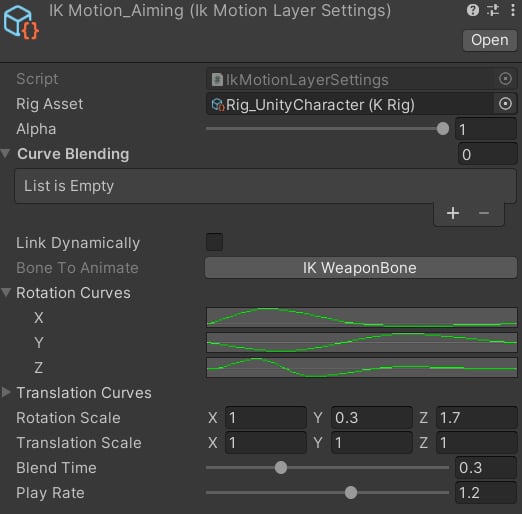 * **Bone To Animate**: character bone which will be animated procedurally.
* **Rotation/Translation Curves**: curves which will animate each axis of rotation/translation.
* **Rotation/Translation Scale**: will scale each axis of rotation/translation.
* **Blend Time**: time in seconds to blend in this motion.
* **Play Rate**: playback speed for this animation.
* **Bone To Animate**: character bone which will be animated procedurally.
* **Rotation/Translation Curves**: curves which will animate each axis of rotation/translation.
* **Rotation/Translation Scale**: will scale each axis of rotation/translation.
* **Blend Time**: time in seconds to blend in this motion.
* **Play Rate**: playback speed for this animation.