> ## Documentation Index
> Fetch the complete documentation index at: https://docs.kinemation.xyz/llms.txt
> Use this file to discover all available pages before exploring further.
# 📚New Animation Library
> In this section you will get an overview of the new animation core.
The **Scriptable Animation System** is a complex technology, which brings not just a single plugin, but a new way to organize, manage and extend the functionality of animation features in your game.
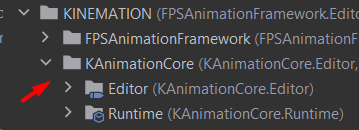
Let's start with a new **KAnimationCore** plugin, which adds a solid low-level library of animation functions and types.
 ## KAnimationMath
This class includes static functions to manipulate transforms in real time. It essentially replaces the **CoreToolkitLib** from the previous version. The only difference is that **KAnimationMath** is responsible for animation functions only.
## KCurves
Includes everything related to the curves in the framework. This includes new curve types and easing functions.
## KMath
A new library designed for general math operations.
## KSpringMath
This class implements runtime spring computation. You can use it if you wish to add a spring interpolation to your feature.
## KTransform
This is a struct that is identical to the Unity built-in Transform type. The only difference is that it is a struct, which means we can use it safely in Unity Jobs!
This struct has all the methods to manipulate the transform:
## KPose
KPose defines how the selected element will be modified in real time. It is often used by Animator Layers, but you can also find it useful for other applications:
## KAnimationMath
This class includes static functions to manipulate transforms in real time. It essentially replaces the **CoreToolkitLib** from the previous version. The only difference is that **KAnimationMath** is responsible for animation functions only.
## KCurves
Includes everything related to the curves in the framework. This includes new curve types and easing functions.
## KMath
A new library designed for general math operations.
## KSpringMath
This class implements runtime spring computation. You can use it if you wish to add a spring interpolation to your feature.
## KTransform
This is a struct that is identical to the Unity built-in Transform type. The only difference is that it is a struct, which means we can use it safely in Unity Jobs!
This struct has all the methods to manipulate the transform:
## KPose
KPose defines how the selected element will be modified in real time. It is often used by Animator Layers, but you can also find it useful for other applications:
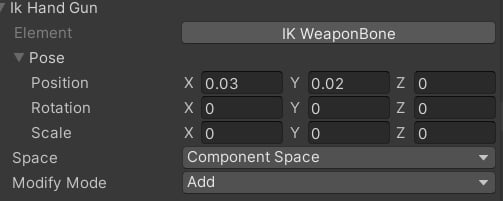 **Element** defines the bone/element that will be modified, and Pose is a KTransform that represents the value.
**Space** defines where our applications will be done. So far the system supports:
* **Bone space**: the space of the element's current frame.
* **Parent Bone** **space**: the space of the parent bone.
* **Component space**: the space of the character root bone.
* **World space**: the global space, a standard world space.
**Modify Mode** defines how the Pose will be applied:
* **Add**: the Pose will be added to the element.
* **Replace**: the Pose will replace the element's transform.
## KTwoBoneIK
This class implements a two-bone IK algorithm, which is Unity Jobs-friendly! The Solve function uses **KTransform** by default and also provides a **KTwoBoneIkJob** class to solve inverse kinematics for multiple limbs in ParallelFor.
By default, this class is used in the **IkLayerState** class to apply inverse kinematics.
As you can see, the new **KAnimationUtilty** is a way more streamlined, and most importantly independent from the main code-based, which makes it possible to use outside of the framework.
In the next section, we will learn more about the **KRig** assets.
**Element** defines the bone/element that will be modified, and Pose is a KTransform that represents the value.
**Space** defines where our applications will be done. So far the system supports:
* **Bone space**: the space of the element's current frame.
* **Parent Bone** **space**: the space of the parent bone.
* **Component space**: the space of the character root bone.
* **World space**: the global space, a standard world space.
**Modify Mode** defines how the Pose will be applied:
* **Add**: the Pose will be added to the element.
* **Replace**: the Pose will replace the element's transform.
## KTwoBoneIK
This class implements a two-bone IK algorithm, which is Unity Jobs-friendly! The Solve function uses **KTransform** by default and also provides a **KTwoBoneIkJob** class to solve inverse kinematics for multiple limbs in ParallelFor.
By default, this class is used in the **IkLayerState** class to apply inverse kinematics.
As you can see, the new **KAnimationUtilty** is a way more streamlined, and most importantly independent from the main code-based, which makes it possible to use outside of the framework.
In the next section, we will learn more about the **KRig** assets.