> ## Documentation Index
> Fetch the complete documentation index at: https://docs.kinemation.xyz/llms.txt
> Use this file to discover all available pages before exploring further.
# 〽️Recoil Pattern
> In this section you will learn about controller recoil.
## Properties
**Recoil Pattern** represents the controller recoil, which is added to the character and camera rotation. This type of recoil is controller by the player, so it has a practical purpose.
The recoil is generated in a standalone component, make sure to add it to your character:
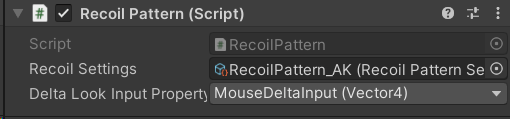 **Recoil Settings** define the actual recoil properties, such as damping, randomized targets for vertical/horizontal recoil, etc.
**Delta Look Input Property** represents the delta input value, which is related to the User Input Controller component we added previously in [Components](/scriptable-animation-system/workflow/components)section.
Let's take a look at the **Recoil Settings**:
**Recoil Settings** define the actual recoil properties, such as damping, randomized targets for vertical/horizontal recoil, etc.
**Delta Look Input Property** represents the delta input value, which is related to the User Input Controller component we added previously in [Components](/scriptable-animation-system/workflow/components)section.
Let's take a look at the **Recoil Settings**:
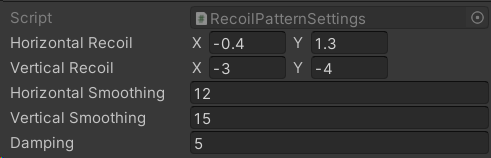 **Horizontal/Vertical Recoil** defines the randomized range.
**Horizontal/Vertical Smoothing** define the interpolation speed.
**Damping** defines how fast we should return to the initial screen position.
## Integration
To add the recoil to your controller, make sure to grab a reference to the **Recoil Pattern** component first.
Then, make sure to access the component and add the recoil to the player inut:
Then, call the *Init* method when a gun is equipped:
Finally, call the *OnFireStart* and *OnFireStop* methods:
**Horizontal/Vertical Recoil** defines the randomized range.
**Horizontal/Vertical Smoothing** define the interpolation speed.
**Damping** defines how fast we should return to the initial screen position.
## Integration
To add the recoil to your controller, make sure to grab a reference to the **Recoil Pattern** component first.
Then, make sure to access the component and add the recoil to the player inut:
Then, call the *Init* method when a gun is equipped:
Finally, call the *OnFireStart* and *OnFireStop* methods: