> ## Documentation Index
> Fetch the complete documentation index at: https://docs.kinemation.xyz/llms.txt
> Use this file to discover all available pages before exploring further.
# ⚠️Initialization Warnings
> Documentation for ⚠️Initialization Warnings.
 ## Reason
These warnings typically occur when the system fails to find target bones for IK targets. It is a common issue with skeletons, that do not use a standard naming convention for bones.
## Solution
To solve this issue, it is vital to follow these steps:
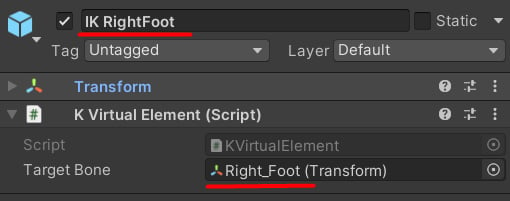
1. Locate the IK Game Objects mentioned in the log.
2. Open the **Virtual Element** component.
3. Make sure it is targeting the proper bone.
## Reason
These warnings typically occur when the system fails to find target bones for IK targets. It is a common issue with skeletons, that do not use a standard naming convention for bones.
## Solution
To solve this issue, it is vital to follow these steps:
1. Locate the IK Game Objects mentioned in the log.
2. Open the **Virtual Element** component.
3. Make sure it is targeting the proper bone.