> ## Documentation Index
> Fetch the complete documentation index at: https://docs.kinemation.xyz/llms.txt
> Use this file to discover all available pages before exploring further.
# ⚠️Weapon is not moving
> Documentation for ⚠️Weapon is not moving.
## Reason
If animations like idle, movement, equip and unequip are not playing, this is usually a sign of the [Additive Layer](/scriptable-animation-system/fundamentals/animator-layers/additive-layer) problem. There could be two potential issues:
1. Additive Layer is not added or set up properly.
2. Curve animations are not added or they use a different skeleton hierarchy.
## Solution
First, it is important to check if Additive Layer is adjusted properly:
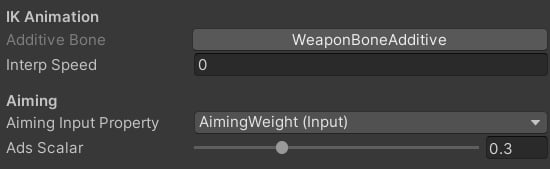 If the issue still occurs, then it means the issue is with curve animations. These animations are usually located in the animator controller as a separate layer:
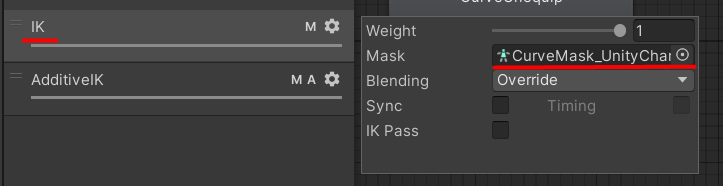 where the curve mask only includes the **Weapon Bone Additive**:
 To add a **Weapon Bone Additive** to a custom Avatar Mask, make sure to visit the [Tools](/scriptable-animation-system/fundamentals/tools) page.
Finally, it is important to check the actual curve animation bone paths:
To add a **Weapon Bone Additive** to a custom Avatar Mask, make sure to visit the [Tools](/scriptable-animation-system/fundamentals/tools) page.
Finally, it is important to check the actual curve animation bone paths:
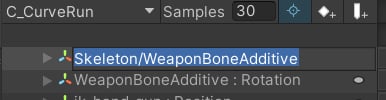 If the path in the image above does not match a character skeleton, the animation will not be played. To solve this problem, follow these steps:
1. Duplicate the curve animation.
2. Copy WeaponBoneAdditive curves from the original to the target animation [Tools](/scriptable-animation-system/fundamentals/tools).
3. Assign the animation in the animator controller.
If the path in the image above does not match a character skeleton, the animation will not be played. To solve this problem, follow these steps:
1. Duplicate the curve animation.
2. Copy WeaponBoneAdditive curves from the original to the target animation [Tools](/scriptable-animation-system/fundamentals/tools).
3. Assign the animation in the animator controller.