> ## Documentation Index
> Fetch the complete documentation index at: https://docs.kinemation.xyz/llms.txt
> Use this file to discover all available pages before exploring further.
# ▶️Playing Animations
> In this section we will find out how to play custom animations in runtime.
## Animation Asset
The **FPS Animation Framework** uses Animation Assets to play custom animations on your character from code. To create a new asset, right-click and go to **Create/KINEMATION/FPS Animator General/Animation Asset**:
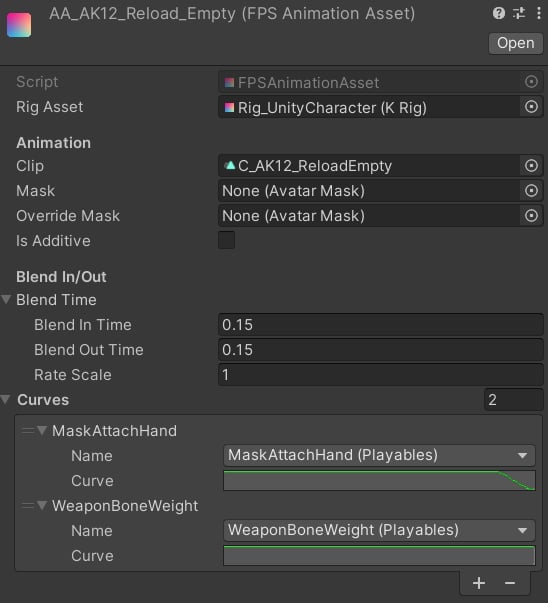 First, you must specify the **Rig Asset** - it will be used to pick the curve names via a popup widget. Then, make sure to assign the actual Animation Clip.
* **Mask** property is optional, but you can use it if you need to affect a specific part of the body.
* **Override Mask** and **Is Additive** are used for shared animations, like emotes, grenade throws, etc. The **Override Mask** will make the left arm use absolute animation, while the right arm will only use additive motion.
* **Blend Time** controls the transition for your animation. The **Rate Scale** is a playback speed multiplier.
* The **Curves** list defines custom curves, which will be used in this animation. This is an extremely useful feature when you want custom animations to control animation features.
**Example:** let's say we want to disable left-hand IK when reloading. Add the MaskAttachHand curve to the animation, set its value to 1. Now we can use this curve as a mask parameter in the left-hand IK layer, which will blend it out when the animation is playing.
## Code
To play an Animation Asset from code, you need to call the PlayAnimation method on the **IPlayablesController**:
***
In the next section, we will learn how to create custom animation features.
First, you must specify the **Rig Asset** - it will be used to pick the curve names via a popup widget. Then, make sure to assign the actual Animation Clip.
* **Mask** property is optional, but you can use it if you need to affect a specific part of the body.
* **Override Mask** and **Is Additive** are used for shared animations, like emotes, grenade throws, etc. The **Override Mask** will make the left arm use absolute animation, while the right arm will only use additive motion.
* **Blend Time** controls the transition for your animation. The **Rate Scale** is a playback speed multiplier.
* The **Curves** list defines custom curves, which will be used in this animation. This is an extremely useful feature when you want custom animations to control animation features.
**Example:** let's say we want to disable left-hand IK when reloading. Add the MaskAttachHand curve to the animation, set its value to 1. Now we can use this curve as a mask parameter in the left-hand IK layer, which will blend it out when the animation is playing.
## Code
To play an Animation Asset from code, you need to call the PlayAnimation method on the **IPlayablesController**:
***
In the next section, we will learn how to create custom animation features.