> ## Documentation Index
> Fetch the complete documentation index at: https://docs.kinemation.xyz/llms.txt
> Use this file to discover all available pages before exploring further.
# ➕Magazines
> In this page you will learn how magazines are animated in the pack
## Animator Controllers
**Tactical Shooter Pack** uses magazines as standalone skeletal meshes, which have spring, mag follower and cartridges properly animated.
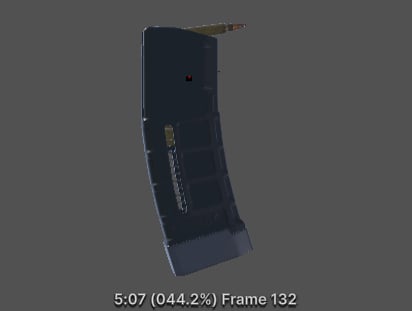 Magazines are added directly to the weapon mesh, they are then assigned an Animator Controller:
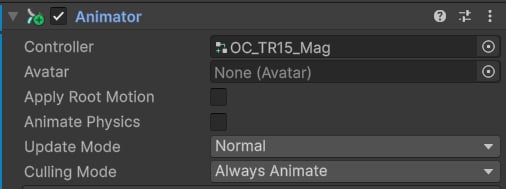 These controllers only contain a mag animation, which is played based on how much ammo is left:
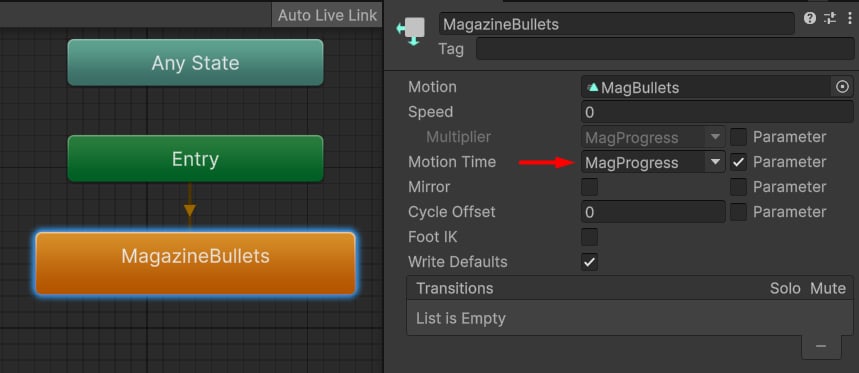 The `MagProgress` float property is updated by the Mag Animator component, which accesses the current weapon ammo capacity.
## Mag Animator
The `MagProgress` float property is updated by the Mag Animator component, which accesses the current weapon ammo capacity.
## Mag Animator
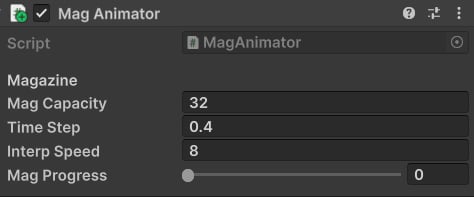 This component tries to get the current weapon's ammo capacity to compute the `MagProgress` value.
To display the animation correctly, it's important to adjust these properties:
* **Mag Capacity**: max ammo for this magazine.
* **Time Step**: how much time in seconds it takes to play a single bullet.
* **Interp Speed**: smoothing speed for mag progress.
* **Mag Progress**: if set to 0, the first frame will be used, if 1 - the last one; this property is dynamically updated at runtime.
This component tries to get the current weapon's ammo capacity to compute the `MagProgress` value.
To display the animation correctly, it's important to adjust these properties:
* **Mag Capacity**: max ammo for this magazine.
* **Time Step**: how much time in seconds it takes to play a single bullet.
* **Interp Speed**: smoothing speed for mag progress.
* **Mag Progress**: if set to 0, the first frame will be used, if 1 - the last one; this property is dynamically updated at runtime.