> ## Documentation Index
> Fetch the complete documentation index at: https://docs.kinemation.xyz/llms.txt
> Use this file to discover all available pages before exploring further.
# 🦾Procedural
> In this section you will learn about IK used in the Tactical Shooter Pack.
## Tac Procedural Animation
This component is responsible for all procedural animation features in the pack, specifically:
* **Weapon sway**
* **Aiming**
* **Weapon and hands positioning**
* **Movement animations and recoil**
* **Spine rotation**
* **Pistol quick draw mechanic**
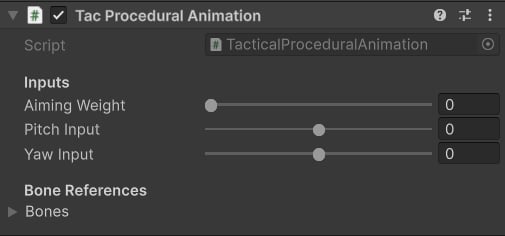 * **Aiming Weight**: influence procedural aiming; if set to 1 - aiming will be fully applied, 0 - disabled completely.
* **Pitch Input**: look up angle.
* **Yaw Input**: look right/left angle.
The **Bones** struct contains references to skeleton bone transforms:
* **Aiming Weight**: influence procedural aiming; if set to 1 - aiming will be fully applied, 0 - disabled completely.
* **Pitch Input**: look up angle.
* **Yaw Input**: look right/left angle.
The **Bones** struct contains references to skeleton bone transforms:
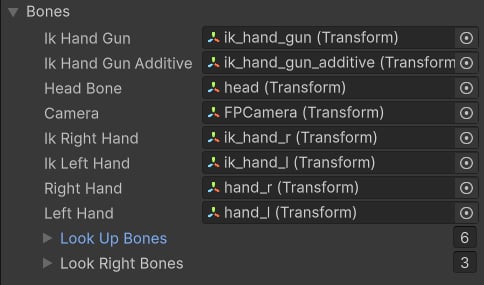 * **Look Up/Right Bones**: contains spine bones to look up/right.
## How to use it in code
The integration process involves updating input values of this component. We will use the **TacticalShooterPlayer** script as an example.
### Initialization
Add a new field of the `TacticalProceduralAnimation` type, and then initialize it on Start. The component does not require manual initialization, as it handles it under the hood.
### Aiming
To make procedural aiming work, it's essential to update `aimingWeight` and `aimPoint`:
The `aimingWeight` is a value in range \[0;1], make sure to smoothly interpolate it to 1 when aiming, and to zero when not.
It's also important to provide the `aimTransform` - a KTransform (position & rotation) pose that represents aim point relative to the weapon transform. Here's an example of how this value is computed in the pack:
### Equipping a new weapon
**TacticalProceduralAnimation** component uses **TacticalWeaponSettings** (a Scriptable Object) as a data source. It is important to update these settings when a new weapon is equipped:
### Updating Inputs
To make the player look around and sway the weapon, make sure to update aim and move inputs:
### Pistol quick draw mechanic
In **Tactical Shooter Pack**, you can quick-draw a sideram while holding a rifle. The mechanic relies on the pistol (siderarm) pose relative to the right hand. To update such a pose, it's important to use this method:
The `gunRightHandPose` field is a part of the **TacticalShooterWeapon** component:
When the game starts, every weapon will sample a base idle pose to compute the weapon pose relative to the right hand.
### Playing IK Motions
**IK Motion** is a feature that allows you to play custom additive IK motions at runtime:
* **Look Up/Right Bones**: contains spine bones to look up/right.
## How to use it in code
The integration process involves updating input values of this component. We will use the **TacticalShooterPlayer** script as an example.
### Initialization
Add a new field of the `TacticalProceduralAnimation` type, and then initialize it on Start. The component does not require manual initialization, as it handles it under the hood.
### Aiming
To make procedural aiming work, it's essential to update `aimingWeight` and `aimPoint`:
The `aimingWeight` is a value in range \[0;1], make sure to smoothly interpolate it to 1 when aiming, and to zero when not.
It's also important to provide the `aimTransform` - a KTransform (position & rotation) pose that represents aim point relative to the weapon transform. Here's an example of how this value is computed in the pack:
### Equipping a new weapon
**TacticalProceduralAnimation** component uses **TacticalWeaponSettings** (a Scriptable Object) as a data source. It is important to update these settings when a new weapon is equipped:
### Updating Inputs
To make the player look around and sway the weapon, make sure to update aim and move inputs:
### Pistol quick draw mechanic
In **Tactical Shooter Pack**, you can quick-draw a sideram while holding a rifle. The mechanic relies on the pistol (siderarm) pose relative to the right hand. To update such a pose, it's important to use this method:
The `gunRightHandPose` field is a part of the **TacticalShooterWeapon** component:
When the game starts, every weapon will sample a base idle pose to compute the weapon pose relative to the right hand.
### Playing IK Motions
**IK Motion** is a feature that allows you to play custom additive IK motions at runtime:
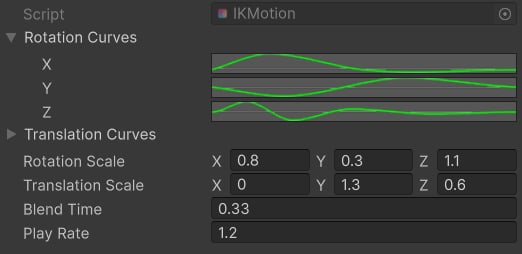 * **Rotation**/**Translation Curves**: define motion for each translation and rotation axes.
* **Rotation**/**Translation Scale**: multipliers for each translation and rotation axes.
* **Blend Time**: blending in time in seconds.
* **Play Rate**: playback multiplier.
**Tip**: This feature is used for additive transitions when aiming or changing a fire mode.
* **Rotation**/**Translation Curves**: define motion for each translation and rotation axes.
* **Rotation**/**Translation Scale**: multipliers for each translation and rotation axes.
* **Blend Time**: blending in time in seconds.
* **Play Rate**: playback multiplier.
**Tip**: This feature is used for additive transitions when aiming or changing a fire mode.