> ## Documentation Index
> Fetch the complete documentation index at: https://docs.kinemation.xyz/llms.txt
> Use this file to discover all available pages before exploring further.
# 🔫Weapons
> In this section we will cover how weapons are animated in the pack.
## Animator Controllers
Similar to the character, guns also use **Animator** to drive parts like magazine, bolt, trigger, etc.:
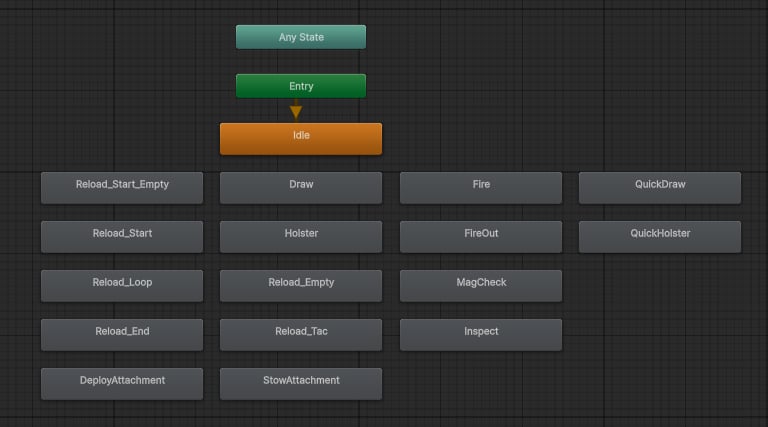 This animator consists of a single layer that has all the weapon-specific actions. These states are activated in the weapon script, and they are played together with character animations, so evreything is synced perfectly.
## Override Controllers
**AC\_TacFPS\_Weapon** is a generic controller, meaning it's never used directly, but instead it serves as a basis for Override Controllers:
This animator consists of a single layer that has all the weapon-specific actions. These states are activated in the weapon script, and they are played together with character animations, so evreything is synced perfectly.
## Override Controllers
**AC\_TacFPS\_Weapon** is a generic controller, meaning it's never used directly, but instead it serves as a basis for Override Controllers:
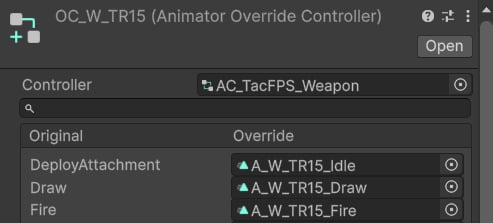 TR15 and Herrington 11-87 are the weapons that use this kind of setup.
### WK-11 Viper
This weapon uses its own controller **AC\_W\_WK-11\_Viper**:
TR15 and Herrington 11-87 are the weapons that use this kind of setup.
### WK-11 Viper
This weapon uses its own controller **AC\_W\_WK-11\_Viper**:
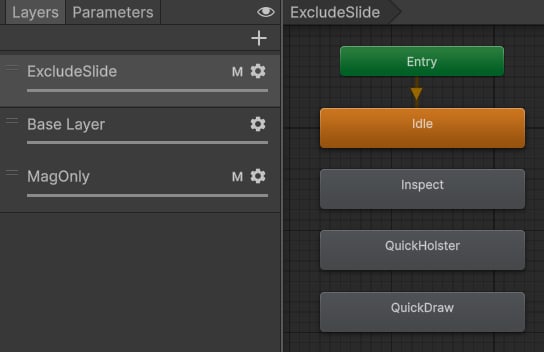 This Animator consists of 3 layers for the purpose of preserving the bolt-slide when out of ammo.
* **ExcludeSlide**: This layer is used for animations that don't affect the bolt-slide directly.
* **Base Layer**: This layer animated all weapon parts.
* **Mag Only**: This layer is only used for mag checks.
### Oryx SRM-12
Similar to WK-11 Viper, this weapon also has its own controller **AC\_W\_Oryx\_SRM-12**:
This Animator consists of 3 layers for the purpose of preserving the bolt-slide when out of ammo.
* **ExcludeSlide**: This layer is used for animations that don't affect the bolt-slide directly.
* **Base Layer**: This layer animated all weapon parts.
* **Mag Only**: This layer is only used for mag checks.
### Oryx SRM-12
Similar to WK-11 Viper, this weapon also has its own controller **AC\_W\_Oryx\_SRM-12**:
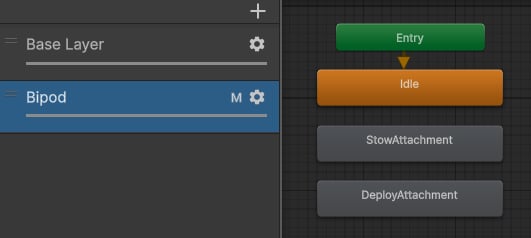 This Animator consists of 2 main layers:
* Base Layer: It's used for all actions aside from deploying/stowing bipods.
* Bipod: It's used to animate bipods only.
The reason for such separation is to preserve the pose of bipods when doing other actions (e.g., reloading or inspecting).
This Animator consists of 2 main layers:
* Base Layer: It's used for all actions aside from deploying/stowing bipods.
* Bipod: It's used to animate bipods only.
The reason for such separation is to preserve the pose of bipods when doing other actions (e.g., reloading or inspecting).