> ## Documentation Index
> Fetch the complete documentation index at: https://docs.kinemation.xyz/llms.txt
> Use this file to discover all available pages before exploring further.
# 📘Player Prefab
> In this section you will learn about the character prefab.
## Tactical Shooter Character
**TacticalShooterCharacter** is the player-controlled prefab in the pack, which is used to preview weapon animations in Unity:
 This prefab has a simple structure:
* `Main Game Object` (contains all components aside from Animator).
* `Player Mesh` (has Animator attached to it).
* `root/ik_hand_gun` (has all guns attached to it).
* `root/.../head/FPCamera` (first-person camera).
Let's take a look at the main components used by the character:
This prefab has a simple structure:
* `Main Game Object` (contains all components aside from Animator).
* `Player Mesh` (has Animator attached to it).
* `root/ik_hand_gun` (has all guns attached to it).
* `root/.../head/FPCamera` (first-person camera).
Let's take a look at the main components used by the character:
 ## Tactical Shooter Player
This is the main player controller script, which handles weapons, inputs and actions:
## Tactical Shooter Player
This is the main player controller script, which handles weapons, inputs and actions:
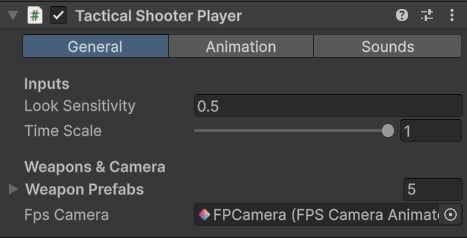 * **Look Sensitivity**: mouse sensitivity multiplier.
* **Weapon Prefabs**: list of prefabs to spawn.
* **Fps Camera**: first-person camera reference.
* **Look Sensitivity**: mouse sensitivity multiplier.
* **Weapon Prefabs**: list of prefabs to spawn.
* **Fps Camera**: first-person camera reference.
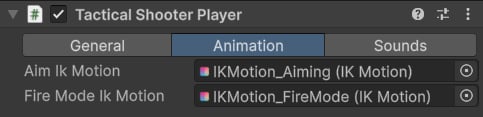 * **Aim Ik Motion**: IK animation played when aiming.
* **Fire Mode Ik Motion**: IK animation played when changing a fire mode.
* **Aim Ik Motion**: IK animation played when aiming.
* **Fire Mode Ik Motion**: IK animation played when changing a fire mode.
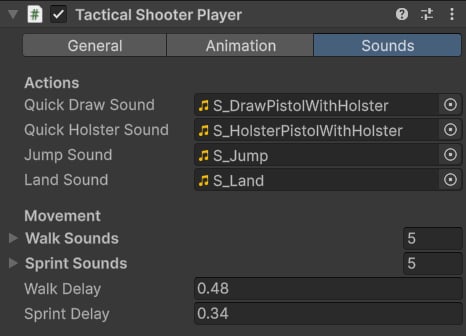 * This tab contains sound references for general actions, like drawing a pistol or jumping.
* Walk and Sprint are lists of sounds that are randomly played when walking or sprinting.
* Walk and Sprint define the frequency of walk and sprint sounds.
**Tip**: This component is only used as an example to showcase the weapons, so it is not necessary to use the pack.
The **TacticalShooterPlayer** supports these actions:
* This tab contains sound references for general actions, like drawing a pistol or jumping.
* Walk and Sprint are lists of sounds that are randomly played when walking or sprinting.
* Walk and Sprint define the frequency of walk and sprint sounds.
**Tip**: This component is only used as an example to showcase the weapons, so it is not necessary to use the pack.
The **TacticalShooterPlayer** supports these actions:
 Most of the actions (*Reload*, *MagCheck*, *Inspect*, *Fire*, *ChangeFireMode*, *Aim*, *ToggleAttachment*) are implemented in the weapon script, which we will cover in the next page.
## Recoil Animation
This system is covered [here](/scriptable-animation-system/recoil-system/recoil-animation).
Most of the actions (*Reload*, *MagCheck*, *Inspect*, *Fire*, *ChangeFireMode*, *Aim*, *ToggleAttachment*) are implemented in the weapon script, which we will cover in the next page.
## Recoil Animation
This system is covered [here](/scriptable-animation-system/recoil-system/recoil-animation).