> ## Documentation Index
> Fetch the complete documentation index at: https://docs.kinemation.xyz/llms.txt
> Use this file to discover all available pages before exploring further.
# 🔫Weapons
> In this section you will learn how weapons work in the pack.
## Tactical Shooter Weapon
This component implements weapon-related functions, such as reloading, firing, inspecting, mag checking, etc.:
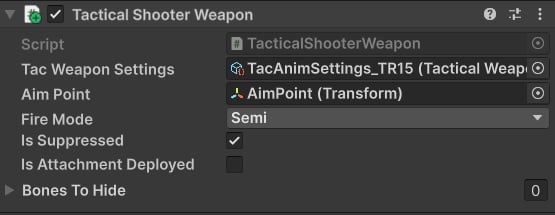 * **Tac Weapon Settings**: Animation settings for this weapon ([Animation Settings](/tactical-shooter-pack/unity/animations/animation-settings)).
* **Aim Point**: Aim point transform.
* **Fire Mode**: Initial fire mode state.
* **Is Suppressed**: Whether the weapon is suppressed.
* **Is Attachment Deployed**: Whether the attachment for this gun is deployed or not.
* **Bones To Hide**: A list of bone transforms that will be hidden/unhidden when `SetBoneHidden(int hidden)` animation event is triggered.
## How initialization works
All weapons are initialized when the game starts, using the `Initialize` method:
It re-trieves references to weapon-related components (Animators, RecoilAnimation, Camera, etc.) and samples a base idle clip to compute the rigth-hand default pose, which is used for quickly drawing a siderarm.
## How animations are played
Almost all animations are triggered by the weapon script, which is achieved by playing character and weapon clips at the same time to achieve a perfect sync:
## How actions are handled
When an input action is triggered, the weapon respective method will be called. For example, a reloading logic is implemented this way:
* **Tac Weapon Settings**: Animation settings for this weapon ([Animation Settings](/tactical-shooter-pack/unity/animations/animation-settings)).
* **Aim Point**: Aim point transform.
* **Fire Mode**: Initial fire mode state.
* **Is Suppressed**: Whether the weapon is suppressed.
* **Is Attachment Deployed**: Whether the attachment for this gun is deployed or not.
* **Bones To Hide**: A list of bone transforms that will be hidden/unhidden when `SetBoneHidden(int hidden)` animation event is triggered.
## How initialization works
All weapons are initialized when the game starts, using the `Initialize` method:
It re-trieves references to weapon-related components (Animators, RecoilAnimation, Camera, etc.) and samples a base idle clip to compute the rigth-hand default pose, which is used for quickly drawing a siderarm.
## How animations are played
Almost all animations are triggered by the weapon script, which is achieved by playing character and weapon clips at the same time to achieve a perfect sync:
## How actions are handled
When an input action is triggered, the weapon respective method will be called. For example, a reloading logic is implemented this way: