> ## Documentation Index
> Fetch the complete documentation index at: https://docs.kinemation.xyz/llms.txt
> Use this file to discover all available pages before exploring further.
# ➕Integrating Animations
> This page explains how to use animations
## Weapon Bone
To fully integrate tactical animations with your animator controller, it's essential to add a Tactical Weapon Bone component to your character:
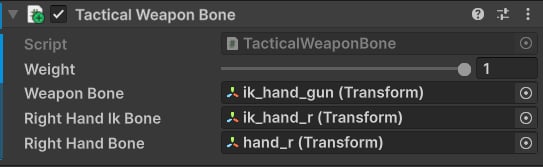 This component will correctly position the weapon relative to the right hand at runtime. If you use a custom model with retargeted animations, assign your custom IK bones here (for more see [Integrating Animations](/tactical-shooter-pack/unity/tutorials/integrating-animations)).
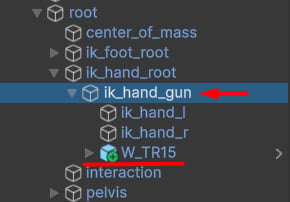
Parent your guns to the ik\_hand\_gun (or a weapon bone):
This component will correctly position the weapon relative to the right hand at runtime. If you use a custom model with retargeted animations, assign your custom IK bones here (for more see [Integrating Animations](/tactical-shooter-pack/unity/tutorials/integrating-animations)).
Parent your guns to the ik\_hand\_gun (or a weapon bone):
 ## Avatar Mask
Now we need to create an Avatar Mask that will affect our upper body and IK bones. Right-click and choose **Create ▸Animation ▸ Avatar Mask.** Then, choose your avatar and select the upper body bones:
## Avatar Mask
Now we need to create an Avatar Mask that will affect our upper body and IK bones. Right-click and choose **Create ▸Animation ▸ Avatar Mask.** Then, choose your avatar and select the upper body bones:
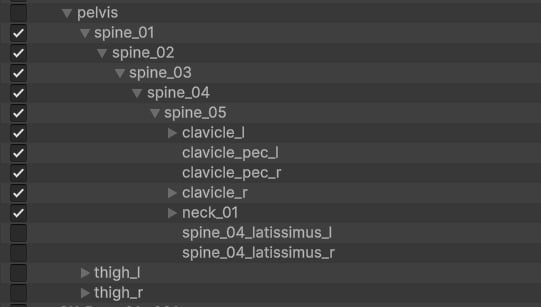 Next, check the weapon bone and IK bones for hands:
 **Tip**: Weapon bone and hand IKs are important for correctly positioning the weapon.
## Animator Controller
Create a new or use an existing layer for playing actions (e.g., reloads, mag checks, inspects, etc.), and assign the new upper body mask:
**Tip**: Weapon bone and hand IKs are important for correctly positioning the weapon.
## Animator Controller
Create a new or use an existing layer for playing actions (e.g., reloads, mag checks, inspects, etc.), and assign the new upper body mask:
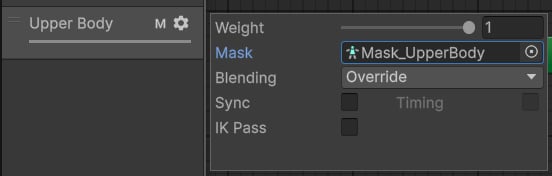 Finally, add animation clips to this layer:
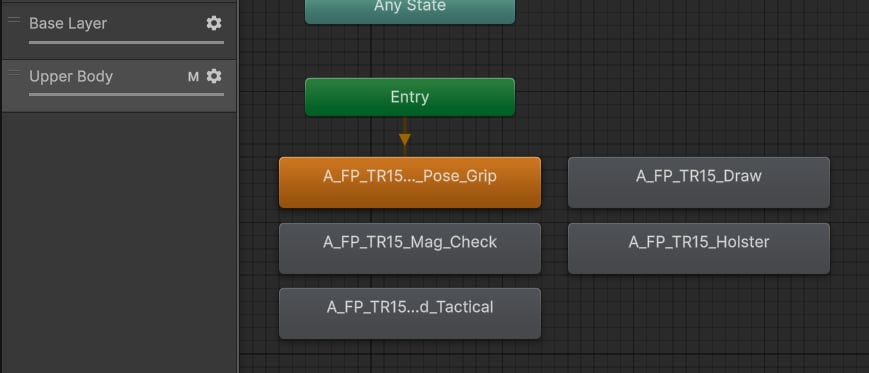 To play animations from code, use Unity-provided API:
## Spine Stabilization
By default, the lower-body locomotion will always affect the upper body. This makes the first-person view unstable when moving around.
To fix this issue, go to the [Tactical Procedural Animation](/tactical-shooter-pack/unity/animations/procedural#tac-procedural-animation) component and set the `Spine Stabilization` to 1:
To play animations from code, use Unity-provided API:
## Spine Stabilization
By default, the lower-body locomotion will always affect the upper body. This makes the first-person view unstable when moving around.
To fix this issue, go to the [Tactical Procedural Animation](/tactical-shooter-pack/unity/animations/procedural#tac-procedural-animation) component and set the `Spine Stabilization` to 1:
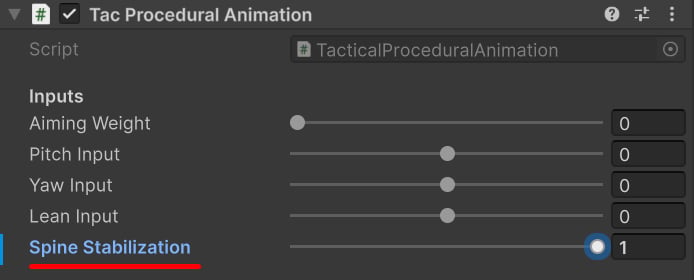 **Tip**: This field is public, meaning you can update it dynamically in code.