> ## Documentation Index
> Fetch the complete documentation index at: https://docs.kinemation.xyz/llms.txt
> Use this file to discover all available pages before exploring further.
# 📹Camera
> This page explains how the camera is animated.
## How it works
The camera is animated using three curves:
* **Camera\_Pitch**
* **Camera\_Yaw**
* **Camera\_Roll**
 These curves are on the character skeleton, so whenever a Montage plays at runtime, it animates the character and camera simultaneously.
## How curves are created
You can find camera animations in each weapon’s **Camera** folder. These sequences aren’t used directly; they are processed by the extraction tool, which transfers camera curves to the character animation:
These curves are on the character skeleton, so whenever a Montage plays at runtime, it animates the character and camera simultaneously.
## How curves are created
You can find camera animations in each weapon’s **Camera** folder. These sequences aren’t used directly; they are processed by the extraction tool, which transfers camera curves to the character animation:
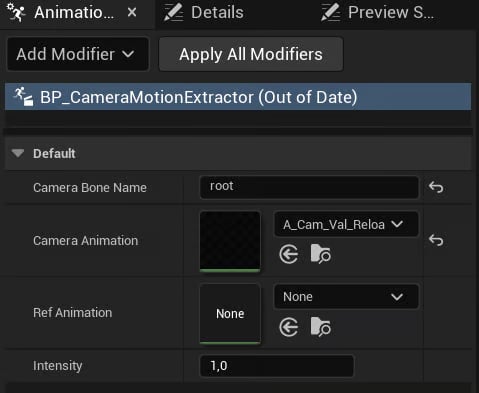 **Tip**: Use this modifier to re‑extract or adjust the intensity of camera animations.First Person Camera
Actor Component applies camera animations by sampling curve values at runtime:
**Tip**: Use this modifier to re‑extract or adjust the intensity of camera animations.First Person Camera
Actor Component applies camera animations by sampling curve values at runtime:
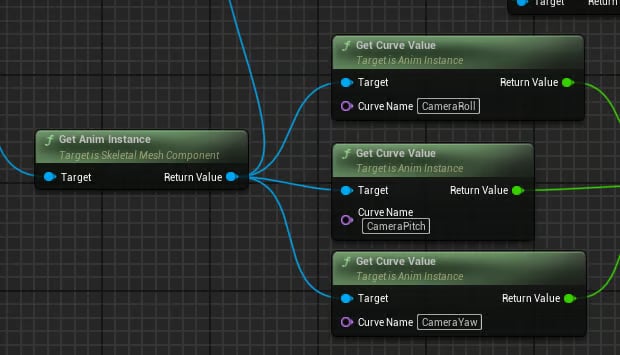 **Tip**: This component also plays camera recoil shakes.