> ## Documentation Index
> Fetch the complete documentation index at: https://docs.kinemation.xyz/llms.txt
> Use this file to discover all available pages before exploring further.
# 📙Procedural Animation Settings
> This page explains the animation settings.
## Tactical Shooter View Settings
Data Asset that contains animation properties used by gameplay and **Animation Blueprints**:
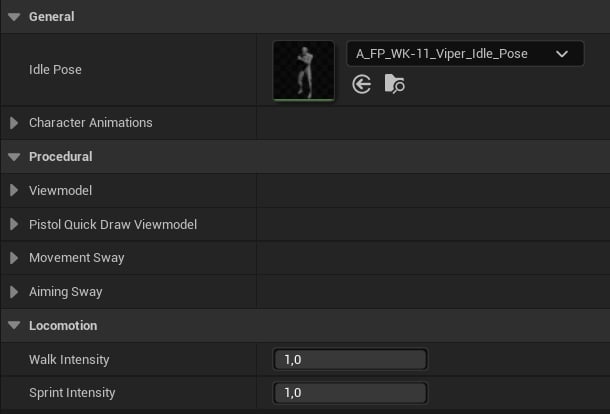 ### General
* **Idle Pose**: Base idle pose for the weapon.
* **Character Animations**: Struct listing all **Anim Montages** used by the Blueprints.
### Procedural
* **Viewmodel**: Contains offsets for first‑person view.
* **Pivot Offset**: Weapon position offset.
* **Pose Offset**: FTransform offset for weapon and arms.
* **Sprint Offset**: FTransform offset, applied only when sprinting.
* **Right**/**Left Hand Offset**: Position offset for the right/left hand.
* LeftElbowSprintOffset: Left elbow offset applied only when sprinting.
* **Pistol Quick Draw Viewmodel**: Has the same exact properties as the Viewmodel.
* **Aiming**/**Movement Sway**
* **Stiffness**: Oscillation factor in range \[0;1].
* **Damping**: Critical damping factor in range \[0;1].
* **Interp Speed**: Smoothing speed.
* **Smoothing Speed**: How fast the value should go to zero.
* **Clamp Value**: Max allowed value.
## Locomotion
* **Walk** and **Sprint Intensity**: Controls the influence of walk and sprint animations.
## How these assets are used
### General
* **Idle Pose**: Base idle pose for the weapon.
* **Character Animations**: Struct listing all **Anim Montages** used by the Blueprints.
### Procedural
* **Viewmodel**: Contains offsets for first‑person view.
* **Pivot Offset**: Weapon position offset.
* **Pose Offset**: FTransform offset for weapon and arms.
* **Sprint Offset**: FTransform offset, applied only when sprinting.
* **Right**/**Left Hand Offset**: Position offset for the right/left hand.
* LeftElbowSprintOffset: Left elbow offset applied only when sprinting.
* **Pistol Quick Draw Viewmodel**: Has the same exact properties as the Viewmodel.
* **Aiming**/**Movement Sway**
* **Stiffness**: Oscillation factor in range \[0;1].
* **Damping**: Critical damping factor in range \[0;1].
* **Interp Speed**: Smoothing speed.
* **Smoothing Speed**: How fast the value should go to zero.
* **Clamp Value**: Max allowed value.
## Locomotion
* **Walk** and **Sprint Intensity**: Controls the influence of walk and sprint animations.
## How these assets are used
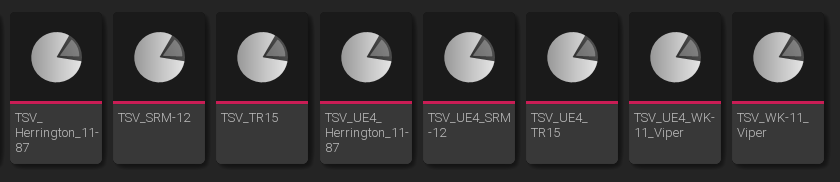 **Tactical Shooter View Settings** are used in both gameplay and **Animation Blueprints**. Each weapon has two settings assets: one for **UE5** animations and one for **UE4** animations.
**Tip**: The Tactical Shooter Pack allows switching **UE4** and **UE5** meshes at runtime.
**Tactical Shooter View Settings** are used in both gameplay and **Animation Blueprints**. Each weapon has two settings assets: one for **UE5** animations and one for **UE4** animations.
**Tip**: The Tactical Shooter Pack allows switching **UE4** and **UE5** meshes at runtime.