> ## Documentation Index
> Fetch the complete documentation index at: https://docs.kinemation.xyz/llms.txt
> Use this file to discover all available pages before exploring further.
# 🔷IK Motion Player
> This page explains how to use IK motions.
## Component
**AC\_IKMotionPlayer** generates procedural shakes when aiming or changing fire mode. It exposes a single method:
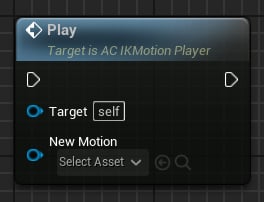 To extract the animation **values** (translation & rotation), access the `IKMotion` property:
 ## IK Motion
This Data Asset contains motion settings. To create a new IK Motion, right‑click and select **Misc → Data Asset → IK Motion**.
## IK Motion
This Data Asset contains motion settings. To create a new IK Motion, right‑click and select **Misc → Data Asset → IK Motion**.
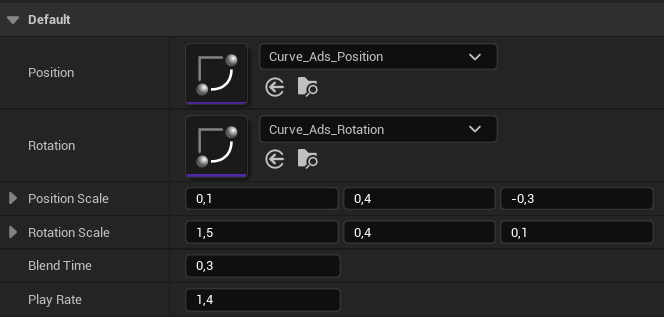 * **Position** and **Rotation**: Curves that define the animation for each translation and rotation axis.
* **Position/Rotation Scale:** Controls the motion magnitude.
* **Blend Time**: How long (in seconds) it takes to blend in a new motion.
* **Play Rate:** Playback speed multiplier.
* **Position** and **Rotation**: Curves that define the animation for each translation and rotation axis.
* **Position/Rotation Scale:** Controls the motion magnitude.
* **Blend Time**: How long (in seconds) it takes to blend in a new motion.
* **Play Rate:** Playback speed multiplier.