> ## Documentation Index
> Fetch the complete documentation index at: https://docs.kinemation.xyz/llms.txt
> Use this file to discover all available pages before exploring further.
# 💥Procedural Recoil
> This section explains how to use the pack’s procedural recoil.
## Recoil Animation
This Actor Component generates smooth weapon‑firing animation at runtime:
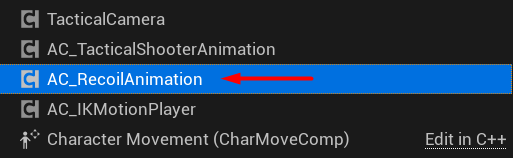 It is typically added to the character Blueprint, but you can also add it to the weapon. Call its methods as described below.
### Init
It is typically added to the character Blueprint, but you can also add it to the weapon. Call its methods as described below.
### Init
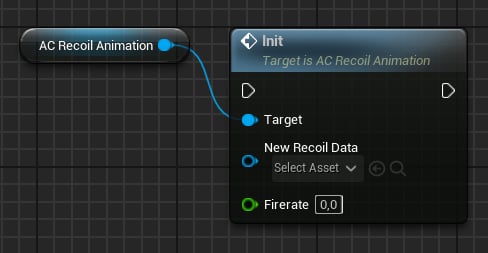 Use this function to update active recoil settings. It requires a **Recoil Data Asset** and **Fire Rate** (rounds per minute).
### Play/Stop
Use this function to update active recoil settings. It requires a **Recoil Data Asset** and **Fire Rate** (rounds per minute).
### Play/Stop
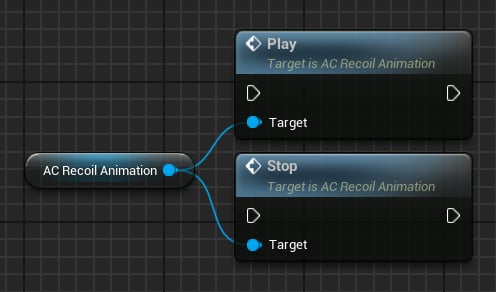 Call **Play** whenever a shot is fired, and **Stop** when the fire input is released.
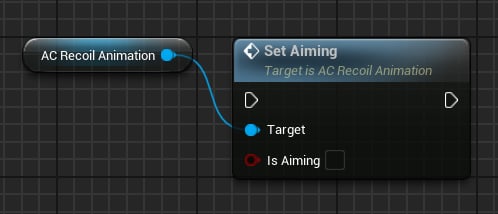
### Set Aiming
Use this method to update the current aiming state:
Call **Play** whenever a shot is fired, and **Stop** when the fire input is released.
### Set Aiming
Use this method to update the current aiming state:
 ### Set Fire Mode
Use this method to update the current fire mode:
### Set Fire Mode
Use this method to update the current fire mode:
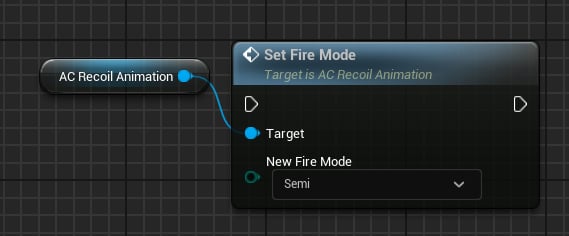 Three fire modes are supported:
* Semi
* Burst
* Auto
**Note:** For Recoil Animation, there is no technical difference between **Burst** and **Auto**.
## Recoil Animation Data
This Data Asset contains recoil properties, from simple inputs to complex layers such as **Sway** and **Pushback**.
### Input values
Three fire modes are supported:
* Semi
* Burst
* Auto
**Note:** For Recoil Animation, there is no technical difference between **Burst** and **Auto**.
## Recoil Animation Data
This Data Asset contains recoil properties, from simple inputs to complex layers such as **Sway** and **Pushback**.
### Input values
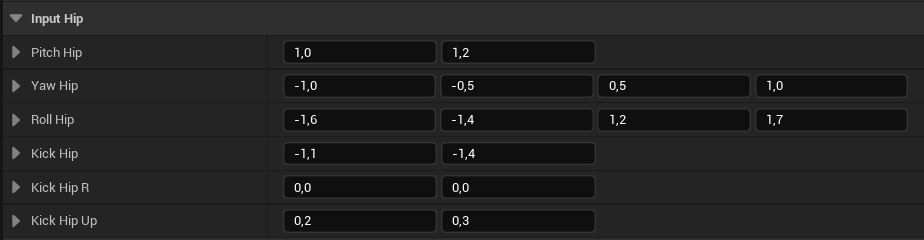 **Hip** and **Aim** properties define recoil ranges. For **Yaw** and **Roll**, a `FVector4` avoids values too close to zero. Final value is computed as:
### Controller Recoil
Adds pitch and yaw to the controller rotation:
**Hip** and **Aim** properties define recoil ranges. For **Yaw** and **Roll**, a `FVector4` avoids values too close to zero. Final value is computed as:
### Controller Recoil
Adds pitch and yaw to the controller rotation:
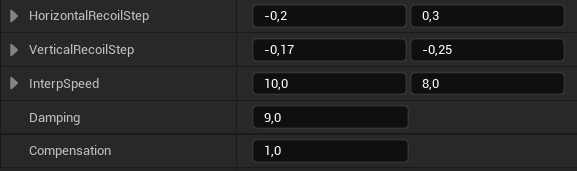 * **Horizontal Recoil Step**: Value range for the yaw input.
* **Vertical Recoil Step**: Value range for the pitch input.
* **Interp Speed**: Recoil smoothing speed.
* **Damping**: How fast recoil should recover.
* **Compensation**: How much player input is used for compensation. **1** uses all input; **0** uses none (the weapon settles after firing).
### Recoil Noise
Random **Y-Z** (right/up) movement that adds translation noise when firing:
* **Horizontal Recoil Step**: Value range for the yaw input.
* **Vertical Recoil Step**: Value range for the pitch input.
* **Interp Speed**: Recoil smoothing speed.
* **Damping**: How fast recoil should recover.
* **Compensation**: How much player input is used for compensation. **1** uses all input; **0** uses none (the weapon settles after firing).
### Recoil Noise
Random **Y-Z** (right/up) movement that adds translation noise when firing:
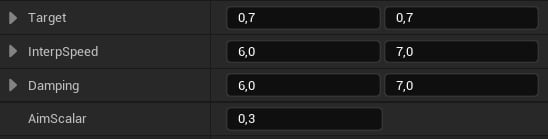 * **Target**: Left and Up target values - these will be added every shot.
* **Interp Speed**: Smoothing speed.
* **Damping**: How fast noise should go to zero.
* **Aim Scalar**: Multiplier applied when aiming.
### Pushback
This layer is applied on the second shot of a burst and auto sequence:
* **Target**: Left and Up target values - these will be added every shot.
* **Interp Speed**: Smoothing speed.
* **Damping**: How fast noise should go to zero.
* **Aim Scalar**: Multiplier applied when aiming.
### Pushback
This layer is applied on the second shot of a burst and auto sequence:
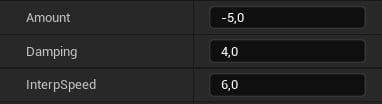 * **Amount**: How much backward translation to apply.
* **Damping**: How fast the value should go to zero.
* **Interp Speed**: General smoothing speed.
### Progress
Accumulates **pitch** and **upward translation** with every shot:
* **Amount**: How much backward translation to apply.
* **Damping**: How fast the value should go to zero.
* **Interp Speed**: General smoothing speed.
### Progress
Accumulates **pitch** and **upward translation** with every shot:
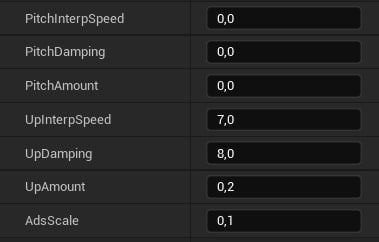 * **Pitch Interp Speed**: Smoothing pitch speed.
* **Pitch Damping**: How fast pitch should go to zero.
* **Pitch Amount**: How much pitch to add with each shot.
* **Up Interp Speed**: Smoothing up speed.
* **Up Damping**: How fast the up translation should go to zero.
* **Up Amount**: How much up translation to add with each shot.
* **Ads Scale**: Multiplier applied when aiming.
### Sway
**Recoil Sway** simulates arm offset when firing:
* **Pitch Interp Speed**: Smoothing pitch speed.
* **Pitch Damping**: How fast pitch should go to zero.
* **Pitch Amount**: How much pitch to add with each shot.
* **Up Interp Speed**: Smoothing up speed.
* **Up Damping**: How fast the up translation should go to zero.
* **Up Amount**: How much up translation to add with each shot.
* **Ads Scale**: Multiplier applied when aiming.
### Sway
**Recoil Sway** simulates arm offset when firing:
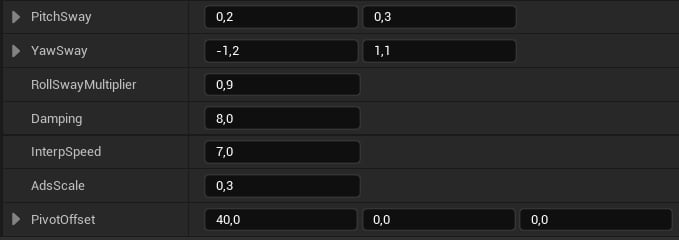 * **Pitch Sway**: A value from this range will be added to the pitch sway.
* **Yaw Sway**: A value from this range will be added to the yaw sway.
* **Roll Sway Multiplier**: Roll will be computed by multiplying the pitch sway with this value.
* **Damping**: How fast the sway should go to zero.
* **Interp Speed**: Sway smoothing speed.
* **Ads Scale**: Multiplier applied when aiming.
* **Pivot Offset**: Virtual pivot to add translation. Recommended **X = 30-40** units so the pivot is near the character’s shoulder.
### General
* **Pitch Sway**: A value from this range will be added to the pitch sway.
* **Yaw Sway**: A value from this range will be added to the yaw sway.
* **Roll Sway Multiplier**: Roll will be computed by multiplying the pitch sway with this value.
* **Damping**: How fast the sway should go to zero.
* **Interp Speed**: Sway smoothing speed.
* **Ads Scale**: Multiplier applied when aiming.
* **Pivot Offset**: Virtual pivot to add translation. Recommended **X = 30-40** units so the pivot is near the character’s shoulder.
### General
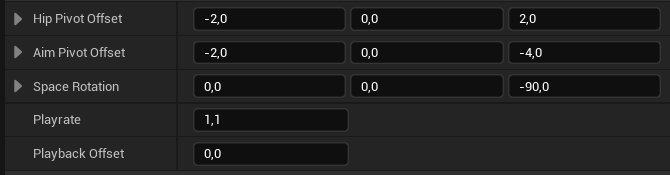 **Tip**: Pivot Offsets apply recoil as if the weapon rotates around a point in world space. For example, with `(-30, 0, 0)`, recoil appears to pivot around the gun offset by that amount.
* **Space Rotation**: Use only if animations have a different root orientation.
* **Play rate**: Playback speed multiplier.
**Playback Offset** applies only to burst or auto fire modes. In these modes, recoil animation length equals the fire delay (`60 / FireRate`). **Playback Offset** adjusts that length to make the sequence longer or shorter.
### Curves
Recoil animation is curve‑driven. The solver uses **Vector Curves** for single and auto/burst fire modes:
**Tip**: Pivot Offsets apply recoil as if the weapon rotates around a point in world space. For example, with `(-30, 0, 0)`, recoil appears to pivot around the gun offset by that amount.
* **Space Rotation**: Use only if animations have a different root orientation.
* **Play rate**: Playback speed multiplier.
**Playback Offset** applies only to burst or auto fire modes. In these modes, recoil animation length equals the fire delay (`60 / FireRate`). **Playback Offset** adjusts that length to make the sequence longer or shorter.
### Curves
Recoil animation is curve‑driven. The solver uses **Vector Curves** for single and auto/burst fire modes:
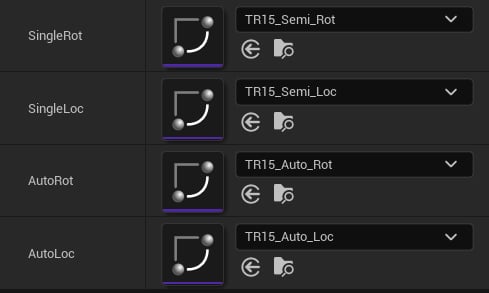 **Tip**: For single‑fire‑only weapons, set **AutoRot** and **AutoLoc** to **None**.How to get recoil values
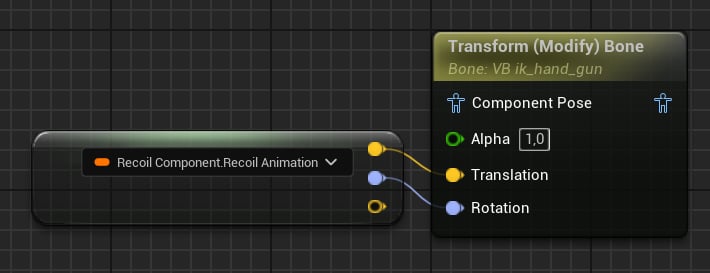
To get recoil values, access the `FTransform RecoilAnimation` property:
**Tip**: For single‑fire‑only weapons, set **AutoRot** and **AutoLoc** to **None**.How to get recoil values
To get recoil values, access the `FTransform RecoilAnimation` property:
 **Tip**: For example, plug this value into a **Transform (Modify) Bone** node in the Animation Blueprint.