
Weapon View
WeaponView extends Item View with firing, reload, aim, recoil, sound, and visual-effect settings. The weapon prefab contains its view and a WeaponExample component. The example tracks ammunition and shot timing; the view plays the animation and effects for each action.
Animation settings
Each action is aGameplayCharacterItemClip: a character animation, a weapon animation, and an optional sound. Assign both sides so hands, magazine, bolt, and other moving parts stay synchronized.
WeaponExample removes one round before calling the view. That is why Fire Out is selected on the last successful shot. Pressing fire with zero ammunition does not play a shot through this example.
Aiming, FOV, and recoil
- Default FOV sets the camera FOV when the weapon is equipped or stops aiming. A value of
0restores the camera’s initial FOV. - Aim FOV sets the FOV while aiming.
- FOV Smoothing controls how quickly the camera approaches the requested FOV.
- Aim Point is the sight-alignment Transform read by the ADS procedural feature.
- Recoil Data configures the character’s
RecoilAnimation. - Recoil Shake is a
GameplayCameraShakeasset played on each shot.
WeaponExample.EquipItem passes the fire rate, fire mode, and player to the weapon view. This initializes recoil as well as the regular item settings. If you call the view directly, use OnEquipItem(fireRate, fireMode, player).
The ADS feature moves the weapon toward its aim point. FOV changes only affect the camera lens; they do not correct a misplaced sight. Adjust Aim Point and the weapon’s procedural asset when the sight is off-center.
Visual effects and sound
Muzzle Flash and Empty Casing referenceParticleSystemPlayer components. PlayFireEffects plays the muzzle flash automatically. Call PlayEmptyCasing from an animation event when the casing leaves the weapon, such as during a pump action.
Fire Sounds contains the clips selected randomly for each shot. Fire Pitch Range and Fire Volume Range control their variation. Fire Mode Switch Sound, Aim In Sound, and Aim Out Sound play for those actions.
Action-pair sounds play when the action begins. For sounds partway through a reload, keep the events on the weapon animation.
Firing and ammunition
WeaponExample implements the basic firearm logic:
- Fire Rate is in rounds per minute. The interval between shots is
60 / fireRateseconds. - Ammo Capacity sets the initial and maximum ammunition.
- Fire Mode selects Semi, Burst, or Auto.
- Burst Rounds enables burst mode when greater than zero.
- Supports Full Auto enables automatic fire.
IWeaponAmmo on the same GameObject:
WeaponExample implements this interface. RestoreAmmo fills to capacity; AddAmmo changes ammo and clamps the result between zero and capacity. Reload animation events call these methods at the moment rounds are inserted. Starting a reload animation alone does not refill the weapon.
The example plays shots and tracks ammunition. Add projectile, hit detection, and damage behavior in your gameplay weapon when building a game.
Runtime methods
Call the example’s methods when using the example gameplay. Call view methods from your own gameplay once it has checked whether the action is allowed.
Included weapons
The prefabs are inAssets/KINEMATION/SciFiFPSPack/Prefabs/Weapons. Each combines a view with the example component that calls it.
ARX Mk2
The ARX is an energy rifle with semi-automatic, automatic, and charge modes. Its prefab has a 30-round capacity, a fire rate of 600 rounds per minute, and Burst Rounds set to3.
On ChargeWeaponExample, Burst is used for charging. Holding use plays Charge Start, then repeats Charge Loop with looping audio. Releasing use plays the firing effects and subtracts the configured Burst Rounds. Semi and Auto use the regular firearm behavior.
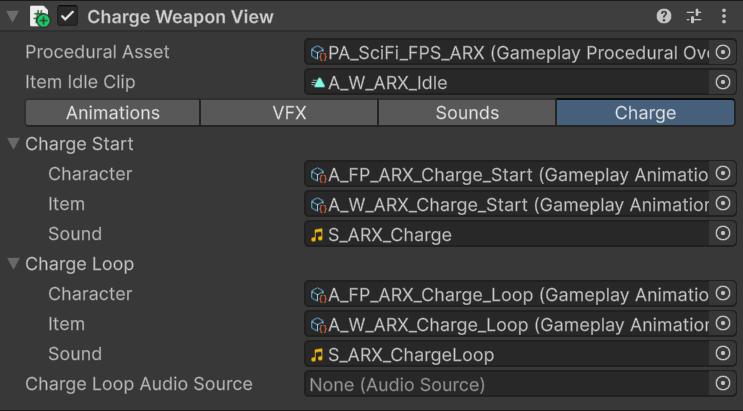
Charge animations and looping audio on the ARX weapon view.
charge float on ChargeWeaponView is animated by the item clip. LightningChargePlayer reads it from the parent weapon, clamps it to 0..1, and writes it to the VFX material’s _AlphaScale property. A positive value starts the particles; returning to zero stops and clears them.
For a custom charge weapon, assign both charge animation pairs and keep the lightning effect under the weapon view. The effect material must use _AlphaScale for the intensity change to appear. Use Gameplay Curve Editor on the item clip to change when the charge rises.
The example fires on release; it does not check a minimum charge threshold. Add that check in your weapon code if charge should determine whether a shot is allowed or how much damage it causes.
Gepard
The Gepard uses the standardWeaponView and WeaponExample. It has a 30-round capacity, a fire rate of 700 rounds per minute, and supports Semi and Auto.
It demonstrates a conventional rifle setup: draw and holster, tactical and empty reload, inspection, aiming, recoil, camera shake, fire sounds, and its own muzzle flash. Its procedural asset sets the weapon position and ADS alignment.
Use this prefab as a starting point when your weapon needs the standard firing and magazine-reload behavior. Add it to Item Prefabs on the character if it is not already in the current setup’s item cycle.
M97
The M97 is a throwable.GameplayItemExample calls ThrowableItemView directly; it does not use firearm ammo or fire-mode settings.
Pressing use plays Throw Start, then Throw Loop repeats while the item is held. Releasing use stops the loop and plays Throw End after Minimum Throw Delay has elapsed. The M97 prefab sets this delay to 1.3 seconds, so a quick press still allows time for the preparation animation.
After Throw End, the view draws the item again. Unequipping or disabling it cancels the active throw sequence. Draw Visibility Delay controls when the held item appears during draw.
The view animates a throw. Add your projectile or grenade creation at the release moment in your gameplay code or an animation event.
Onyx
The Onyx usesRevolverWeaponView with a six-round capacity and a fire rate of 400 rounds per minute. It fires in Semi mode.
The Reloads list contains partial reload animation pairs. The view selects an entry from the number of missing rounds: one missing round uses entry 0, two use entry 1, and so on.
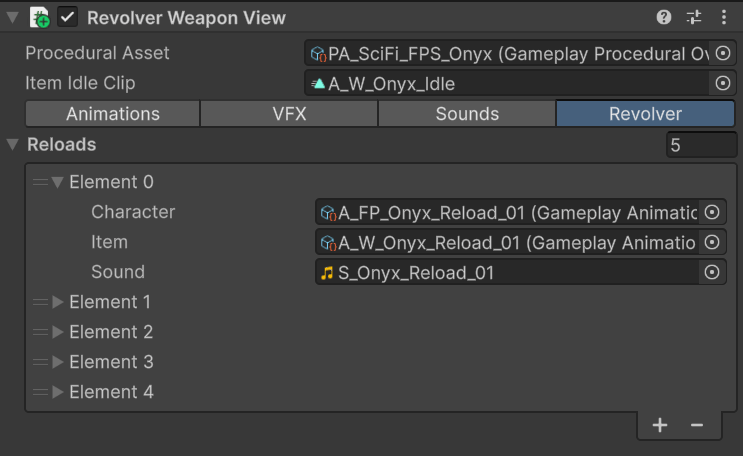
Partial reload animations on the Onyx revolver.
RPG90
The RPG90 usesWeaponView with a one-round capacity and a fire rate of 100 rounds per minute. It fires in Semi mode.
Because each shot empties the launcher, the regular example selects Fire Out after firing and Reload Empty when reloading. Its character and launcher clips animate the hands and moving weapon parts together.
The example does not simulate a rocket. Use the view for launcher animations, recoil, camera response, and sounds, then create and launch the projectile from your gameplay code.
TP12
The TP12 usesShotgunWeaponView. Its prefab has Ammo Capacity set to 16, Fire Rate to 250, Fire Length to 2, and Fire Pump Delay to 0.05 seconds. It fires in Semi mode.
Fire Length determines the pump sequence. After a shot, the view checks remaining ammo. When that count is divisible by Fire Length and is not zero, it schedules Pump Action after Fire Pump Delay. With the prefab’s value of 2, the pump follows each pair of shots.
Reloading has three stages:
- Reload Start Tactical or Reload Start Empty opens the reload.
- Reload Loop repeats while ammo is below capacity. Animation events add ammunition.
- Reload End Tactical or Reload End Empty closes the reload and clears the controller’s active-action flag.
OnReload returns -1 because the duration depends on how many loops are required. The character controller keeps the action active until the view ends the reload. If the loop never finishes, check that the animation’s ammo events are still present.
Cartridge display
TP12CartridgeDisplay reads IWeaponAmmo on the weapon root and controls six cartridge transforms in pairs:
Cartridge_L_03andCartridge_R_03Cartridge_L_02andCartridge_R_02Cartridge_L_01andCartridge_R_01